
 蒙奇迪孤狼
蒙奇迪孤狼
本文实例为大家分享了unity实现文本转贴图的具体代码,供大家参考,具体内容如下
导入字体
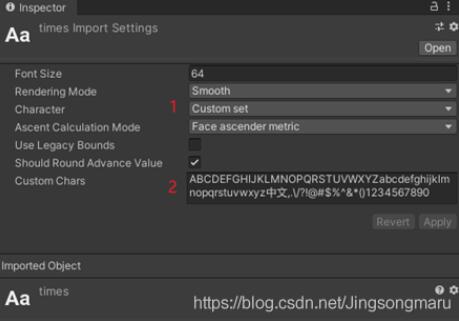
导入ttf字体,修改character为custom set,并填入custom chars:
可以看到,unity为我们生成了对应的材质和贴图:
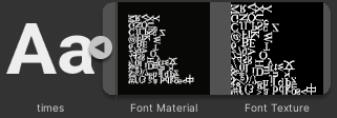
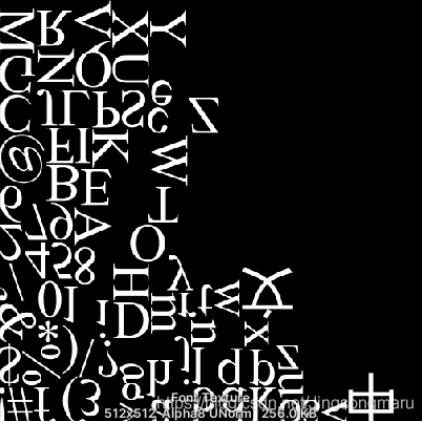
从上图可以看出:
1、unity中texture2d的坐标原点为左下角,和opengl相同,v坐标与dx相反。
2、某些字符被上下翻转,某些字符被顺时针旋转了90度
这两点需要特别注意。
原理分析
本文中使用的方法是创建一个texture,然后利用texture2d的
public color[] getpixels(int x, int y, int blockwidth, int blockheight);
成员方法,读取字体贴图中的像素信息,然后基于特定字符,利用texture2d的
public void setpixel(int x, int y, color color);
方法,将像素信息写入创建的texrue。
确定getpixels的参数x,y时,需要注意以下两点:
1、对于被上下翻转的字符,比如数字“1”,利用characterinfo. uvtopleft计算;
2、对于被顺时针旋转90度的字符,比如字母“k”,利用characterinfo.uvbottomright计算。
代码实现
public texture2d texttotexture(
        font font,
        string text,
        int texturewidth, int textureheight,
        int drawoffsetx, int drawoffsety,
        int textgap, int spacegap, int rowheight,
        color textcolor,
        color backgroundcolor)
    {
        // 创建返回的texture
        var texttexture = new texture2d(texturewidth, textureheight, textureformat.argb32, true);
        color[] emptycolor = new color[texturewidth * textureheight];
        for (int i = 0; i < emptycolor.length; i++)
        {
            emptycolor[i] = backgroundcolor;
        }
        texttexture.setpixels(emptycolor);

        // 字体贴图不可读,需要创建一个新的可读的
        var fonttexture = (texture2d)font.material.maintexture;
        var readablefonttexture = new texture2d(fonttexture.width, fonttexture.height, fonttexture.format, fonttexture.mipmapcount, true);
        graphics.copytexture(fonttexture, readablefonttexture);

        // 调整偏移量
        var originaldrawoffsetx = drawoffsetx;// 记录一下,换行用
        drawoffsety = textureheight - drawoffsety - rowheight;// 从上方开始画

        // 逐个字符绘制
        foreach (var @char in text.tochararray())
        {
            if (@char == ' ')
            {
                drawoffsetx += spacegap;
                continue;
            }

            if (@char == '\n')
            {
                // 换行
                drawoffsetx = originaldrawoffsetx;
                drawoffsety -= rowheight;

                continue;
            }


            int charwidth, charheight;// 字符宽高
            color[] charcolor;// 字符颜色,数组内颜色的顺序为从左至右,从下至上

            font.getcharacterinfo(@char, out characterinfo info);
            if (info.uvtopleft.x < info.uvbottomright.x)// 处理被垂直翻转的字符
            {
                charwidth = info.glyphwidth;
                charheight = info.glyphheight;

                charcolor = readablefonttexture.getpixels(
                    (int)(readablefonttexture.width * info.uvtopleft.x),
                    (int)(readablefonttexture.height * info.uvtopleft.y),
                    charwidth, charheight);

                for (int j = 0; j < charheight; j++)
                {
                    for (int i = 0; i < charwidth; i++)
                    {
                        if (charcolor[j * charwidth + i].a != 0)
                        {
                            texttexture.setpixel(
                                drawoffsetx + i,
                                drawoffsety + charheight - j,// 从上往下画,把字符颠倒过来
                                textcolor);
                        }
                    }
                }
            }
            else// 处理被顺时针旋转90度的字符
            {
                charwidth = info.glyphheight;
                charheight = info.glyphwidth;

                charcolor = readablefonttexture.getpixels(
                    (int)(readablefonttexture.width * info.uvbottomright.x),
                    (int)(readablefonttexture.height * info.uvbottomright.y),
                    charwidth, charheight);

                for (int j = 0; j < charheight; j++)
                {
                    for (int i = 0; i < charwidth; i++)
                    {
                        if (charcolor[j * charwidth + i].a != 0)
                        {
                            // 旋转
                            texttexture.setpixel(
                                drawoffsetx + charheight - j,
                                drawoffsety + i,
                                textcolor);
                        }
                    }
                }
            }

            // 更新偏移
            drawoffsetx += charwidth + textgap;
        }

        texttexture.apply();
        return texttexture;
    }
以上就是本文的全部内容,希望对大家的学习有所帮助,也希望大家多多支持。
