
 昨夜风流今昭当爹
该示例项目通过自定义注解,实现接口访问次数控制,从而实现接口防刷功能,项目结构如下:
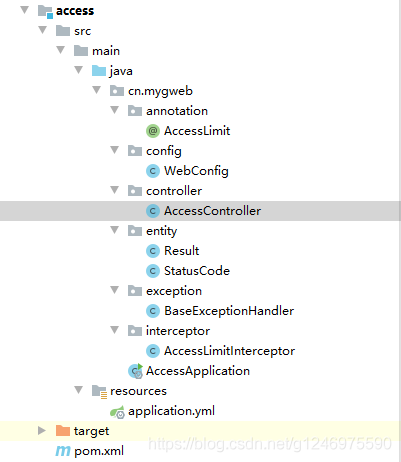
一、编写注解类 accesslimit
package cn.mygweb.annotation;

import java.lang.annotation.elementtype;
import java.lang.annotation.retention;
import java.lang.annotation.retentionpolicy;
import java.lang.annotation.target;

/**
 * 访问控制注解(实现接口防刷功能)
 */
@retention(retentionpolicy.runtime)
@target(elementtype.method)
public @interface accesslimit {
  /**
   * 限制周期(单位为秒)
   *
   * @return
   */
  int seconds();

  /**
   * 规定周期内限制次数
   *
   * @return
   */
  int maxcount();

  /**
   * 是否需要登录
   *
   * @return
   */
  boolean needlogin() default false;
}
二、在interceptor拦截器中实现拦截逻辑
package cn.mygweb.interceptor;

import cn.mygweb.annotation.accesslimit;
import cn.mygweb.entity.result;
import cn.mygweb.entity.statuscode;
import com.alibaba.fastjson.json;
import org.springframework.stereotype.component;
import org.springframework.web.method.handlermethod;
import org.springframework.web.servlet.handler.handlerinterceptoradapter;

import javax.servlet.http.httpservletrequest;
import javax.servlet.http.httpservletresponse;
import java.io.outputstream;
import java.util.hashmap;
import java.util.map;

/**
 * 访问控制拦截器
 */
@component
public class accesslimitinterceptor extends handlerinterceptoradapter {

  //模拟数据存储,实际业务中可以自定义实现方式
  private static map<string, accessinfo> accessinfomap = new hashmap<>();

  @override
  public boolean prehandle(httpservletrequest request, httpservletresponse response,
               object handler) throws exception {
    //判断请求是否属于方法的请求
    if (handler instanceof handlermethod) {
      handlermethod hm = (handlermethod) handler;

      //获取方法中的注解,看是否有该注解
      accesslimit accesslimit = hm.getmethodannotation(accesslimit.class);
      if (accesslimit == null) {
        return true;
      }
      int seconds = accesslimit.seconds();
      int maxcount = accesslimit.maxcount();
      boolean needlogin = accesslimit.needlogin();
      string key = request.getrequesturi();
      //如果需要登录
      if (needlogin) {
        //获取登录的session进行判断
        //……
        key += " " + "usera";//这里假设用户是usera,实际项目中可以改为userid
      }

      //模拟从redis中获取数据
      accessinfo accessinfo = accessinfomap.get(key);
      if (accessinfo == null) {
        //第一次访问
        accessinfo = new accessinfo();
        accessinfo.setfirstvisittimestamp(system.currenttimemillis());
        accessinfo.setaccesscount(1);
        accessinfomap.put(key, accessinfo);
      } else if (accessinfo.getaccesscount() < maxcount) {
        //访问次数加1
        accessinfo.setaccesscount(accessinfo.getaccesscount() + 1);
        accessinfomap.put(key, accessinfo);
      } else {
        //超出访问次数,判断时间是否超出设定时间
        if ((system.currenttimemillis() - accessinfo.getfirstvisittimestamp()) <= seconds * 1000) {
          //如果还在设定时间内,则为不合法请求,返回错误信息
          render(response, "达到访问限制次数,请稍后重试!");
          return false;
        } else {
          //如果超出设定时间,则为合理的请求,将之前的请求清空,重新计数
          accessinfo.setfirstvisittimestamp(system.currenttimemillis());
          accessinfo.setaccesscount(1);
          accessinfomap.put(key, accessinfo);
        }
      }
    }
    return true;
  }

  /**
   * 向页面发送消息
   *
   * @param response
   * @param msg
   * @throws exception
   */
  private void render(httpservletresponse response, string msg) throws exception {
    response.setcontenttype("application/json;charset=utf-8");
    outputstream out = response.getoutputstream();
    string str = json.tojsonstring(new result(true, statuscode.accesserror, msg));
    out.write(str.getbytes("utf-8"));
    out.flush();
    out.close();
  }

  /**
   * 封装的访问信息对象
   */
  class accessinfo {

    /**
     * 一个计数周期内第一次访问的时间戳
     */
    private long firstvisittimestamp;
    /**
     * 访问次数统计
     */
    private int accesscount;

    public long getfirstvisittimestamp() {
      return firstvisittimestamp;
    }

    public void setfirstvisittimestamp(long firstvisittimestamp) {
      this.firstvisittimestamp = firstvisittimestamp;
    }

    public int getaccesscount() {
      return accesscount;
    }

    public void setaccesscount(int accesscount) {
      this.accesscount = accesscount;
    }

    @override
    public string tostring() {
      return "accessinfo{" +
          "firstvisittimestamp=" + firstvisittimestamp +
          ", accesscount=" + accesscount +
          '}';
    }
  }
}
三、把interceptor注册到springboot中
package cn.mygweb.config;

import cn.mygweb.interceptor.accesslimitinterceptor;
import org.springframework.context.annotation.configuration;
import org.springframework.web.servlet.config.annotation.interceptorregistry;
import org.springframework.web.servlet.config.annotation.webmvcconfigurer;

/**
 * 拦截器注册配置
 */
@configuration
public class webconfig implements webmvcconfigurer {

  @override
  public void addinterceptors(interceptorregistry registry) {
    //注册拦截器
    registry.addinterceptor(new accesslimitinterceptor());
  }
}
四、在controller中加入注解实现接口防刷
package cn.mygweb.controller;

import cn.mygweb.annotation.accesslimit;
import cn.mygweb.entity.result;
import cn.mygweb.entity.statuscode;
import org.springframework.web.bind.annotation.getmapping;
import org.springframework.web.bind.annotation.requestmapping;
import org.springframework.web.bind.annotation.restcontroller;

@restcontroller
@requestmapping("/access")
public class accesscontroller {

  @accesslimit(seconds = 5, maxcount = 2)//访问控制,5秒内只能访问2次
  @getmapping
  public result access() {
    return new result(true, statuscode.ok, "访问成功!");
  }

}
五、测试访问
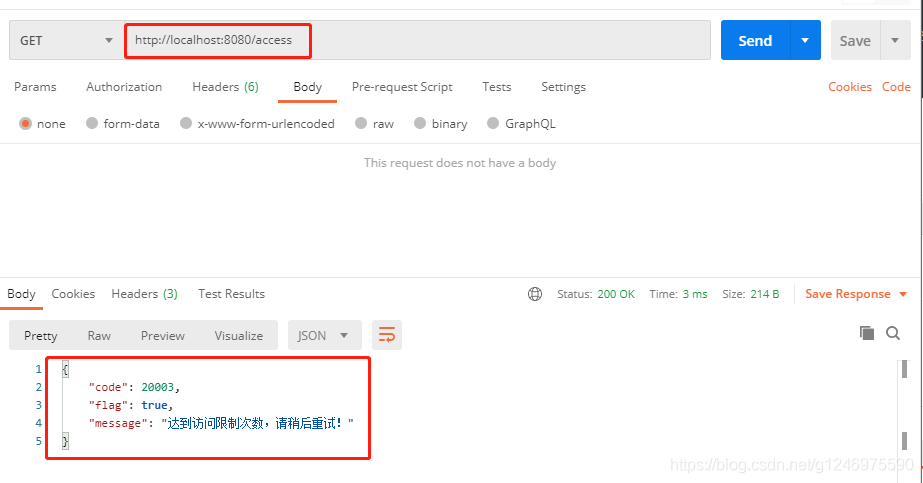
附:statuscode.java、result.java、application.yml
statuscode类
package cn.mygweb.entity;

/**
 * 返回状态码
 */
public class statuscode {
  public static final int ok = 20000;//成功
  public static final int error = 20001;//失败
  public static final int loginerror = 20002;//用户名或密码错误
  public static final int accesserror = 20003;//权限不足
  public static final int remoteerror = 20004;//远程调用失败
  public static final int reperror = 20005;//重复操作
  public static final int notfounderror = 20006;//没有对应的抢购数据
}
result类:
package cn.mygweb.entity;

import java.io.serializable;

/**
 * 响应结果
 */
public class result<t> implements serializable {
  private boolean flag;//是否成功
  private integer code;//返回码
  private string message;//返回消息
  private t data;//返回数据

  public result(boolean flag, integer code, string message, object data) {
    this.flag = flag;
    this.code = code;
    this.message = message;
    this.data = (t) data;
  }

  public result(boolean flag, integer code, string message) {
    this.flag = flag;
    this.code = code;
    this.message = message;
  }

  public result() {
    this.flag = true;
    this.code = statuscode.ok;
    this.message = "操作成功!";
  }

  public boolean isflag() {
    return flag;
  }

  public void setflag(boolean flag) {
    this.flag = flag;
  }

  public integer getcode() {
    return code;
  }

  public void setcode(integer code) {
    this.code = code;
  }

  public string getmessage() {
    return message;
  }

  public void setmessage(string message) {
    this.message = message;
  }

  public t getdata() {
    return data;
  }

  public void setdata(t data) {
    this.data = data;
  }
}
applications.yml:
server:
 port: 8080
到此这篇关于基于注解实现 springboot 接口防刷的方法的文章就介绍到这了,更多相关springboot 接口防刷内容请搜索以前的文章或继续浏览下面的相关文章希望大家以后多多支持!
