
 老子叫李单纯
基于vue-cropper插件实现图片截取上传组件封装的具体代码,供大家参考,具体内容如下
需求场景:
后台开发需要上传图片并进行相应比例尺寸图片的截取,本组件开发采用ant design vue组件库搭配vue-cropper插件进行封装
实现如下
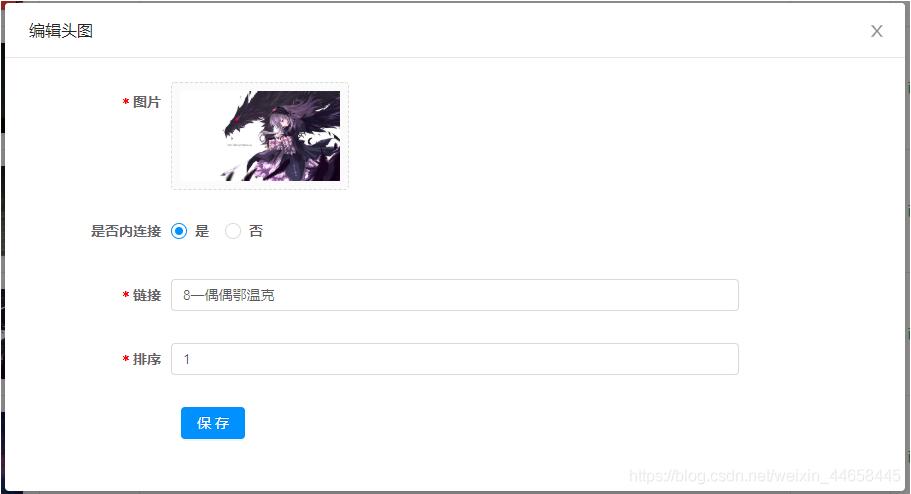
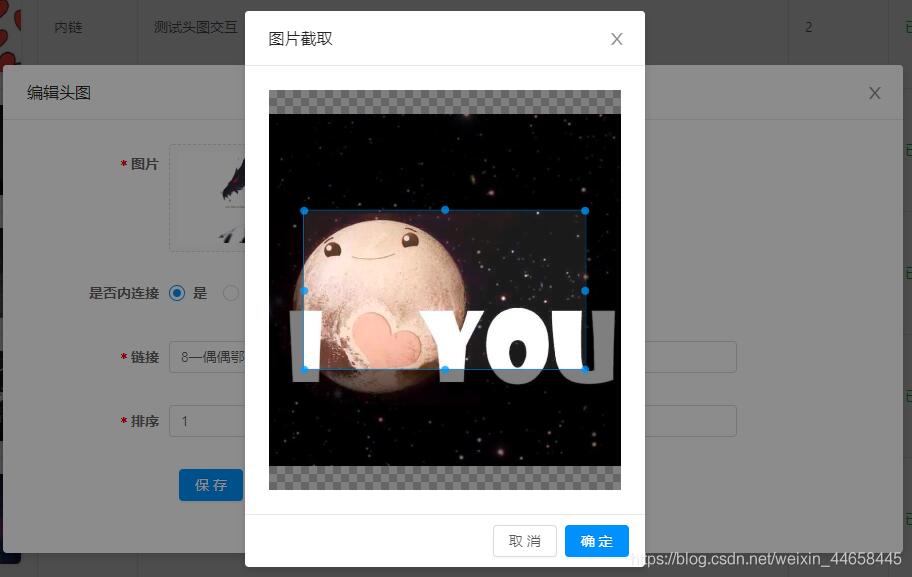
html
<template>
  <div>
    <a-upload
      name="avatar"
      list-type="picture-card"
      class="avatar-uploader"
      :show-upload-list="false"
      :custom-request="customrequest"
      :before-upload="beforeupload"
      :style="`width: ${width}; height: ${height};`"
    >
      <img
        v-if="imageurl && !loading"
        :src="imageurl"
        alt="avatar"
        :style="`width: ${width}; height: ${height};`"
      />
      <div v-else>
        <a-icon :type="loading ? 'loading' : 'plus'" />
        <div class="ant-upload-text">上传图片</div>
      </div>
    </a-upload>
    <a-modal
      v-model="imagecut.isshowmodal"
      title="图片截取"
      width="400px"
      @ok="finish"
      @cancel="imagecut.close"
    >
      <div class="cropper-content" v-if="imagecut.isshowmodal">
        <div class="cropper" style="text-align:center">
          <vuecropper
            ref="cropper"
            :img="imagecut.imgfile"
            :outputsize="outputsize"
            :outputtype="outputtype"
            :info="info"
            :full="full"
            :canmove="canmove"
            :canmovebox="canmovebox"
            :original="original"
            :autocrop="autocrop"
            :fixed="fixed"
            :fixednumber="fixednumber"
            :centerbox="centerbox"
            :infotrue="infotrue"
            :fixedbox="fixedbox"
          ></vuecropper>
        </div>
      </div>
    </a-modal>
  </div>
</template>
js
<script>
import { uploadimage } from '@/api/common'
import { vuecropper } from "vue-cropper";
export default {
  name: 'imageupload',
  components: { vuecropper },
  data() {
    return {
      loading: false,
      imagecut: {
        isshowmodal: false,
        imgfile: '',
        init: imgfile => {
          this.imagecut.imgfile = imgfile
          this.imagecut.isshowmodal = true
        },
        close: () => {
          this.imagecut.imgfile = ''
          this.imagecut.isshowmodal = false
        }
      }
    }
  },
  props: {
    imageurl: string,
    width: {
      type: string,
      default: '100px'
    },
    height: {
      type: string,
      default: '100px'
    },
    cancut: {
      type: boolean,
      default: false
    },
    info: {
      type: boolean,
      default: false
    }, // 裁剪框的大小信息
    outputsize: {
      type: number,
      default: 0.8
    }, // 裁剪生成图片的质量
    outputtype: {
      type: string,
      default: 'jpeg'
    }, // 裁剪生成图片的格式
    canscale: {
      type: boolean,
      default: true
    }, // 图片是否允许滚轮缩放
    autocrop: {
      type: boolean,
      default: true
    }, // 是否默认生成截图框
    // autocropwidth: 300, // 默认生成截图框宽度
    // autocropheight: 200, // 默认生成截图框高度
    fixedbox: {
      type: boolean,
      default: false
    }, // 固定截图框大小 不允许改变
    fixed: {
      type: boolean,
      default: true
    }, // 是否开启截图框宽高固定比例
    fixednumber: {
      type: array,
      default: () => [1, 1]
    }, // 截图框的宽高比例
    full: {
      type: boolean,
      default: true
    }, // 是否输出原图比例的截图
    canmove: {
      type: boolean,
      default: false
    },
    canmovebox: {
      type: boolean,
      default: true
    }, // 截图框能否拖动
    original: {
      type: boolean,
      default: false
    }, // 上传图片按照原始比例渲染
    centerbox: {
      type: boolean,
      default: true
    }, // 截图框是否被限制在图片里面
    infotrue: {
      type: boolean,
      default: true
    } // true 为展示真实输出图片宽高 false 展示看到的截图框宽高
  },
  methods: {
    beforeupload(file) {
      const isjpgorpng = file.type === 'image/jpeg' || file.type === 'image/png'
      if (!isjpgorpng) {
        this.$message.error('请上传jpg或png文件!')
      }
      const islt2m = file.size / 1024 / 1024 < 2
      if (!islt2m) {
        this.$message.error('请上传2mb以下文件!')
      }
      return isjpgorpng && islt2m
    },
    customrequest(file) {
      if (this.cancut) {
        this.readfile(file.file)
      } else {
        this.loading = true
        const formdata = new formdata()
        formdata.append('fileidcard', file.file)
        uploadimage(formdata).then(res => {
          this.loading = false
          this.$emit('uploadsuccess', res.ossurl)
        })
      }
    },
    readfile(file) {
      var reader = new filereader()
      reader.readasdataurl(file)
      reader.onload = () => {
        this.imagecut.init(reader.result)
      }
    },
    finish() {
      this.$refs.cropper.getcropblob(data => {
        this.loading = true
        // 上传阿里云服务器
        const formdata = new formdata()
        formdata.append('fileidcard', data)
        uploadimage(formdata).then(res => {
          this.imagecut.close()
          this.loading = false
          this.$emit('uploadsuccess', res.ossurl)
        })
      })
    }
  }
}
</script>
css
<style lang="less">
.avatar-uploader > .ant-upload {
  width: 100%;
  height: 100%;
}
.ant-upload-select-picture-card i {
  font-size: 32px;
  color: #999;
}

.ant-upload-select-picture-card .ant-upload-text {
  margin-top: 8px;
  color: #666;
}
.cropper-content {
  .cropper {
    width: auto;
    height: 400px;
  }
}
</style>
组件使用及说明
<image-upload
        :imageurl="form.diagramurl"
        @uploadsuccess="uploadsuccess"
        width="160px"
        height="90px"
        :can-edit="cancut"
        :fixed-number="[16,9]"
      />
组件调用时需传入canedit属性,指定组件是否启动图片选取后的裁剪功能,默认值为不启用裁剪;需裁剪时可传入fixednumber属性,定义裁剪框的宽高比
以上就是本文的全部内容,希望对大家的学习有所帮助,也希望大家多多支持。
