
 佑耳_钉
佑耳_钉
本文实例为大家分享了vue实现淘宝购物车的具体代码,供大家参考,具体内容如下
淘宝购物车功能,效果如下图
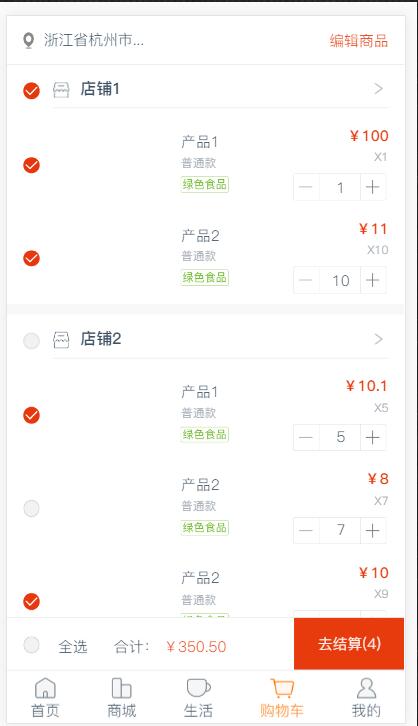
非常简单的逻辑,没有做代码的封装,代码如下
<div class="list-container">
    <div class="top-ops">
        <div>
          <img src="../../../static/images/homerecommendshopinfoadress@2x.png" alt="">
          <span>浙江省杭州市...</span>
        </div>
        <div class="ops">
          <span v-if="cartstatus === 'account'" @click="cartstatus = 'edit'">编辑商品</span>
          <span v-if="cartstatus === 'edit'" @click="cartstatus = 'account'">完成</span>
        </div>
    </div>
    <div class="paddingb200">
      <div class="shop-list" v-for="(item,index) in cartshops" :key="index">
        <div class="shop-name">
          <label>
            <input type="checkbox"
              name="shopradio"
              :value="item.productshopid"
              @click="shopcheck($event,cartshops)"
            class="disn">
            <b></b>
          </label>
          <div>
            <div>
              <img src="../../../static/images/mall@2x.png" alt="">
              <span class="name">{{item.shopname}}</span>
            </div>
            <span>
              <img src="../../../static/images/jtxq@2x.png" alt="">
            </span>
          </div>
        </div>
        <div class="goods-list" v-for="(goods,goodsindex) in item.detaillists" :key="goodsindex">
          <label>
            <input type="checkbox"
              name="goodradio"
              :price="goods.price"
              :num="goods.number" :dataid="item.productshopid"
              :value="goods.cartdetailid"
              @click="goodsckeck($event,item.detaillists,cartshops,item.productshopid)"
            class="disn">
            <b></b>
          </label>
          <div class="middle">
            <img :src="goods.reportimage" alt="">
            <div>
              <p class="name">{{goods.name}}</p>
              <p class="spec">{{goods.specifications}}</p>
              <p class="tab">
                <img src="../../../static/images/lsspbq@2x.png" alt="">
              </p>
            </div>
          </div>
          <div class="right">
            <p class="price">¥{{goods.price}}</p>
            <p class="num">x{{goods.number}}</p>
            <p class="caculate">
              <span class="mark" @click="numdecrease(goods.number)"></span>
              <span class="beeforcacul">{{goods.number}}</span>
              <span class="cacul" :num="goods.cartdetailid">{{goods.number}}</span>
              <span class="mark" @click="numadd(goods.number)"></span>
            </p>
          </div>
        </div>
      </div>
      <div class="edit" v-if="cartstatus === 'edit'">
        <label>
          <input type="checkbox" name="allradio" class="disn" @click="allcheck($event)">
          <b></b>
          <span>全选</span>
        </label>
        <span class="delet">删除(3)</span>
      </div>
      <div class="gotopay" v-if="cartstatus === 'account'">
        <label>
          <input type="checkbox" name="allradio" class="disn" @click="allcheck($event)">
          <b></b>
          <span class="marginr40">全选</span>
          <span>合计:</span>
          <span class="sum">¥{{sumprice.tofixed(2)}}</span>
        </label>
        <span class="delet" @click="causum">去结算({{totalnumber}})</span>
      </div>
    </div>
</div>
export default {
  components: {

  },
  name: "life",
  data() {
    return {
      cartstatus:"account", //购物车状态,account结算,edit删除编辑状态
      cartshops: [], //店铺列表
      sumprice:0, //合计金额
      totalnumber: 0, //总数
      shoplist:[], //店铺列表
      goodslist:[], //商品列表
    };
  },
  watch: {

  },
  mounted() {
    this.getcartdetail();
  },
  methods: {
    //购物车列表
    getcartdetail: function(){
      this.$http.get("api/product/v1/getcartdetail").then( res => {
        if(res.data.code === 200){
          //console.log(res.data.data)
          this.cartshops = res.data.data.cartshops;
        }else{
          toast(res.data.msg);
        }
      }).catch( error => {
        console.log(error)
      })
    },
    //商品选择
    goodsckeck: function(event,goodslist,shoplist,shopid){
      //商品列表+-,店铺是否checked(店铺列表+-),全选是否checked
      var input = document.getelementsbytagname('input')
      if(event.currenttarget.checked){
        this.goodslist.push(string(event.currenttarget.value));
        //如果店铺内所有商品全选,店铺选中
        var newarr = this.goodslist;
        var tt = goodslist.every(function(itemvalue){
          return (newarr.indexof(string(itemvalue.cartdetailid)) != -1)
        })
        if(tt){
          //店铺内全选,店铺checked,店铺列表+
          for(var i = 0;i<input.length;i++){
            if(input[i].value == shopid){
              input[i].checked = true;
            }
          }
          this.shoplist.push(string(shopid)); //防止shopid是number类型造成麻烦
          //如果所有店铺都全选,则全选按钮checked
          if(this.shoplist.length === shoplist.length){
            //所有店铺全选
            for(var i = 0;i<input.length;i++){
              if(input[i].name == 'allradio'){
                input[i].checked = true;
              }
            }
          }
        }
      }else{
        //商品列表--
        this.goodslist.splice(this.goodslist.indexof(event.currenttarget.value),1)
        //如果店铺checked,则取消,店铺列表--
        for(var i = 0;i<input.length;i++){
          if(input[i].value == shopid){
            if(input[i].checked){
              input[i].checked = false;
              this.shoplist.splice(this.shoplist.indexof(string(shopid)),1); //防止shopid是number类型造成麻烦
            }
          }
          //任意一个不选,全选取消
          if(input[i].name == 'allradio'){
            input[i].checked = false;
          }
        }
      }
      //计算总价和数量
      this.caculate();
    },
    //店铺选择
    shopcheck: function(event,shoplist){
      //店铺选中则对应商品全选,否则全不选
      //console.log(event.currenttarget)
      var input = document.getelementsbytagname('input')
      if(event.currenttarget.checked){
        //店铺列表+,店铺checked,店铺内商品全checked,商品列表++
        //console.log(this.shoplist)
        this.shoplist.push(string(event.currenttarget.value));
        //店铺内商品全checked
        for(var i = 0;i<input.length;i++){
          if(input[i].getattribute('dataid') == event.currenttarget.value){
            //将没有选中的checked,并加入列表,去重
            if(!input[i].checked){
              input[i].checked = true;
              //商品列表++
              this.goodslist.push(string(input[i].value))
            }
          }
        }
        //所有店铺全选
        if(this.shoplist.length === shoplist.length){
          for(var i = 0;i<input.length;i++){
            if(input[i].name == 'allradio'){
              input[i].checked = true;
            }
          }
        }
      }else{
        //店铺取消checked,店铺列表--,店铺内所有商品取消checked,商品列表--
        this.shoplist.splice(this.shoplist.indexof(string(event.currenttarget.value)),1);
        //店铺内所有商品取消checked
        for(var i = 0;i<input.length;i++){
          if(input[i].getattribute('dataid') == event.currenttarget.value){
            input[i].checked = false;
            //商品列表--
            this.goodslist.splice(this.goodslist.indexof(input[i].value),1);
          }
          //任意一个不选,全选取消
          if(input[i].name == 'allradio'){
            input[i].checked = false;
          }
        }
      }
      //计算总价和数量
      this.caculate();
    },
    //所有全选
    allcheck: function(event){
      var input = document.getelementsbytagname('input')
      if(event.currenttarget.checked){
        //全选checked,所有店铺checked,店铺列表++,所有商品checked,商品列表++
        for(var i = 0;i<input.length;i++){
          //去重
          if(!input[i].checked){
            input[i].checked = true;
            if(input[i].name == 'shopradio'){
              this.shoplist.push(string(input[i].value))
            }
            if(input[i].name == 'goodradio'){
              this.goodslist.push(string(input[i].value))
            }
          }
        }
      }else{
        //全不选取消checked,店铺全部取消checked,店铺列表清空,所有商品取消checked,商品列表清空
        for(var i = 0;i<input.length;i++){
          input[i].checked = false;
          this.shoplist = [];
          this.goodslist = [];
        }
      }
      //计算总价和数量
      this.caculate();
    },
    //计算总金额总数量
    caculate: function(){
      var input = document.getelementsbytagname('input');
      var newarr = [];
      for(var i = 0;i<input.length;i++){
        if(input[i].name == 'goodradio' && input[i].checked){
          var num = input[i].parentnode.parentnode.children[2].children[2].children[2].innerhtml;
          newarr.push(
            {
              'price': input[i].getattribute('price'),
              'num': num
            }
          )
        }
      }
      this.totalnumber = newarr.length;
      //归零
      this.sumprice = 0;
      for(var j = 0,len = newarr.length;j<len;j++){
        this.sumprice += newarr[j].price * newarr[j].num;
      }
    },
    //数量减小
    numdecrease: function(num){
      //如果当前input选中,则修改数量计算价格,如果当前input没有选中,则修改数量不计算价格
      var spanlist = event.currenttarget.parentnode.children;
      for(var i = 0,len = spanlist.length;i<len;i++){
        if(spanlist[i].getattribute("class") == 'beeforcacul'){
          spanlist[i].style.display = 'none';
        }
        if(spanlist[i].getattribute("class") == 'cacul'){
          spanlist[i].style.display = 'block';
          var caculnum = spanlist[i].innerhtml;
          if(caculnum < 2){
            toast('宝贝不能再少了哦');
          }else{
            caculnum --
            spanlist[i].innerhtml = caculnum;
          }
        }
      }
      if(event.currenttarget.parentnode.parentnode.parentnode.children[0].children[0].checked){
        this.caculate();
      }
    },
    //数量增加
    numadd: function(num){
      var spanlist = event.currenttarget.parentnode.children;
      //console.log(event.currenttarget.parentnode.children)
      for(var i = 0,len = spanlist.length;i<len;i++){
        if(spanlist[i].getattribute("class") == 'beeforcacul'){
          spanlist[i].style.display = 'none';
        }
        if(spanlist[i].getattribute("class") == 'cacul'){
          spanlist[i].style.display = 'block';
          var caculnum = spanlist[i].innerhtml;
          caculnum ++;
          spanlist[i].innerhtml = caculnum;
        }
      }
      if(event.currenttarget.parentnode.parentnode.parentnode.children[0].children[0].checked){
        this.caculate();
      }
    },
    //去结算
    causum:function(){
      if(this.sumprice === 0){
        toast('您还没有选择宝贝哦');
      }else{
        this.$router.push('/cart/order')
      }
    },
  }
};
以上就是本文的全部内容,希望对大家的学习有所帮助,也希望大家多多支持。
