
 小枫兜兜
小枫兜兜
| 导读 | 这篇文章主要为大家介绍了SpringMVC RESTFul实现列表功能详解,有需要的朋友可以借鉴参考下,希望能够有所帮助,祝大家多多进步,早日升职加薪 |
SpringMVC RESTFul列表功能实现
一、增加控制器方法
在控制器类 EmployeeController 中,添加访问列表方法。
@Controller
public class EmployeeController {
    @Autowired
    private EmployeeDao employeeDao;
    @RequestMapping(value = "/employee", method = RequestMethod.GET)
    public String getAllEmployee(Model model) {
        Collection employeeList = employeeDao.getAll();
        model.addAttribute("employeeList", employeeList);
        return "employee_list";
    }
}
这里就没写 service 层了,直接在 getAllEmployee() 方法中操作 dao 层,也就是调用 employeeDao.getAll()来获取所有员工信息,返回是一个列表集合。
接着把数据放到 request 域里,供前端页面使用,这里使用前面讲过的 Model 方法。
在model.addAttribute("employeeList", employeeList); 中,2个分别对应 key - value,页面里使用 key 可以获取到 value 。
最后返回 employee_list 页面。
二、编写列表页 employee_list.html
控制器里返回了 employee_list ,这是一个 html 页面,依然写在 templates 下面:
< !doctype="" html="">
< html="" lang="en" xmlns:th="http://www.51sjk.com/Upload/Articles/1/0/324/324894_20220920124727275.org">
< head="">
    < meta="" charset="UTF-8">
    < title="">员工信息< itle="">
< ead="">
< body="">
    < table="" border="1" cellspacing="0" cellpadding="0" style="text-align: center;">
        < tr="">
            < th="" colspan="5">员工列表< h="">
        < r="">
        < tr="">
            < th="">id< h="">
            < th="">lastName< h="">
            < th="">email< h="">
            < th="">gender< h="">
            < th="">options< h="">
        < r="">
        < !--循环后端放到request域中的数据="" employeelist--="">
        < tr="" th:each="employee : ${employeeList}">
            < td="" th:text="${employee.id}">< d="">
            < td="" th:text="${employee.lastName}">< d="">
            < td="" th:text="${employee.email}">< d="">
            < td="" th:text="${employee.gender}">< d="">
            < td="">
                < a="" href="">删除<>
                < a="" href="">更新<>
            < d="">
        < r="">
    < able="">
< ody="">
< tml="">
这里使用了简单的样式,使其看起来更像个列表。
每一行的数据,要通过循环后端放到 request 域中的数据 employeeList,得到单个对象 employee,然后就可以将对象的属性获取出来展示, 比如 employee.id 。
th:each,${}这些都是 thymeleaf 的用法。
三、访问列表页
重新部署应用。
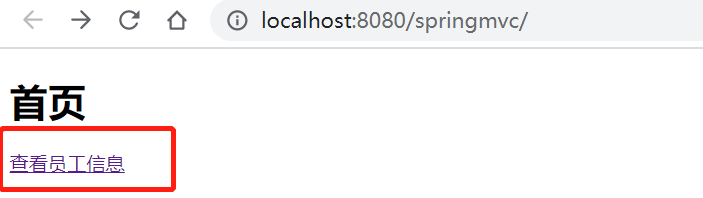
因为在首页中,已经加了跳转到列表页的超链接,直接点击。
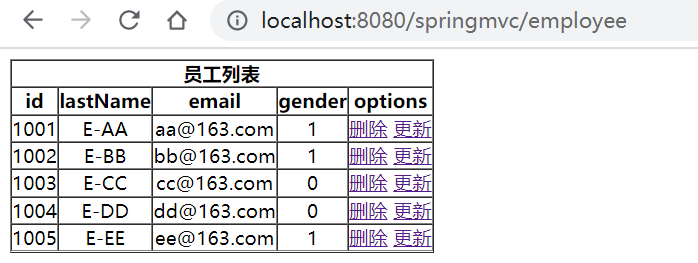
访问成功,忽略掉好不好看的问题,起码这是一个正常的列表。
