
 o生来彷徨o
单选按钮要在一组中选择一项,并且不能多选。
同一组radiobutton要放在同一个radiogroup节点下。
radiobutton默认未选中,点击后选中但是再次点击不会取消选中。
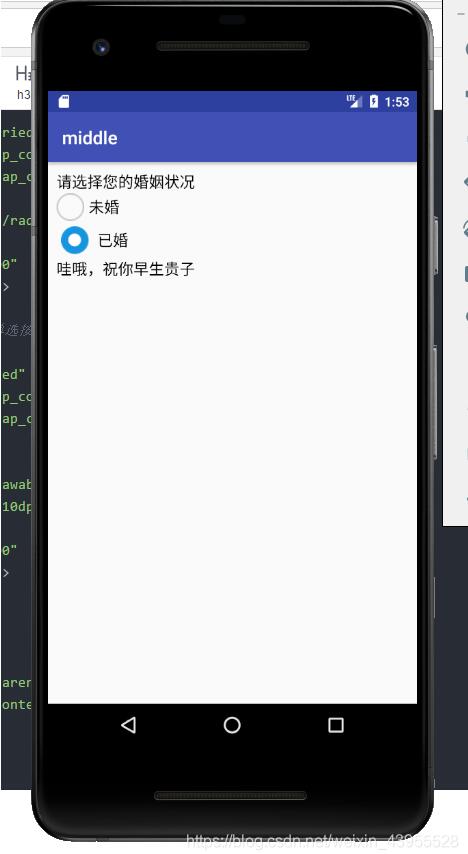
radiobutton经常会更换按钮图标,如果通过button属性变更图标,那么图标与文字就会挨得很近。为了拉开图标与文字之间的距离,得换成drawableleft属性展示新图标(不要忘记把button改为@null),再设置drawablepadding即可指定间隔距离。
复现代码时出现了一个错误,处理单选按钮的响应,要先写一个单选监听器实现接口 radiogroup.oncheckedchangelistener,而不是复合按钮的compoundbutton.oncheckedchangelistener。

mainactivity
package com.example.middle;

import androidx.appcompat.app.appcompatactivity;
import android.os.bundle;
import android.widget.radiogroup;
import android.widget.textview;
import android.widget.radiogroup.oncheckedchangelistener;

public class radioverticalactivity extends appcompatactivity implements oncheckedchangelistener {
    private textview tv_marry; // 声明一个文本视图对象

    @override
    protected void oncreate(bundle savedinstancestate) {
        super.oncreate(savedinstancestate);
        setcontentview(r.layout.activity_radio_vertical);
        // 从布局文件中获取名叫tv_marry的文本视图
        tv_marry = findviewbyid(r.id.tv_marry);
        // 从布局文件中获取名叫rg_marry的单选组
        radiogroup rg_marry = findviewbyid(r.id.rg_marry);
        // 给rg_marry设置单选监听器,一旦用户点击组内的单选按钮,就触发监听器的oncheckedchanged方法
        rg_marry.setoncheckedchangelistener(this);
    }

    // 在用户点击组内的单选按钮时触发
    public void oncheckedchanged(radiogroup group, int checkedid) {
        if (checkedid == r.id.rb_married) {
            tv_marry.settext("哇哦,祝你早生贵子");
        } else if (checkedid == r.id.rb_unmarried) {
            tv_marry.settext("哇哦,你的前途不可限量");
        }
    }

}
layout
<linearlayout xmlns:android="http://schemas.android.com/apk/res/android"
    android:layout_width="match_parent"
    android:layout_height="match_parent"
    android:orientation="vertical"
    android:padding="10dp" >

    <textview
        android:layout_width="match_parent"
        android:layout_height="wrap_content"
        android:text="请选择您的婚姻状况"
        android:textcolor="#000000"
        android:textsize="17sp" />

    <radiogroup
        android:id="@+id/rg_marry"
        android:layout_width="match_parent"
        android:layout_height="wrap_content"
        android:orientation="vertical" >

        <!-- 通过button属性修改单选按钮的图标 -->
        <radiobutton
            android:id="@+id/rb_unmarried"
            android:layout_width="wrap_content"
            android:layout_height="wrap_content"
            android:padding="5dp"
            android:button="@drawable/radio_selector"
            android:text="未婚"
            android:textcolor="#000000"
            android:textsize="17sp" />

        <!-- 通过drawableleft属性修改单选按钮的图标 -->
        <radiobutton
            android:id="@+id/rb_married"
            android:layout_width="wrap_content"
            android:layout_height="wrap_content"
            android:padding="5dp"
            android:button="@null"
            android:drawableleft="@drawable/radio_selector"
            android:drawablepadding="10dp"
            android:text="已婚"
            android:textcolor="#000000"
            android:textsize="17sp" />
    </radiogroup>

    <textview
        android:id="@+id/tv_marry"
        android:layout_width="match_parent"
        android:layout_height="wrap_content"
        android:textcolor="#000000"
        android:textsize="17sp" />
</linearlayout>
result
以上就是本文的全部内容,希望对大家的学习有所帮助,也希望大家多多支持。
