
 如果如果可以的话我想说我爱你
1、组件first.js下有子组件:
import admin from './admin'
import formcom from './formcom'
import one from './one'
import buttoncom from './buttoncom'
import menucom from './menucom'
import stepscom from './stepscom'
import tabscom from './tabscom'
import tablecom from './tablecom'
import messagecom from './messagecom'
import notificationcom from './notificationcom'
import progresscom from './progresscom'
import spincom from './spincom'
import badgecom from './badgecom'
first.js完整代码如下:
import react from 'react'
import { layout, menu } from 'antd';
import { useroutlined, laptopoutlined, notificationoutlined } from '@ant-design/icons';
import { hashrouter, route, link } from 'react-router-dom'
import admin from './admin'
import formcom from './formcom'
import one from './one'
import buttoncom from './buttoncom'
import menucom from './menucom'
import stepscom from './stepscom'
import tabscom from './tabscom'
import tablecom from './tablecom'
import messagecom from './messagecom'
import notificationcom from './notificationcom'
import progresscom from './progresscom'
import spincom from './spincom'
import badgecom from './badgecom'
const { submenu } = menu;
const { header, content, sider } = layout;

export default class first extends react.component {
    constructor() {
        super();
    }

    //只展开当前父级菜单 begin
    rootsubmenukeys = ['sub1', 'sub2', 'sub3'];

    state = {
        openkeys: ['sub1'],
    };

    onopenchange = openkeys => {
        const latestopenkey = openkeys.find(key => this.state.openkeys.indexof(key) === -1);
        if (this.rootsubmenukeys.indexof(latestopenkey) === -1) {
            this.setstate({ openkeys });
        } else {
            this.setstate({
                openkeys: latestopenkey ? [latestopenkey] : [],
            });
        }
    };
    //只展开当前父级菜单 end

    render() {
        return (<div>
            <layout>
                <hashrouter>
                    <header classname="header" style={{ position: 'fixed', zindex: 1, width: '100%', paddingleft: '20px'}}>
                        <div classname="logo" style={{fontsize: '32px', color: '#ffffff', fontweight: 'bold'}}>react app</div>
                        <menu theme="dark" mode="horizontal" defaultselectedkeys={['1']}>
                            {/*<menu.item key="1">nav 1</menu.item>
                            <menu.item key="2">nav 2</menu.item>
                            <menu.item key="3">nav 3</menu.item>*/}
                        </menu>
                    </header>
                    <layout>
                        <sider width={200} classname="site-layout-background" style={{
                            overflow: 'auto',
                            height: '100vh',
                            position: 'fixed',
                            left: 0,
                        }}>
                            <menu
                                theme="dark"
                                mode="inline"
                                defaultselectedkeys={['2']}
                                defaultopenkeys={['sub1']}
                                style={{ height: '100%', paddingtop: '60px', borderright: 0 }}
                                onopenchange={this.onopenchange}
                                openkeys={this.state.openkeys}
                            >
                                <submenu key="sub1" icon={<useroutlined />} title="subnav 1">
                                    <menu.item key="1"><link to={`${this.props.match.path}/admin`}>admin</link></menu.item>
                                    <menu.item key="2"><link to={`${this.props.match.path}/form`}>form</link></menu.item>
                                    <menu.item key="3"><link to={`${this.props.match.path}/one`}>one</link></menu.item>
                                    <menu.item key="4"><link to={`${this.props.match.path}/menu`}>menu</link></menu.item>
                                </submenu>
                                <submenu key="sub2" icon={<laptopoutlined />} title="subnav 2">
                                    <menu.item key="5"><link to={`${this.props.match.path}/step`}>step</link></menu.item>
                                    <menu.item key="6"><link to={`${this.props.match.path}/tabs`}>tabs</link></menu.item>
                                    <menu.item key="7"><link to={`${this.props.match.path}/table`}>table</link></menu.item>
                                    <menu.item key="8"><link to={`${this.props.match.path}/message`}>message</link></menu.item>
                                </submenu>
                                <submenu key="sub3" icon={<notificationoutlined />} title="subnav 3">
                                    <menu.item key="9"><link to={`${this.props.match.path}/notification`}>notification</link></menu.item>
                                    <menu.item key="10"><link to={`${this.props.match.path}/progress`}>progresscom</link></menu.item>
                                    <menu.item key="11"><link to={`${this.props.match.path}/spin`}>spin</link></menu.item>
                                    <menu.item key="12"><link to={`${this.props.match.path}/badge`}>badge</link></menu.item>
                                    <menu.item key="13"><link to={`${this.props.match.path}/button`}>button</link></menu.item>
                                </submenu>
                            </menu>
                        </sider>
                        <layout style={{ padding: '84px 20px 20px', marginleft: 200}}>
                            <content
                                classname="site-layout-background"
                                style={{
                                    padding: 24,
                                    margin: 0
                                }}
                            >
                                <route path={`${this.props.match.path}/admin`} exact component={admin}></route>
                                <route path={`${this.props.match.path}/form`} component={formcom}></route>
                                <route path={`${this.props.match.path}/one`} component={one}></route>
                                <route path={`${this.props.match.path}/menu`} component={menucom}></route>
                                <route path={`${this.props.match.path}/step`} component={stepscom}></route>
                                <route path={`${this.props.match.path}/tabs`} component={tabscom}></route>
                                <route path={`${this.props.match.path}/table`} component={tablecom}></route>
                                <route path={`${this.props.match.path}/message`} component={messagecom}></route>
                                <route path={`${this.props.match.path}/notification`} component={notificationcom}></route>
                                <route path={`${this.props.match.path}/progress`} component={progresscom}></route>
                                <route path={`${this.props.match.path}/spin`} component={spincom}></route>
                                <route path={`${this.props.match.path}/badge`} component={badgecom}></route>
                                <route path={`${this.props.match.path}/button`} component={buttoncom}></route>
                            </content>
                        </layout>
                    </layout>
                </hashrouter>
            </layout>
        </div>)
    }
}
其中
${this.props.match.path}
是关键。
2、假设还有一个登录组件login.js,代码如下:
import react from 'react'
import { button } from 'antd';

export default class login extends react.component {
    constructor() {
        super();
    }

    redirecthandle = () => {
        console.log("aaa");
        this.props.history.push("/home");
    }

    render() {
        return (<button type="primary" onclick={()=>this.redirecthandle()}>primary button</button>)
    }
}
假设react项目用的是react脚手架搭建,则在src目录下的app.js文件中设置路由:
  render() {
    return (<hashrouter>
      <switch>
        <route exact={true} path="/login" component={login} />
        <route path="/home" component={first} />
        <redirect to='/login' /> {/*/login和/home之外的路由直接跳转到/login*/}
      </switch>
    </hashrouter>)
  }
app.js完整代码如下:
import react from 'react';
import { notification } from 'antd'
import { hashrouter, route, switch, redirect } from 'react-router-dom';
import first from './first';
import login from './login';
import './app.css';

class app extends react.component {
  constructor() {
    super();
    this.opennotificationwithicon = type => {
      notification[type]({
        message: 'notification title',
        description:
          'this is the content of the notification. this is the content of the notification. this is the content of the notification.',
      });
    }
  }

  clickhandle() {
    console.log("clicked!!!");
  }

  render() {
    return (<hashrouter>
      <switch>
        <route exact={true} path="/login" component={login} /> {/**exact 防止混路由混合   如:输入127.xx.xx.xx/home 中有/login页面*/}
        <route path="/home" component={first} />
        <redirect to='/login' />
      </switch>
    </hashrouter>)
  }
}

export default app;
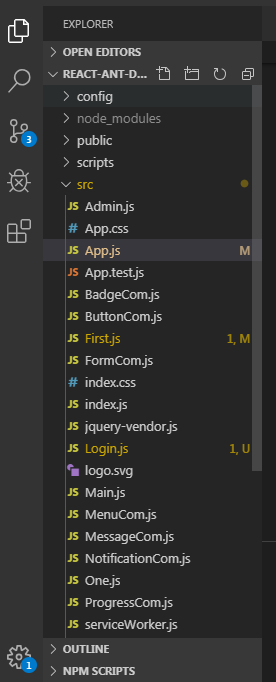
项目目录结构如下:
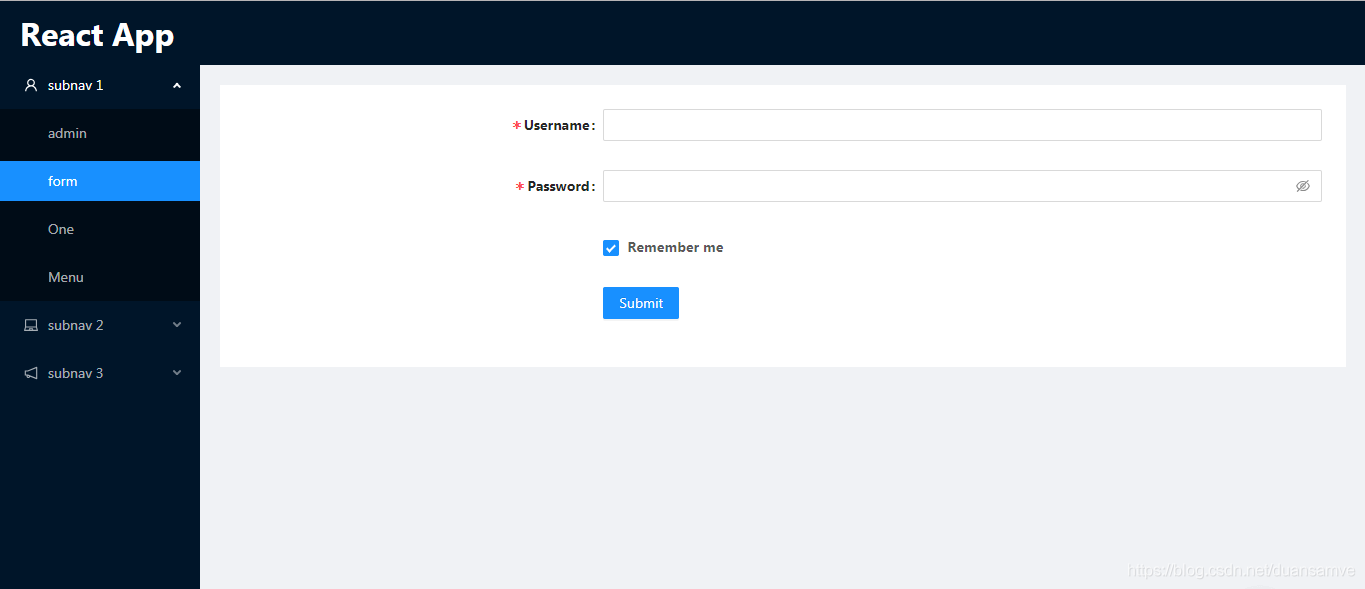
项目预览效果如下:
到此这篇关于react配置子路由的实现的文章就介绍到这了,更多相关react配置子路由内容请搜索以前的文章或继续浏览下面的相关文章希望大家以后多多支持!
