 空白55041098
自定义指令中使用angularjs扩展html的功能。自定义指令使用的“指令”的功能定义。自定义指令只是替换了它被激活的元素。引导过程中angularjs应用程序找到了匹配的元素,并做好使用自定义指令compile()方法一次活动再处理使用基于指令的范围自定义指令link()方法的元素。 angularjs提供支持,以下列元素的类型来创建自定义指令。
- element directives - 指令遇到时激活一个匹配的元素。
- attribute - - 指令遇到时激活一个匹配的属性。
- css - - 指令遇到时激活匹配css样式。
- comment - - 指令遇到时激活匹配的注释。
了解自定义指令
定义自定义的html标签。
<student name="mahesh"></student><br/>
<student name="piyush"></student>
定义自定义指令来处理上面的自定义html标签。
var mainapp = angular.module("mainapp", []);

//create a directive, first parameter is the html element to be attached.
//we are attaching student html tag.
//this directive will be activated as soon as any student element is encountered in html
mainapp.directive('student', function() {
  //define the directive object
  var directive = {};
  //restrict = e, signifies that directive is element directive
  directive.restrict = 'e';
  //template replaces the complete element with its text.
  directive.template = "student: <b>{{student.name}}</b> , roll no: <b>{{student.rollno}}</b>";
  //scope is used to distinguish each student element based on criteria.
  directive.scope = {
    student : "=name"
  }
  //compile is called during application initialization. angularjs calls it once when html page is loaded.
  directive.compile = function(element, attributes) {
   element.css("border", "1px solid #cccccc");
  //linkfunction is linked with each element with scope to get the element specific data.
   var linkfunction = function($scope, element, attributes) {
     element.html("student: <b>"+$scope.student.name +"</b> , roll no: <b>"+$scope.student.rollno+"</b><br/>");
     element.css("background-color", "#ff00ff");
   }
   return linkfunction;
  }
  return directive;
});
定义控制器以更新范围为指令。在这里,我们使用name属性值作为子的作用域。
mainapp.controller('studentcontroller', function($scope) {
   $scope.mahesh = {};
   $scope.mahesh.name = "mahesh parashar";
   $scope.mahesh.rollno = 1;

   $scope.piyush = {};
   $scope.piyush.name = "piyush parashar";
   $scope.piyush.rollno = 2;
});
例子
<html>
<head>
  <title>angular js custom directives</title>
</head>
<body>
  <h2>angularjs sample application</h2>
  <div ng-app="mainapp" ng-controller="studentcontroller">
 <student name="mahesh"></student><br/>
 <student name="piyush"></student>
  </div>
  <script src="http://www.51sjk.com/Upload/Articles/1/0/261/261563_20210702000829166.js"></script>
  <script>
   var mainapp = angular.module("mainapp", []);

   mainapp.directive('student', function() {
     var directive = {};
     directive.restrict = 'e';
     directive.template = "student: <b>{{student.name}}</b> , roll no: <b>{{student.rollno}}</b>";

     directive.scope = {
      student : "=name"
     }

     directive.compile = function(element, attributes) {
      element.css("border", "1px solid #cccccc");

      var linkfunction = function($scope, element, attributes) {
        element.html("student: <b>"+$scope.student.name +"</b> , roll no: <b>"+$scope.student.rollno+"</b><br/>");
        element.css("background-color", "#ff00ff");
      }

      return linkfunction;
     }

     return directive;
   });

   mainapp.controller('studentcontroller', function($scope) {
      $scope.mahesh = {};
      $scope.mahesh.name = "mahesh parashar";
      $scope.mahesh.rollno = 1;

      $scope.piyush = {};
      $scope.piyush.name = "piyush parashar";
      $scope.piyush.rollno = 2;
   });

  </script>
</body>
</html>
结果
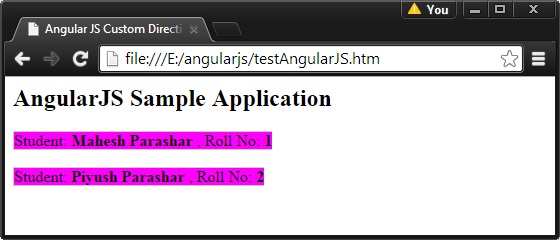
在web浏览器中打开textangularjs.html。看到结果如下: