 老湿弟
老湿弟
html不支持嵌入在html页面中的html页面。实现这一功能通过使用以下方式:
- 使用ajax - 让一台服务器来调用获取相应的html页面,并将其设置在html控件的innerhtml。
- 使用服务器端包含 - jsp,php等web端服务器技术可以在包括动态页面中的html页面。
使用angularjs,我们可以用ng-include指令在一个html页面嵌入另一个html页面。
<div ng-app="" ng-controller="studentcontroller">
  <div ng-include="'main.html'"></div>
  <div ng-include="'subjects.html'"></div>
</div>
例子
tryangularjs.html
<html>
<head>
<title>angular js includes</title>
<style>
table, th , td {
  border: 1px solid grey;
  border-collapse: collapse;
  padding: 5px;
}
table tr:nth-child(odd) {
  background-color: #f2f2f2;
}
table tr:nth-child(even) {
  background-color: #ffffff;
}
</style>
</head>
<body>
<h2>angularjs sample application</h2>
<div ng-app="" ng-controller="studentcontroller">
<div ng-include="'main.html'"></div>
<div ng-include="'subjects.html'"></div>
</div>
<script>
function studentcontroller($scope) {
  $scope.student = {
   firstname: "mahesh",
   lastname: "parashar",
   fees:500,
   subjects:[
     {name:'physics',marks:70},
     {name:'chemistry',marks:80},
     {name:'math',marks:65},
     {name:'english',marks:75},
     {name:'hindi',marks:67}
   ],
   fullname: function() {
     var studentobject;
     studentobject = $scope.student;
     return studentobject.firstname + " " + studentobject.lastname;
   }
  };
}
</script>
<script src="http://www.51sjk.com/Upload/Articles/1/0/261/261684_20210702001206759.js"></script>
</body>
</html>
main.html
<table border="0">
  <tr><td>enter first name:</td><td><input type="text" ng-model="student.firstname"></td></tr>
  <tr><td>enter last name: </td><td><input type="text" ng-model="student.lastname"></td></tr>
  <tr><td>name: </td><td>{{student.fullname()}}</td></tr>
</table>
subjects.html
<p>subjects:</p>
<table>
  <tr>
   <th>name</th>
   <th>marks</th>
  </tr>
  <tr ng-repeat="subject in student.subjects">
   <td>{{ subject.name }}</td>
   <td>{{ subject.marks }}</td>
  </tr>
</table>
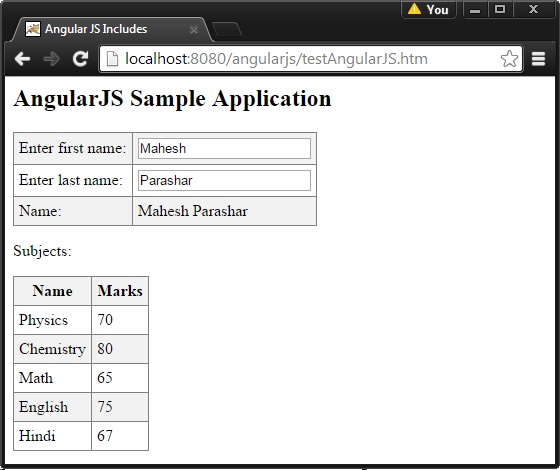
输出
要运行这个例子,需要部署textangularjs.html,main.html和subjects.html 到一个网络服务器。使用服务器url在web浏览器中打开textangularjs.html。看到结果。