 兀_兀小王
兀_兀小王
angularjs应用主要依赖于控制器来控制数据在应用程序中的流动。控制器采用ng-controller指令定义。控制器是一个包含属性/属性和javascript对象的功能。每个控制器接受$scope参数指定应用程序/模块,由控制器控制。
<div ng-app="" ng-controller="studentcontroller">
...
</div>
在这里,我们已经声明采用ng-controller指令的控制器studentcontroller。作为下一步,我们将定义studentcontroller如下
- studentcontroller 定义 $scope 作为javascript对象参数。
- $scope 表示应用程序,使用studentcontroller对象。
- $scope.student 是studentcontroller对象的属性。
- firstname和lastname是$scope.student 对象的两个属性。我们已经通过了默认值给他们。
- fullname 是$scope.student对象的函数,它的任务是返回合并的名称。
- 在fullname函数中,我们现在要学生对象返回组合的名字。
- 作为一个说明,还可以定义控制器对象在单独的js文件,并把有关文件中的html页面。
<script>
function studentcontroller($scope) {
  $scope.student = {
   firstname: "yiibai",
   lastname: "com",
   fullname: function() {
     var studentobject;
     studentobject = $scope.student;
     return studentobject.firstname + " " + studentobject.lastname;
   }
  };
}
</script>
现在可以使用ng-model或使用表达式如下使用studentcontroller学生的属性。
- 现在有 student.firstname 和 student.lastname 两个输入框。
- 现在有 student.fullname()方法添加到html。
- 现在,只要输入first name和lastname输入框中输入什么,可以看到两个名称自动更新。
enter first name: <input type="text" ng-model="student.firstname"><br>
enter last name: <input type="text" ng-model="student.lastname"><br>
<br>
you are entering: {{student.fullname()}}
例子
下面的例子将展示使用控制器。
testangularjs.html 文件内容如下:
<html>
<head>
<title>angular js controller</title>
</head>
<body>
<h2>angularjs sample application</h2>
<div ng-app="" ng-controller="studentcontroller">

enter first name: <input type="text" ng-model="student.firstname"><br><br>
enter last name: <input type="text" ng-model="student.lastname"><br>
<br>
you are entering: {{student.fullname()}}
</div>
<script>
function studentcontroller($scope) {
  $scope.student = {
   firstname: "mahesh",
   lastname: "parashar",
   fullname: function() {
     var studentobject;
     studentobject = $scope.student;
     return studentobject.firstname + " " + studentobject.lastname;
   }
  };
}
</script>
<script src="http://www.51sjk.com/Upload/Articles/1/0/261/261809_20210702001725561.js"></script>
</body>
</html>
输出
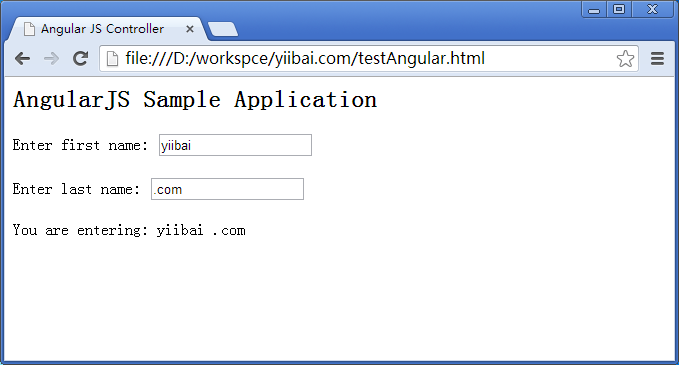
在web浏览器打开textangularjs.html,看到以下结果: