
 A谁是谁的谁A
angularjs 包含
在 angularjs 中,你可以在 html 中包含 html 文件。
在 html 中包含 html 文件
在 html 中,目前还不支持包含 html 文件的功能。
服务端包含
大多服务端脚本都支持包含文件功能 (ssi: server side includes)。
使用 ssi, 你可在 html 中包含 html 文件,并发送到客户端浏览器。
php 实例
<?php require("navigation.php"); ?>
客户端包含
通过 javascript 有很多种方式可以在 html 中包含 html 文件。
通常我们使用 http 请求 (ajax) 从服务端获取数据,返回的数据我们可以通过 使用 innerhtml 写入到 html 元素中。
angularjs 包含
使用 angularjs, 你可以使用 ng-include 指令来包含 html 内容:
实例
<body>

<div class="container">
 <div ng-include="'myusers_list.htm'"></div>
 <div ng-include="'myusers_form.htm'"></div>
</div>
步骤如下:
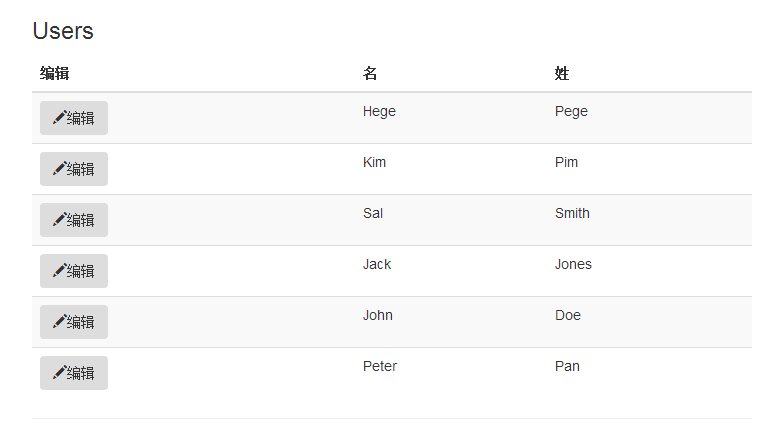
步骤 1: 创建 html 列表
myusers_list.html
<h1>用户</h1>

<table class="table table-striped">
 <thead><tr>
 <th>编辑</th>
 <th>名</th>
 <th>姓</th>
 </tr></thead>
 <tbody><tr ng-repeat="user in users">
 <td>
  <button class="btn" ng-click="edituser(user.id)">
  <span class="glyphicon glyphicon-pencil"></span>  edit
  </button>
 </td>
 <td>{{ user.fname }}</td>
 <td>{{ user.lname }}</td>
 </tr></tbody>
</table>
运行结果:
用户
| 编辑 | 名 | 姓 |
|---|---|---|
| {{ user.fname }} | {{ user.lname }} |
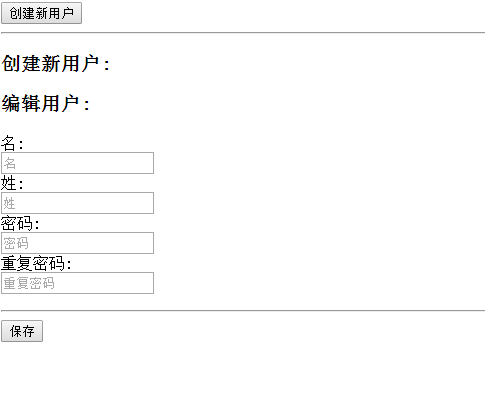
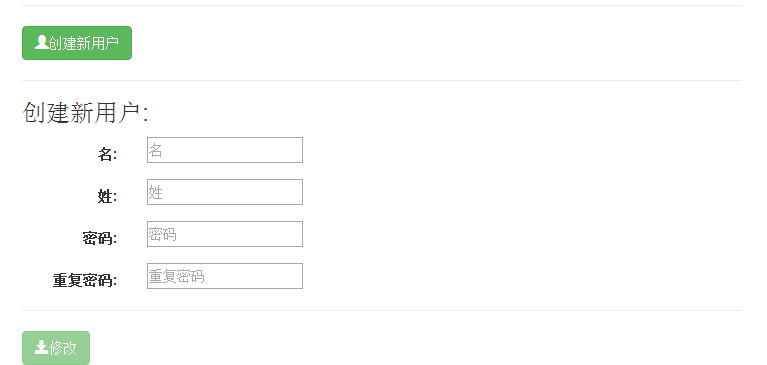
步骤 2: 创建 html 表单
myusers_form.html
<button class="btn btn-success" ng-click="edituser('new')">
<span class="glyphicon glyphicon-user"></span>创建新用户
</button>
<hr>

<h3 ng-show="edit">创建新用户:</h3>
<h3 ng-hide="edit">编辑用户:</h3>

<form class="form-horizontal">
 <div class="form-group">
 <label class="col-sm-2 control-label">名:</label>
 <div class="col-sm-10">
 <input type="text" ng-model="fname" ng-disabled="!edit" placeholder="名">
 </div>
 </div>
 <div class="form-group">
 <label class="col-sm-2 control-label">姓:</label>
 <div class="col-sm-10">
 <input type="text" ng-model="lname" ng-disabled="!edit" placeholder="姓">
 </div>
 </div>
 <div class="form-group">
 <label class="col-sm-2 control-label">密码:</label>
 <div class="col-sm-10">
 <input type="password" ng-model="passw1" placeholder="密码">
 </div>
 </div>
 <div class="form-group">
 <label class="col-sm-2 control-label">重复密码:</label>
 <div class="col-sm-10">
 <input type="password" ng-model="passw2" placeholder="重复密码">
 </div>
 </div>
</form>

<hr>
<button class="btn btn-success" ng-disabled="error || incomplete">
<span class="glyphicon glyphicon-save"></span>保存
</button>
运行结果:
步骤 3: 创建控制器
myusers.js
angular.module('myapp', []).controller('userctrl', function($scope) {
$scope.fname = '';
$scope.lname = '';
$scope.passw1 = '';
$scope.passw2 = '';
$scope.users = [
{id:1, fname:'hege',lname:"pege" },
{id:2, fname:'kim',lname:"pim" },
{id:3, fname:'sal',lname:"smith" },
{id:4, fname:'jack',lname:"jones" },
{id:5, fname:'john',lname:"doe" },
{id:6, fname:'peter',lname:"pan" }
];
$scope.edit = true;
$scope.error = false;
$scope.incomplete = false;
$scope.edituser = function(id) {
 if (id == 'new') {
 $scope.edit = true;
 $scope.incomplete = true;
 $scope.fname = '';
 $scope.lname = '';
 } else {
 $scope.edit = false;
 $scope.fname = $scope.users[id-1].fname;
 $scope.lname = $scope.users[id-1].lname;
 }
};

$scope.$watch('passw1',function() {$scope.test();});
$scope.$watch('passw2',function() {$scope.test();});
$scope.$watch('fname',function() {$scope.test();});
$scope.$watch('lname',function() {$scope.test();});

$scope.test = function() {
 if ($scope.passw1 !== $scope.passw2) {
 $scope.error = true;
 } else {
 $scope.error = false;
 }
 $scope.incomplete = false;
 if ($scope.edit && (!$scope.fname.length ||
 !$scope.lname.length ||
 !$scope.passw1.length || !$scope.passw2.length)) {
 $scope.incomplete = true;
 }
};
})
步骤 4: 创建主页
myusers.html
<!doctype html>
<html>
<head>
<meta charset="utf-8">
<link rel="stylesheet" >
<script src="http://www.51sjk.com/Upload/Articles/1/0/268/268337_20210708023633886.js"></script>
</head>
<body ng-app="myapp" ng-controller="userctrl">

<div class="container">
 <div ng-include="'myusers_list.htm'"></div>
 <div ng-include="'myusers_form.htm'"></div>
</div>

<script src= "myusers.js"></script>

</body>
</html>
运行结果:
以上就是 对angularjs 包含资料的整理,希望能帮助angularjs 编程的朋友。
