
 你爱上了他的它
一、引用template
对于指令,可以把它简单的理解成在特定dom元素上运行的函数,指令可以扩展这个元素的功能。
指令要生效,那么html头里面要
<html lang="en" ng-app="app">
制定ng-app的值和定义指令的module名字一致:
angular.module('app',[])
指令的完整参数:
angular.module('myapp', [])
.directive('mydirective', function() {
 return {
 restrict: string,
 priority: number,
 terminal: boolean,
 template: string or template function:
 function(telement, tattrs) {...},
 templateurl: string,
 replace: boolean or string,
 scope: boolean or object,
 transclude: boolean,
 controller: string or
 function(scope, element, attrs, transclude, otherinjectables) { ... },
 controlleras: string,
 require: string,
 link: function(scope, ielement, iattrs) { ... },
 compile: // 返回一个对象或连接函数,如下所示: function(telement, tattrs, transclude) {
 return {
 pre: function(scope, ielement, iattrs, controller) { ... },
 post: function(scope, ielement, iattrs, controller) { ... }
 }
 return function postlink(...) { ... }
 }
 };
 });
指令可以使用的方式:
restrict[string]
restrict是一个可选的参数。用于指定该指令在dom中以何种形式被声明。默认值是a,即以属性的形式来进行声明。
可选值如下:
- e(元素)<my-directive></my-directive>
- a(属性,默认值)<div my-directive="expression"></div>
- c(类名)<div class="my-directive:expression;"></div>
- m(注释)<--directive:my-directive expression-->
replace[bool]
replace是一个可选参数,如果设置了这个参数,值必须为true,因为默认值为false。默认值意味着模板会被当作子元素插入到调用此指令的元素内部,
例如上面的示例默认值情况下,生成的html代码如下:
<my-directive value="http://www.51sjk.com/Upload/Articles/1/0/280/280341_20210709000040760.com" text="百度"><a rel="external nofollow" rel="external nofollow" rel="external nofollow" >百度</a></my-directive>
如果设置replace=true
<a rel="external nofollow" rel="external nofollow" rel="external nofollow" value="http://www.51sjk.com/Upload/Articles/1/0/280/280341_20210709000040760.com" text="百度">百度</a>
据我观察,这种效果只有设置restrict="e"的情况下,才会表现出实际效果。
template[string or function]
template参数是可选的,必须被设置为以下两种形式之一:
一段html文本;
一个可以接受两个参数的函数,参数为telement和tattrs,并返回一个代表模板的字符串。telement和tattrs中的t代表template,是相对于instance的。
不管是返回html文本还是函数,都是最后替换一个html,和replace属性搭配使用的,先给出一个完整的index.heml directive.js,以这个为例子来说明:
<!doctype html>
<html lang="en" ng-app="app">

<head>
 <meta charset="utf-8">
 <title>my html file</title>
 <link rel="stylesheet"  rel="external nofollow" rel="external nofollow" rel="external nofollow" >
 <script src="angularjs/angular.js"></script>
 <script src="mydirective.js"></script>
</head>

<body>
 <my-directive></my-directive>
</body>

</html>
然后js:
 angular.module('app',[])
 .directive('mydirective', function () {
 return {
 restrict: 'e',
 template: '<a  rel="external nofollow" rel="external nofollow" rel="external nofollow" >百度</a>'
 };
 })
最后的运行效果以及firebug查看到的效果:
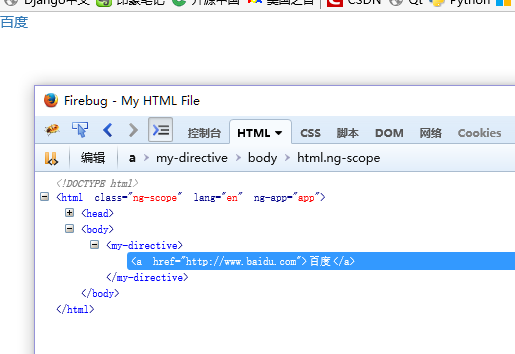
如果添加指令的replace属性为ture,那么就不会有这个directvie指令部分了:
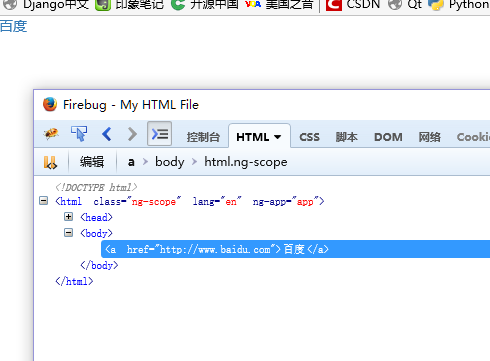
上面就是差别。
再说说指令定义里面模板参数是函数的情况,我们改写html以及js:
<!doctype html>
<html lang="en" ng-app="app">

<head>
 <meta charset="utf-8">
 <title>my html file</title>
 <link rel="stylesheet"  rel="external nofollow" rel="external nofollow" rel="external nofollow" >
 <script src="angularjs/angular.js"></script>
 <script src="mydirective.js"></script>
</head>

<body>
 <my-directive value="http://www.51sjk.com/Upload/Articles/1/0/280/280341_20210709000040760.com" text="百度"></my-directive>
</body>

</html>

js文件:
angular.module('app',[])
 .directive('mydirective', function () {
 return {
 restrict: 'eac',
 template: function (elem, attr) {
  return "<a href='" + attr.value + "'>" + attr.text + "</a>";
 }
 };
 })
指令定义的template是一个函数对象,返回一个html的字符串,那么他的elem和attr就是分别代表这个指令和他在index.html里面的属性:
attr.value和attr.text分别对应:
<my-directive value="http://www.51sjk.com/Upload/Articles/1/0/280/280341_20210709000040760.com" text="百度"></my-directive>
里面的value和text。
不replace的情况:
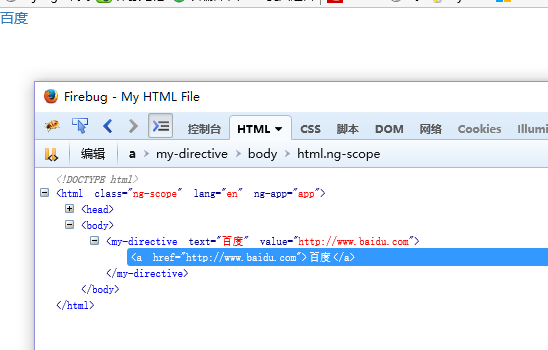
二、指令当做属性
上面说过:
angular.module('myapp', [])
 .directive('mydirective', function() {
 return {
 restrict: string, 后面省略
指令restrict有四种用法,默认是a,也就是当做属性,
- e(元素)<my-directive></my-directive>
- a(属性,默认值)<div my-directive="expression"></div>
- c(类名)<div class="my-directive:expression;"></div>
- m(注释)<--directive:my-directive expression-->
然后如果一个指令直接返回一个函数的时候,其实返回的一个link函数,比如:
angular.module('time', [])
 .directive('xxx', function() {
 return function(scope, element, attrs) {
这个是表示直接link。
当指令做属性的时候,有两重含义:
1.在一个html元素里面制定为属性
2.js定义的指令名。
看一个例子:
js:
angular.module('time', [])
 .controller("ctrl2", function($scope) {
 $scope.format = 'm/d/yy h:mm:ss a';
 })
 // register the 'mycurrenttime' directive factory method.
 // we inject $timeout and datefilter service since the factory method is di.
 .directive('mycurrenttime', function($timeout, datefilter) {
 // return the directive link function. (compile function not needed)
 return function(scope, element, attrs) {
  var format, // date format
  timeoutid; // timeoutid, so that we can cancel the time updates

  // used to update the ui
  function updatetime() {
  element.text(datefilter(new date(), format));
  }

  // watch the expression, and update the ui on change.
  scope.$watch(attrs.mycurrenttime, function(value) {
  format = value;
  updatetime();
  });

  // schedule update in one second
  function updatelater() {
  // save the timeoutid for canceling
  timeoutid = $timeout(function() {
   updatetime(); // update dom
   updatelater(); // schedule another update
  }, 1000);
  }

  // listen on dom destroy (removal) event, and cancel the next ui update
  // to prevent updating time ofter the dom element was removed.
  element.bind('$destroy', function() {
  $timeout.cancel(timeoutid);
  });

  updatelater(); // kick off the ui update process.
 }
 });
然后index.html:
<!doctype html>
<html lang="en" ng-app="time">

<head>
 <meta charset="utf-8">
 <title>my html file</title>
 <link rel="stylesheet"  rel="external nofollow" rel="external nofollow" rel="external nofollow" >
 <script src="angularjs/angular.js"></script>
 <script src="mydirective.js"></script>
</head>

<body>
 <div ng-controller="ctrl2">
 date format:
 <input ng-model="format">
 <hr/>
 current time is: <span my-current-time="format"></span>
 </div>
</body>

</html>
注意:ng-app="time"一定要指明是time。否则无法关联起来。
分析如下:
- 给span制定了一个属性,绑定到了scope里面的format
<span my-current-time="format"></span>- 定义了输入框,绑定了scope里面的format
<input ng-model="format">- 定义了controller -- ctrl2, 然后引入了scope,定义了变量format
- 定义了指令mycurrenttime , 然后就是和html里面的
my-current-time="format"对应,html里面用破折号连起来,指令就是驼峰样子的mycurrenttime(首字母小写) - link函数的三个参数,以及attrs的使用:
return function(scope, element, attrs) { scope.$watch(attrs.mycurrenttime, function(value) { - 可看到,mycurrenttime既是指令名字,然后在这个span元素里面又是属性名,他的值是format的真实值。
- 用firebug看到:
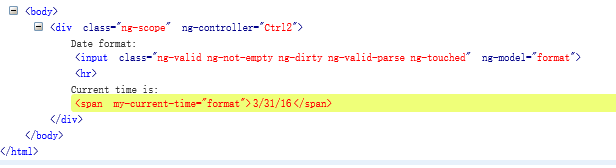
- 指令当成属性,不会有replace起作用的时候,不会被替换也不会插入,就是一个属性,后面的日期值,其实是
updatetime()函数直接写elem.text的效果。 - 此处指令当做属性的作用就是扩展当前元素的功能。
总结
以上就是这篇文章的全部内容了,希望本文的内容对大家的学习或者工作能带来一定的帮助,如果有疑问大家可以留言交流,谢谢大家对的支持。
