
 用户35175328
01 | spring security 架构及核心类
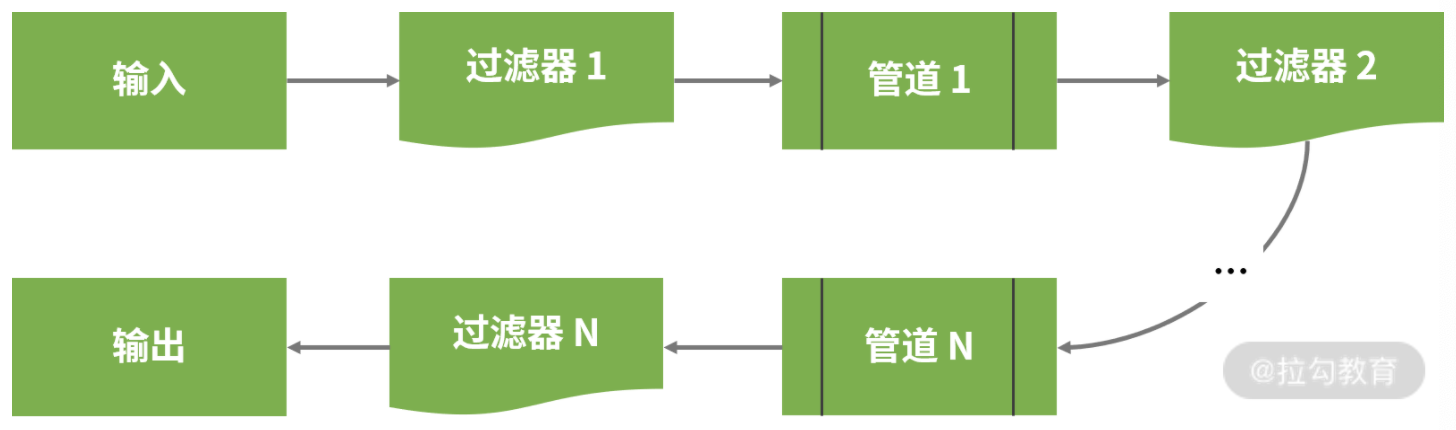
spring security 中的过滤器链
spring security 中采用的是管道-过滤器(pipe-filter)架构模式,这些过滤器链,构成了 spring security 的核心。如下图所示:
项目一旦启动,过滤器链将会实现自动配置,如下图所示:

usernamepasswordauthenticationfilter 用来检查输入的用户名和密码,代码如下:
public class usernamepasswordauthenticationfilter extends abstractauthenticationprocessingfilter {

    public authentication attemptauthentication(httpservletrequest request,
                                                httpservletresponse response)
        throws authenticationexception {
        if (postonly && !request.getmethod().equals("post")) {
            throw new authenticationserviceexception(
                "authentication method not supported: " + request.getmethod());
        }

        string username = obtainusername(request);
        string password = obtainpassword(request);

        if (username == null) {
            username = "";
        }

        if (password == null) {
            password = "";
        }

        username = username.trim();

        usernamepasswordauthenticationtoken authrequest =
            new usernamepasswordauthenticationtoken(username, password);

        // allow subclasses to set the "details" property
        setdetails(request, authrequest);

        return this.getauthenticationmanager().authenticate(authrequest);
    }
    …
}
basicauthenticationfilter 用来认证用户的身份。
filtersecurityinterceptor 用来判定该请求是否能够访问目标 http 端点。
spring security 中的核心类
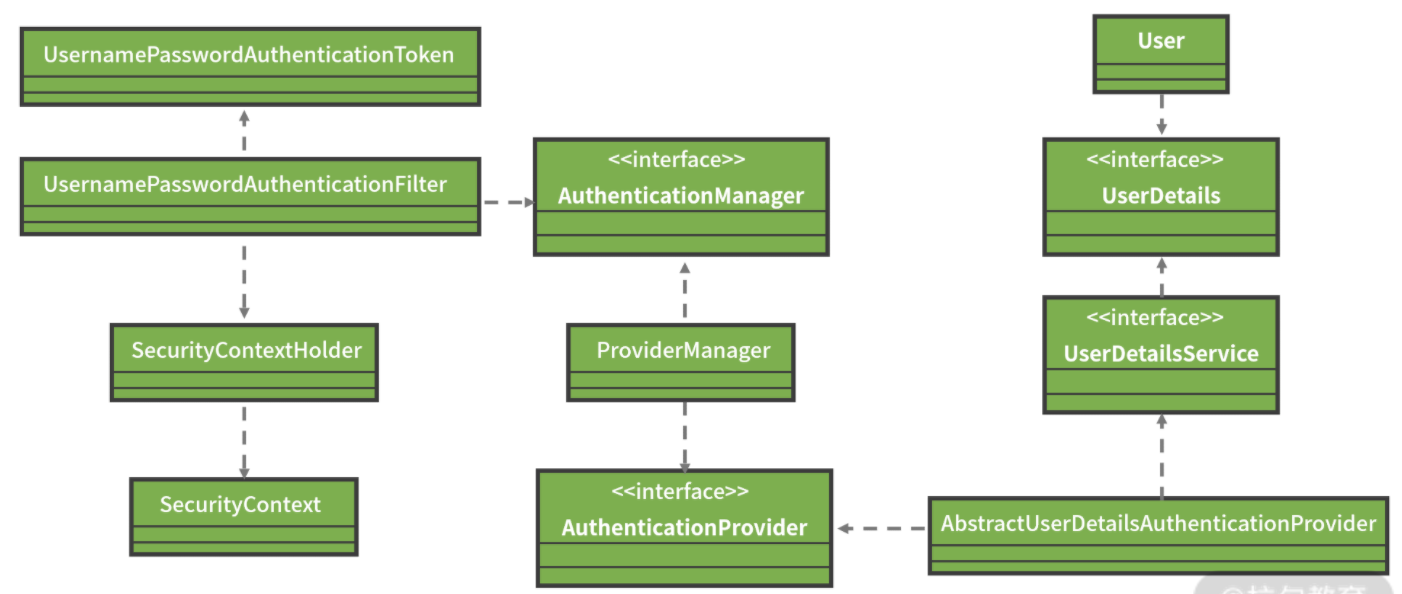
securitycontextholder 存储了应用的安全上下文对象 securitycontext,包含系统请求中最近使用的认证信息。
一个 http 请求到达系统后,将通过一系列的 filter 完成用户认证,然后具体的工作交由 authenticationmanager 完成,authenticationmanager 成功验证后会返回填充好的 authentication 实例。
authenticationmanager 是一个接口,其实现类 providermanager 会进一步依赖 authenticationprovider 接口完成具体的认证工作。
在 spring security 中存在一大批 authenticationprovider 接口的实现类,分别完成各种认证操作。在执行具体的认证工作时,spring security 势必会使用用户详细信息,userdetailsservice 服务就是用来对用户详细信息实现管理。
02 | 基于 spring security 构建用户认证体系
在 spring boot 中整合 spring security 框架首先需要引入依赖:
<dependency>
    <groupid>org.springframework.boot</groupid>
    <artifactid>spring-boot-starter-security</artifactid>
</dependency>
只要我们在代码工程中添加了上述依赖,包含在该工程中的所有 http 端点都将被保护起来。
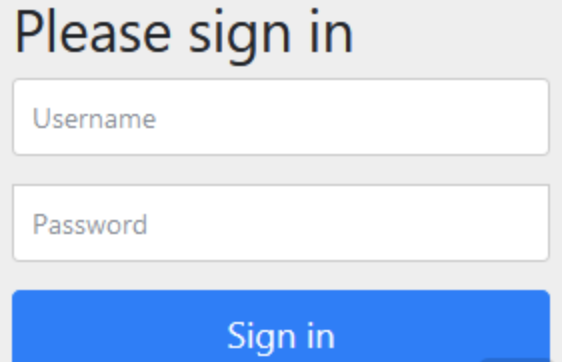
在引入 spring-boot-starter-security 依赖之后,spring security 会默认创建一个用户名为“user”的账号。当我们访问 accountcontroller 的 “accounts/{accountid}” 端点时,弹出如下界面:
同时,控制台日志打印如下:
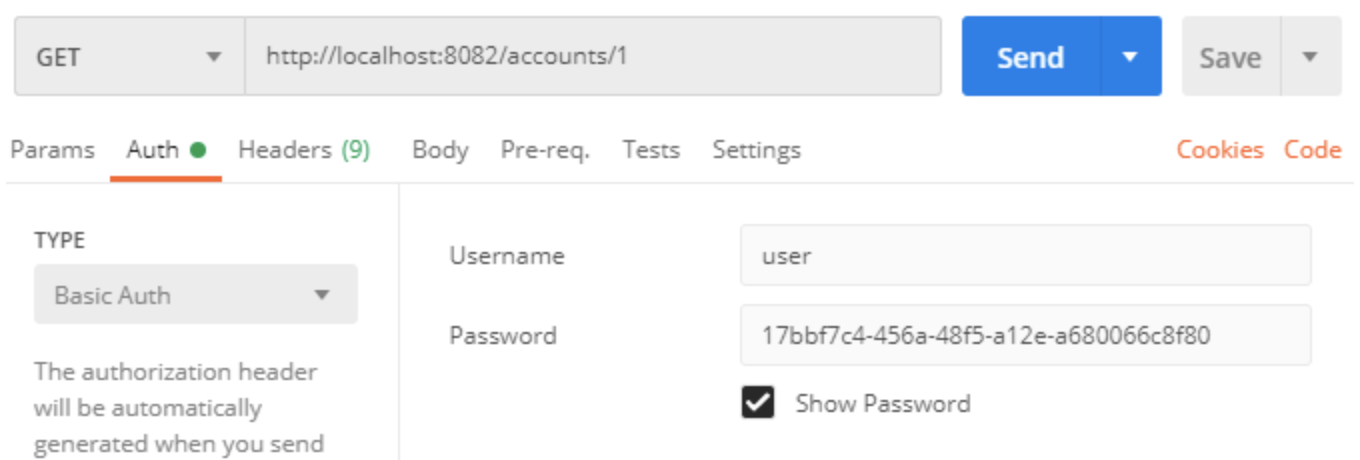
using generated security password: 17bbf7c4-456a-48f5-a12e-a680066c8f80
因此,访问该接口需要设置如下信息:
每次启动应用时,通过 spring security 自动生成的密码都会有所变化。如果我们想设置登录账号和密码,可以在 application.yml 中配置如下:
spring:
  security:
    user:
      name: springcss
      password: springcss_password
配置 spring security
初始化用户信息所依赖的配置类是 websecurityconfigurer 接口,在日常开发中,我们往往是使用 websecurityconfigureradapter 类并覆写其中的 configure(authenticationmanagerbuilder auth) 的方法完成配置工作。
使用 authenticationmanagerbuilder 类创建一个 authenticationmanager 就能够轻松实现基于内存、ladp 和 jdbc 的验证。初始化所使用的用户信息只需要指定用户名(username)、密码(password)和角色(role)这三项数据即可。
使用基于内存的用户信息存储方案
@override
protected void configure(authenticationmanagerbuilder builder) throws exception {
    builder.inmemoryauthentication()
        .withuser("springcss_user")
        .password("password1")
        // 或者使用.authorities("role_user")
        .roles("user")
        .and()
        .withuser("springcss_admin")
        .password("password2")
        .roles("user", "admin");
}
使用基于数据库的用户信息存储方案
表结构如下:
create table users(
  username varchar_ignorecase(50) not null primary key,
  password varchar_ignorecase(500) not null,
  enabled boolean not null
);

create table authorities (
  username varchar_ignorecase(50) not null,
  authority varchar_ignorecase(50) not null,
  constraint fk_authorities_users foreign key(username) references users(username)
);

create unique index ix_auth_username on authorities (username,authority);
spring security 的配置代码如下:
@autowired
datasource datasource;

@override
protected void configure(authenticationmanagerbuilder auth) throws exception {
    auth.jdbcauthentication()
        .datasource(datasource)
        .usersbyusernamequery("select username, password, enabled from users where username=?")
        .authoritiesbyusernamequery("select username, authority from userauthorities where username=?")
        .passwordencoder(new bcryptpasswordencoder());
}
实现定制化用户认证方案
扩展 userdetails
public class springcssuser implements userdetails {

    private static final long serialversionuid = 1l;
    private long id;
    private final string username;
    private final string password;
    private final string phonenumber;
    // 省略getter/setter
    // 省略重写方法
}
扩展 userdetailsservice
@service
public class springcssuserdetailsservice implements userdetailsservice {

    @autowired
    private springcssuserrepository repository;

    @override
    public userdetails loaduserbyusername(string username) throws usernamenotfoundexception {
        springcssuser user = repository.findbyusername(username);
        if (user != null) {
            return user;
        }
        throw new usernamenotfoundexception("springcss user '" + username + "' not found");
    }
}
整合定制化配置
@configuration
public class springcsssecurityconfig extends websecurityconfigureradapter {

    @autowired
    springcssuserdetailsservice springcssuserdetailsservice;

    @override
    protected void configure(authenticationmanagerbuilder auth) throws exception {
        auth.userdetailsservice(springcssuserdetailsservice);
    }
}
03 | 基于 spring security 实现安全访问
在日常开发过程中,我们需要对 web 应用中的不同 http 端点进行不同粒度的权限控制。
对 http 端点进行访问授权管理
使用配置方法
配置方法也是位于 websecurityconfigureradapter 类中,但使用的是 configure(httpsecurity http) 方法,如下代码所示:
protected void configure(httpsecurity http) throws exception {
    http.authorizerequests()
        // 所有请求都需要认证
        .anyrequest()
        // 允许认证用户访问
        .authenticated()
        .and()
        // 需要使用表单进行登录
        .formlogin()
        .and()
        // 使用 http basic authentication 方法完成认证
        .httpbasic();
}
spring security 还提供了一个 access() 方法,允许开发人员传入一个表达式进行更细粒度的权限控制,这里,我们将引入spring 框架提供的一种动态表达式语言—— spel(spring expression language 的简称)。
只要 spel 表达式的返回值为 true,access() 方法就允许用户访问,如下代码所示:
@override
public void configure(httpsecurity http) throws exception {

    http.authorizerequests()
        .antmatchers("/orders")
        .access("hasrole('role_user')");
}
使用注解
spring security 提供了 @preauthorize 注解也可以实现类似的效果,使用该注解代码如下所示:
@restcontroller
@requestmapping(value="orders")
public class ordercontroller {

    @postmapping(value = "/")
    @preauthorize("hasrole(role_admin)")
    public void addorder(@requestbody order order) {
        …
    }
}
@postauthorize 主要用于请求结束之后检查权限。
实现多维度访问授权方案
使用用户级别保护服务访问
该级别是最基本的资源保护级别,只要是认证用户就可能访问服务内的各种资源。
@configuration
public class springcsssecurityconfig extends websecurityconfigureradapter {

    protected void configure(httpsecurity http) throws exception {
        http.authorizerequests()
            .anyrequest()
            .authenticated();
    }
}
使用用户+角色级别保护服务访问
该级别在认证用户级别的基础上,还要求用户属于某一个或多个特定角色。
@configuration
public class springcsssecurityconfig extends websecurityconfigureradapter {

    @override
    public void configure(httpsecurity http) throws exception {

        http.authorizerequests()
            .antmatchers("/customers/**")
            .hasrole("admin")
            .anyrequest()
            .authenticated();
    }
}
上述代码表示只有"admin"角色的认证用户才能访问以"/customers/"为根地址的所有 url。
使用用户+角色+操作级别保护服务访问
该级别在认证用户+角色级别的基础上,对某些 http 操作方法做了访问限制。
@configuration
public class springcsssecurityconfig extends websecurityconfigureradapter {

    @override
    public void configure(httpsecurity http) throws exception{
        http.authorizerequests()
                .antmatchers(httpmethod.delete, "/customers/**")
                .hasrole("admin")
                .anyrequest()
                .authenticated();
    }
}
上述代码的效果在于对“/customers”端点执行删除操作时,我们需要使用具有“admin”角色的“springcss_admin”用户,否则会出现“access_denied”错误信息。
以上就是spring boot构建系统安全层的步骤的详细内容,更多关于spring boot构建系统安全层的资料请关注其它相关文章!
