
 大婊姐-
大婊姐-
一、jdbc概述
1、数据的持久化
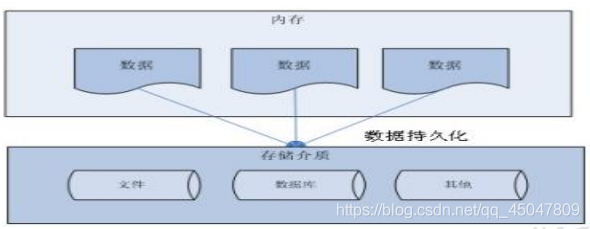
持久化(persistence):把数据保存到可掉电式存储设备中以供之后使用。大多数情况下,特别是企业级应用,数据持久化意味着将内存中的数据保存到硬盘上加以"固化”,而持久化的实现过程大多通过各种关系数据库来完成。
持久化的主要应用是将内存中的数据存储在关系型数据库中,当然也可以存储在磁盘文件、xml数据文件中。
2、java 中的数据存储技术 在java中,数据库存取技术可分为如下几类:
øjdbc直接访问数据库
øjdo技术
ø第三方o/r工具,如hibernate, mybatis 等jdbc是java访问数据库的基石,jdo, hibernate等只是更好
的封装了jdbc
3、jdbc基础
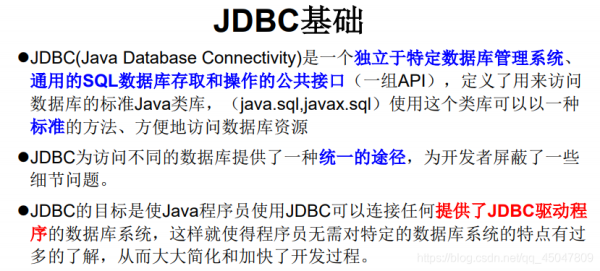
连接数据库:
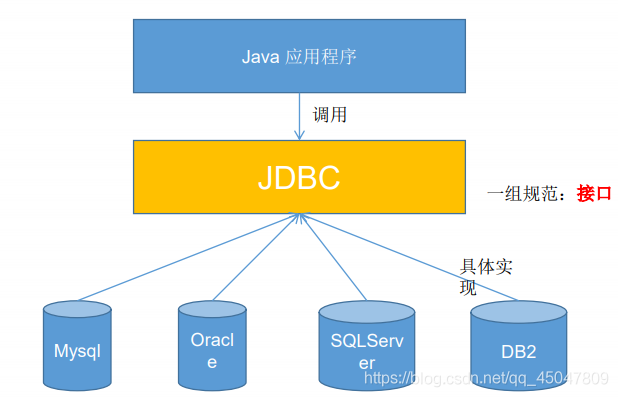
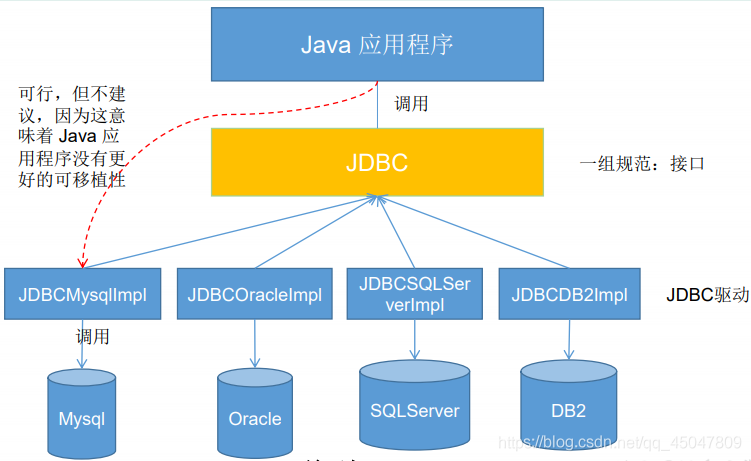
4、jdbc体系结构
jdbc接口(api)包括两个层次:
ø 面向应用的api:java api,抽象接口,供应用程序开发人员使用(连接数据库,执行sql语句,获得结果)。
ø 面向数据库的api:java driver api,供开发商开发数据库驱动程序用。

5、jdbc api
jdbc api 是一系列的接口,它使得应用程序能够进行数据库联接,执行sql语句,并且得到返回结果。
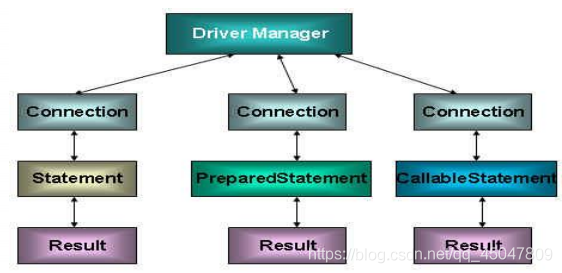
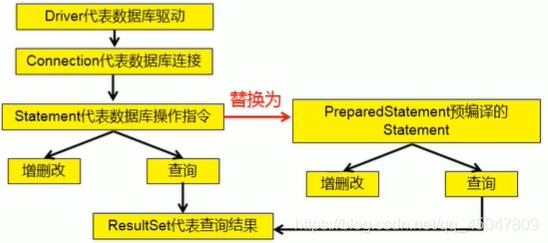
6、jdbc程序访问数据库步骤
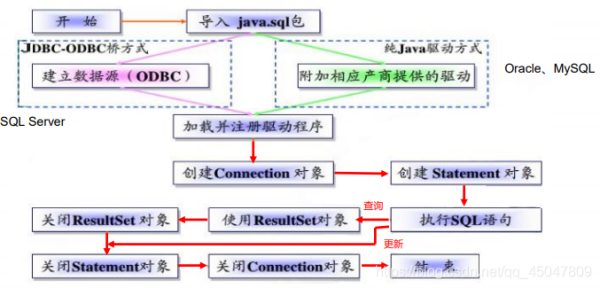

二、获取数据库连接
1、driver 接口
java.sql.driver 接口是所有 jdbc 驱动程序需要实现的接口。这个接口是提
供给数据库厂商使用的,不同数据库厂商提供不同的实现
在程序中不需要直接去访问实现了 driver 接口的类,而是由驱动程序管理
器类(java.sql.drivermanager)去调用这些driver实现
øoracle的驱动:oracle.jdbc.driver.oracledriver
ømysql的驱动: com.mysql.jdbc.driver
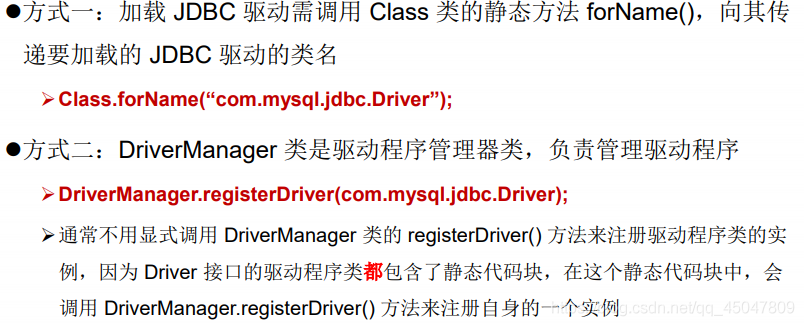
2、加载与注册 jdbc 驱动
3、建立连接(connection)
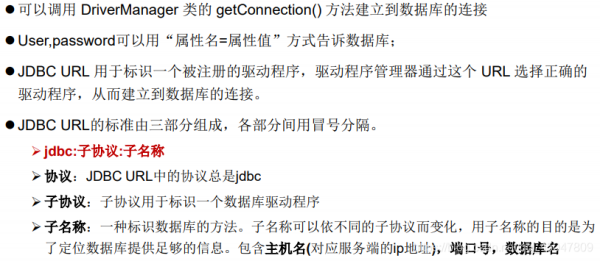
4、几种常用数据库的jdbc url
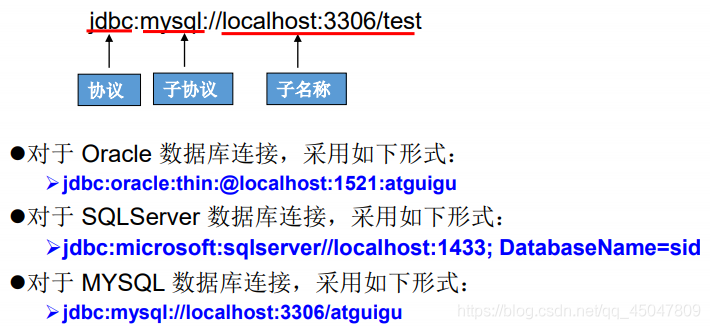
连接mysql代码实例:
import java.io.inputstream;
import java.sql.drivermanager;
import java.sql.sqlexception;
import java.util.properties;

import org.junit.test;

import com.mysql.jdbc.connection;
import com.mysql.jdbc.driver;

public class testconnction01 {


    /**
     * @throws sqlexception
     */
    @test
    //方式一
	public void testconnection011() throws sqlexception {
		driver driver = new com.mysql.jdbc.driver();
		string url = "jdbc:mysql://localhost:3306/test";
		properties info = new properties();
		info.setproperty("user", "root");
		info.setproperty("password", "root");
		connection collection = (connection) driver.connect(url, info);
		system.out.println(collection);
	}

    @test
    //方式二,对方式一的迭代,使得程序具有更好的可移植性
   	public void testconnection02() throws exception {
   		//获取driver实现类对象;使用反射
   		class clazz= class.forname("com.mysql.jdbc.driver");
   		driver driver=(driver) clazz.newinstance();
   		//提供要连接的数据库
   		string url = "jdbc:mysql://localhost:3306/test";
   		//提供连接需要的用户名和密码
   		properties info = new properties();
   		info.setproperty("user", "root");
   		info.setproperty("password", "root");
   		//获取连接
   		connection collection = (connection) driver.connect(url, info);
   		system.out.println(collection);
   	}

    @test
    //方式三,使用drivermanager替换driver
   	public void testconnection03() throws exception {
    	class clazz= class.forname("com.mysql.jdbc.driver");
   		driver driver=(driver) clazz.newinstance();

   		//提供另外三个连接的基本信息;
   		string url ="jdbc:mysql://localhost:3306/test";
   		string user ="root";
   		string password ="root";

    	//注册驱动
    	drivermanager.registerdriver(driver);

    	//获取连接
    	connection connection= (connection) drivermanager.getconnection(url,user,password);
   		system.out.println(connection);
   	}

    @test
    //方式四,可以只是加载驱动,不用是示的注册驱动过了。
   	public void testconnection04() throws exception {

   		//提供另外三个连接的基本信息;
   		string url ="jdbc:mysql://localhost:3306/test";
   		string user ="root";
   		string password ="root";

   		class.forname("com.mysql.jdbc.driver");

//   		class clazz= class.forname("com.mysql.jdbc.driver");
//   		driver driver=(driver) clazz.newinstance();
//
//    	//注册驱动
//    	drivermanager.registerdriver(driver);
//
    	//获取连接
    	connection connection= (connection) drivermanager.getconnection(url,user,password);
   		system.out.println(connection);
   	}

    @test
    //方式五,(final版):将数据库连接需要的4个基本信息声明在配置文件中,通过读取配置文件的方式,获取连接
    //实现了数据和代码的分离(解耦)
   	public void testconnection05() throws exception {

   	//读取配置文件的4个基本信息
    inputstream is = testconnction01.class.getclassloader().getresourceasstream("jdbc.properties");

      properties p =new properties();
      p.load(is);

      string user = p.getproperty("user");
      string password = p.getproperty("password");
      string url = p.getproperty("url");
      string driverclass =p.getproperty("driverclass");

      class.forname(driverclass);

        //获取连接
  	    connection connection= (connection) drivermanager.getconnection(url,user,password);
 		system.out.println(connection);
   	}
}
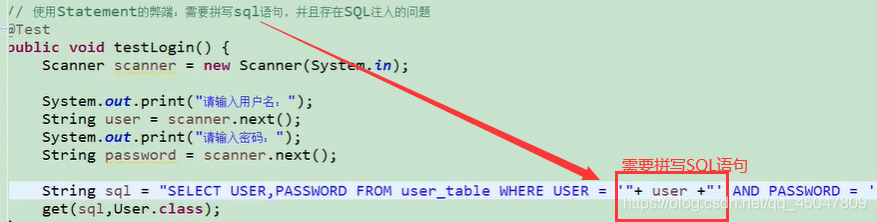
5、使用statement操作数据表的弊端 a、需要拼写sql语句
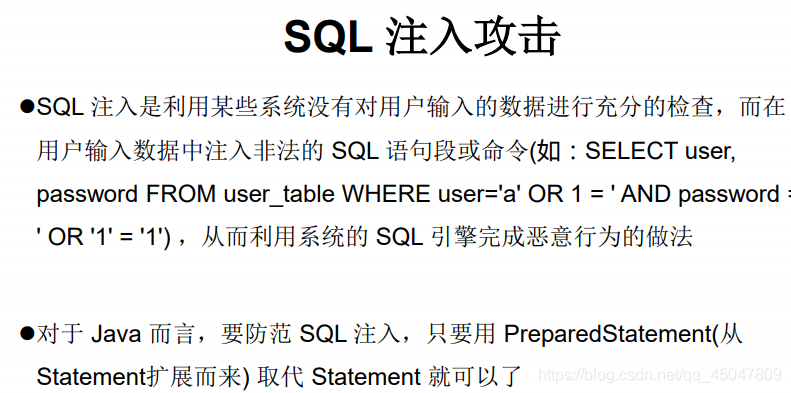
b、statement操作会导致sql注入攻击
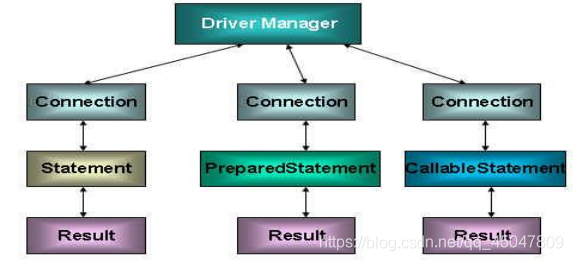
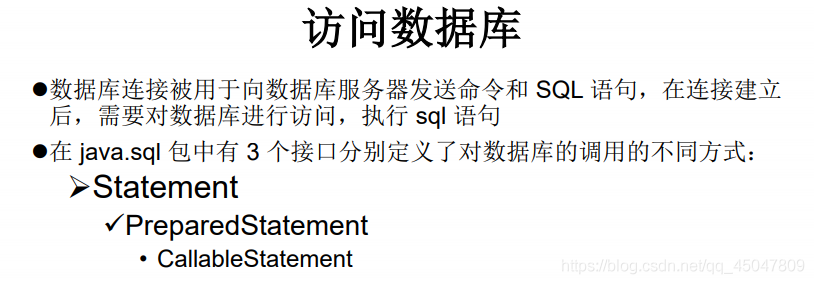
数据库连接被用于向数据库服务器发送命令和sql语句,并接受数据库服务器返回的结果。其实一个数据库连接就是一个socket连接。
在java.sql包中有3个接口分别定义了对数据库的调用的不同方式:
statement :用于执行静态sql语句并返回它所生成结果的对象。prepatediatement : sql语句被预编译并存储在此对象中,可以使用此对象多次高效地执行该语句。callablestatement :用于执行sql存储过程
-
到此这篇关于jdbc核心技术详解的文章就介绍到这了,更多相关jdbc核心技术内容请搜索以前的文章或继续浏览下面的相关文章希望大家以后多多支持!
