
 别闹丶这是个认真的玩笑
由于模型数量有点多,并且都要修改参数,还有从里面提取动画。就搜搜查查,搞了个小工具,批量的修改 fbx 模型的 参数,以及提取动画相关。
using unityeditor;
using unityengine;
using system.io;
using system.collections;
using system.collections.generic;
public class modifymoidel : editor
{
    [menuitem("benben/修改模型modelscal")]
    public static void modifymoidelscale()
    {
        list<string> paths = new list<string>();
        foreach (object o in selection.getfiltered(typeof(object), selectionmode.assets))
        {
            debug.log(o.name);
            //非对象不继续
            if (!(o is gameobject))
                continue;
            //将o作为模型存储在mod中
            //debug.logwarning(o.name);
            gameobject mod = o as gameobject;
            //将mod模型路径存储在path中
            string path = assetdatabase.getassetpath(mod);
            modelimporter modelimporter = modelimporter.getatpath(path) as modelimporter;
            if (!modelimporter)
            {
                unityengine.debug.logerror(string.format("path-->{0}<---不是modelimporter", path));
                continue;
            }
            //修改model 下的scale factor
            modelimporter.globalscale = 10;
            paths.add(path);
            assetdatabase.importasset(path);
        }
        assetdatabase.refresh();
        creatnewanimations(paths);
    }
    private static void creatnewanimations(list<string> paths)
    {
        unityeditor.animations.animatorcontroller animatorcontroller = null;
        unityeditor.animations.animatorcontrollerlayer layer = null;
        unityeditor.animations.animatorstatemachine asm = null;
        debug.log(paths.count);
        for (int i = 0; i < paths.count; i++)
        {
            paths[i].replace("\", "/");
            animationclip newclip = new animationclip();
            animationclip clip = assetdatabase.loadassetatpath(paths[i], typeof(animationclip)) as animationclip;
            if (!clip)
            {
                unityengine.debug.logerror(string.format("path-->{0}<--不包含animationclip", paths[i]));
                continue;
            }
            string fbxname = path.getfilenamewithoutextension(paths[i]);
            fbxname = fbxname.substring(fbxname.lastindexof("_") + 1);
            //新的animationclip名字
            var newclipname = getaniname(int.parse(fbxname)) + ".anim";
            string directorypath = paths[i].replace(path.getfilename(paths[i]), "animationclip/");
            if (!directory.exists(directorypath))
            {
                directory.createdirectory(directorypath);
            }
            editorcurvebinding[] binding = animationutility.getcurvebindings(clip);
            for (int j = 0; j < binding.length; j++)
            {
                animationcurve animationcurve = animationutility.geteditorcurve(clip, binding[j]);
                animationutility.seteditorcurve(newclip, binding[j], animationcurve);
            }
            //非legacy动画使用getcurvebindings、geteditorcurve和seteditorcurve方法
			//legacy要使用getobjectreferencecurvebindings、getobjectreferencecurve和setobjectreferencecurve方法
            //设置animationclipsettings
            animationutility.setanimationclipsettings(newclip, animationutility.getanimationclipsettings(clip));
            string newclippath = directorypath + newclipname;
            assetdatabase.createasset(newclip, newclippath);
            //生成animator
            if (!animatorcontroller)
            {
                animatorcontroller = unityeditor.animations.animatorcontroller.createanimatorcontrolleratpath(directorypath + "animator.controller");
                layer = animatorcontroller.layers[0];
                asm = layer.statemachine;
            }
            //添加到animator中
            unityeditor.animations.animatorstate state = asm.addstate(newclip.name);
            state.motion = newclip;
            //如果是idle 动画,设置loop
            if (newclip.name == "idle")
            {
                animationclipsettings animationclipsettings = animationutility.getanimationclipsettings(newclip);
                animationclipsettings.looptime = true;
                animationutility.setanimationclipsettings(newclip, animationclipsettings);
                layer.statemachine.defaultstate = state;
            }
            assetdatabase.importasset(paths[i]);
        }
        assetdatabase.refresh();
    }
    private static string getaniname(int count)
    {
        switch (count)
        {
            case 1:
                return "idle";
            case 2:
                return "2-1";
            case 3:
                return "2-2";
            case 4:
                return "2-3";
            case 5:
                return "2-4";
            default:
                return "";
        }
    }
}
如果有更简单的实现方法欢迎各位大佬留言。
补充:unity 动态修改prefab 同步fbx
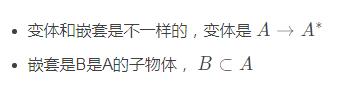
有时候我们想prefab和fbx无缝切换怎么办,也就是在unity里调完效果后不满意,返回dcc如阿健修改模型,但是prefab上又挂载了东西,不想重拖怎么办?这时候prefab variant就又用途了
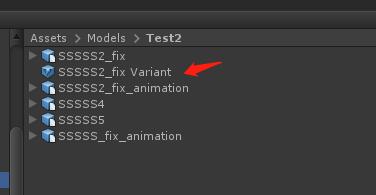
建立变体,把变体拖到场景里。
或者先拖fbx到场景,再选择变体放置。
然后修改好模型后,直接再在文件浏览器里替换同名prefab
貌似需要到prefab模式里再revert一下
这样就可以实现“动态”修改perfab了。没改变的话可以右键相关属性revert
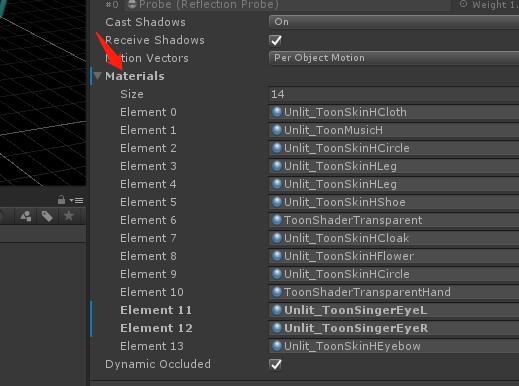
嗯
以上为个人经验,希望能给大家一个参考,也希望大家多多支持。如有错误或未考虑完全的地方,望不吝赐教。
