
 传说中的若若
本文实例为大家分享了unity实现翻页效果的具体代码,供大家参考,具体内容如下
一、示意图
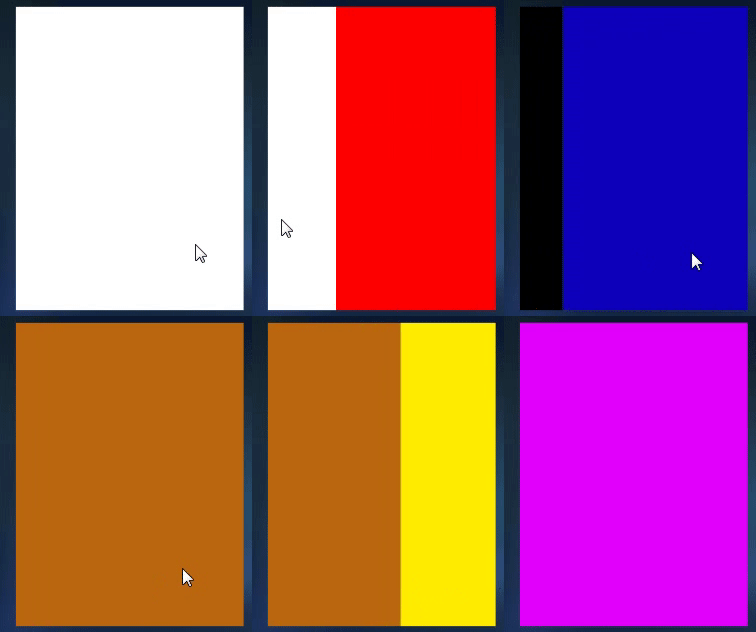
二、步骤
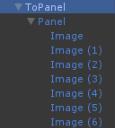
创建物体topanel;添加组件scrollrect,
在下面创建一个空物体用来装需要移动的子物体,
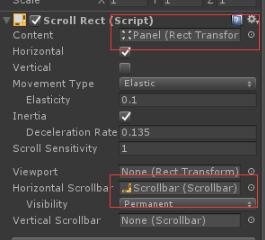
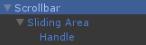
创建一个scrollbar;
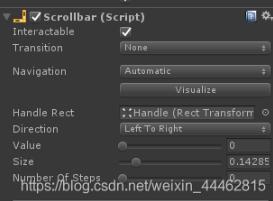
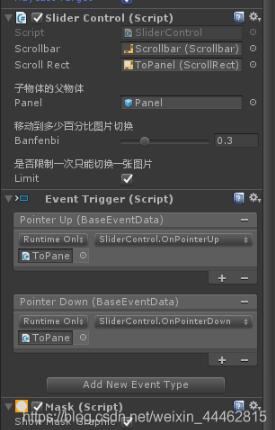
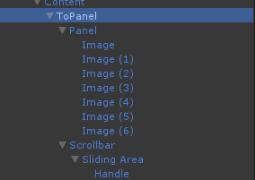
三、代码
下面展示一些 内联代码片。
using unityengine;
using system.collections;
using unityengine.ui;
using system.collections.generic;

public class slidercontrol : monobehaviour
{
  public scrollbar m_scrollbar;
  public scrollrect m_scrollrect;
  [header("子物体的父物体")]
  public gameobject panel;
  [header("移动到多少百分比图片切换")]  //注释
  [range(0.1f, 0.9f)] //范围
  public float banfenbi = 0.5f;
  [header("是否限制一次只能切换一张图片")]
  public bool limit = false;

  private float mtargetvalue;
  private bool mneedmove = false;
  private const float smooth_time = 0.2f;
  private float mmovespeed = 0f;

  private float child_count;
  private float num1;
  private float var_down;
  private list<float> num_list1 =new list<float>();
  private list<float> num_list2 = new list<float>();
  private list<float> num_list3 = new list<float>();
  private int weizhi; //页数
  void start()
  {
    weizhi = 0;
    child_count = panel.transform.childcount;
    num1 = 1 / (child_count - 1);
    print("-----子物体数量------  " + child_count + "   " + num1);
    for (int i = 0; i < child_count; i++)
    {
      float a = 0;
      num_list1.add(a + num1 * i);
      float b = (a + num1 * i) + (num1 * banfenbi);
      num_list2.add(b);
      float c = (a + num1 * i) + (num1 * (1-banfenbi));
      num_list3.add(c);
      print("---child_count----- " + num_list1[i] + "  " + num_list2[i]);
    }
  }
  public void onpointer()
  { }

  public void onpointerdown()
  {
    //print("---onpointerdown----");
    var_down = m_scrollbar.value;
    mneedmove = false;
  }
  public void onpointerup()
  {
    //print("---onpointerup----");
    //print("-----m_scrollbar.value---- " + m_scrollbar.value);
    for (int i = 0; i < child_count; i++)
    {
      float num;
      if (var_down- m_scrollbar.value<0)
      {
        num = num_list2[i];
      }
      else
      {
        num = num_list3[i];
      }
      if (m_scrollbar.value <= num)
      {
        if (limit)
        {
          if (i> weizhi)
          {
            weizhi = weizhi + 1;
          }
          else if (i == weizhi)
          {
            weizhi = i;
          }
          else
          {
            weizhi = weizhi - 1;
          }
          mtargetvalue = num_list1[weizhi];
        }
        else
        {
          mtargetvalue = num_list1[i];
          weizhi = i;  //页数
        }
        break;
      }
    }

    mneedmove = true;
    mmovespeed = 0;
  }
  /// <summary>
  /// 直接跳转到指定页数
  /// </summary>
  /// <param name="页数"></param>
  public void onbuttonclick(int value)
  {
    mtargetvalue = num_list1[value];
    if (mtargetvalue<0)
    {
      mtargetvalue = 0;
    }
    if (mtargetvalue>1)
    {
      mtargetvalue = 1;
    }
    weizhi = value;
    mneedmove = true;
  }
  void update()
  {
    if (mneedmove)
    {
      if (mathf.abs(m_scrollbar.value - mtargetvalue) < 0.01f)
      {
        m_scrollbar.value = mtargetvalue;
        mneedmove = false;
        moveend();
        return;
      }
      m_scrollbar.value = mathf.smoothdamp(m_scrollbar.value, mtargetvalue, ref mmovespeed, smooth_time);
    }
  }
  /// <summary>
  /// 移动完毕的回调
  /// </summary>
  public void moveend()
  {
    print("----- 移动完毕-----第几页--- "+ (weizhi+1));
  }
}
以上就是本文的全部内容,希望对大家的学习有所帮助,也希望大家多多支持。
