
 滴兜兜
滴兜兜
| 导读 | 这篇文章主要介绍了jQuery实现简易商城系统项目实操,文章围绕主题展开详细的内容介绍,具有一定的参考价值,感兴趣的小伙伴可以参考一下 |
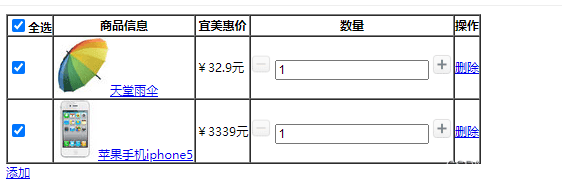
一.效果图
二.body
< body="">
< table="" border="1" cellpadding="0" cellspacing="0">
< tr="">
< th="">< input="" type='checkbox' name="c1">全选< h="">
< th="">商品信息< h="">
< th="">宜美惠价< h="">
< th="">数量< h="">
< th="">操作< h="">
< r="">
< tr="" class="tr_0">
< td="">
< input="" name="" type="checkbox" value="">
< d="">
< td="">
< img="" src="images/sang.gif" class="products">天堂雨伞¥32.9元
< d="">
< td="">
< img="" src="images/subtraction.gif" width="20" height="20">
< input="" type="text" class="quantity" value="1">
< img="" src="images/add.gif" width="20" height="20">
< d="">
< td="">
< a="" href="#" rel="external nofollow" rel="external nofollow" rel="external nofollow" rel="external nofollow" rel="external nofollow" class="del">删除
< d="">
< r="">
< tr="">
< td="">
< input="" name="" type="checkbox" value="">
< d="">
< td="">
< img="" src="images/iphone.gif" class="products">苹果手机iphone5 ¥3339元
< d="">
< td="">
< img="" src="images/subtraction.gif" width="20" height="20">
< input="" type="text" class="quantity" value="1">
< img="" src="images/add.gif" width="20" height="20">
< d="">
< td="">
< a="" href="#" rel="external nofollow" rel="external nofollow" rel="external nofollow" rel="external nofollow" rel="external nofollow" class="del">删除
< d="">
< r="">
< able="">
< a="" href="#" rel="external nofollow" rel="external nofollow" rel="external nofollow" rel="external nofollow" rel="external nofollow" class="add">添加
< ody="">
三.jQuery
< script="" type="text/javascript" src="js/jquery-1.12.4.js">< cript="">
< script="">
$(function(){
//点击加号触发事件
$('[src="images/add.gif"]').click(function(){
var num=parseInt($(this).prev().val());
$(this).prev().val(num+1);
});
//点击减号触发事件
$('[src="images/subtraction.gif"]').click(function(){
var num=parseInt($(this).next().val());
if(num<=0){ return="" alert('不能再少了!');="" };="" $(this).next().val(num-1);="" });="" 删除事件="" $('[class="del" ]').click(function(){="" $(this).parent().parent().remove();="" });="" 选中框,全选框事件="" $('[type="checkbox" ]').click(function(){="" var="" len="$('[type=" checkbox"]').length;"="" var="" clen="$('[type=" checkbox"]:checked').length;"="" var="" t1="$('[name=" c1"]').prop("checked");"="" var="" pd="$(this).parent().text();" if(pd="=" 全选"){"="" $('[name="c1" ]').prop("checked",t1);="" $('[type="checkbox" ]').prop("checked",t1);="" return="" "";="" }="" if(clen="=len-1" &="" t1="=false){" $('[name="c1" ]').prop("checked",true);="" }else="" if(clen="">=len-1 & t1==true){
$('[name="c1"]').prop("checked",false);
}
});
//添加事件
$('[class="add"]').click(function(){
var newD=$('tr:eq(2)').clone();
$('tr:last').after(newD);
});
//输入框
$('[type="text"]').change(function(){
var te=$(this).val();
te=te.toString();
for(i=0;i
四.css
< style="" type="text/css">
*{
    font-size:12px;
}
< tyle="">
本章使用jQuery的方式实现了一个简易的商城系统,这一个比较潦草,明天再实现一个比较好看的.
到此这篇关于jQuery实现简易商城系统项目实操的文章就介绍到这了
