
 朕心甚悦
朕心甚悦
先用word建立一个“模板”,把该画的表格和格式设置好,然后调出“窗体”工具栏,在你想要接收vb传来数值的位置加入“文本型窗体域”(就是文本框),在“窗体”工具栏上把“域底纹”点一下把域的底纹去掉,要不然不好看。加入域的时候记得要为每个“域”的属性里“书签”命名(其实就是相当于vb中的“名称”),保存退出(假设为c:\doc1.doc)。
在vb中新建工程并引用Microsoft Word x Object Library,在窗体中加入与word中域相对应的文本框,加一个command,加入类似以下的代码(我只用了一个文本框做例子,你自己再扩展一下吧):
Private Sub Command1_Click()
Dim doc1 As Word.Application
Set doc1 = New Word.Application
doc1.Documents.Open ("c:\doc1.doc")
doc1.ActiveDocument.FormFields("text1").Result = Text1.Text
doc1.ActiveDocument.Save
doc1.Documents.Close
Set doc1 = Nothing
End Sub
这样一来,我就把窗体中text1中的text值传入到了名为doc1.doc的word文件中。
vb怎么输出word文档
保存到TXT文件最简单,如果要输出到WORD,则要在工程里引用WORD对象,对WORD对象进行操作。至于为什么要设置不可见,因为程序引用WORD或者EXCEL对象时,相当于打开了一个WORD或者EXCEL,这不是程序想要的,程序只管引用对象,并对对象进行自动操作,不需要看到这个对象。更多
我怎么设置创建的excel文件的文件名和存储位置啊??还有我使用了一下
dim outp as new excel.application显示错误,然后查了一下从项目里引用Microsoft.Excel15.0objectlibrary.然后在代码里输入Imports Microsoft.Office.Interop,还是不行。imports这里就显示语法错误了。
给你我以前做的一段代码参考一下:PrivateSubSavetoexcelfile(TempexcelfileAsString)'输出到excel文件
DimTempExcelAsExcel.Application'定义EXCEL对象
DimTempBookAsExcel.Workbook'定义EXCEL工作簿
DimTempSheetAsExcel.Worksheet'定义EXCEL表
SetTempExcel=NewExcel.Application'新建EXCEL对象
IfDir(Tempexcelfile)<>""Then'存在则先删除文件,重新创建,防止保存EXCEL文件时出现错误
KillTempexcelfile
EndIf
SetTempBook=TempExcel.Workbooks.Add
SetTempSheet=TempBook.Worksheets("sheet1")
'以下省略将相关数据保存到EXCEL表格的代码
TempExcel.ActiveWorkbook.SaveAsFileName:=Tempexcelfile'将数据保存为EXCEL文件
TempBook.Close'关闭工作簿
TempExcel.Quit'退出EXCEL对象
SetTempSheet=Nothing
SetTempBook=Nothing
SetTempExcel=Nothing
MsgBox"数据导出到电子表格已成功!",0+48,"数据导出"
EndSub
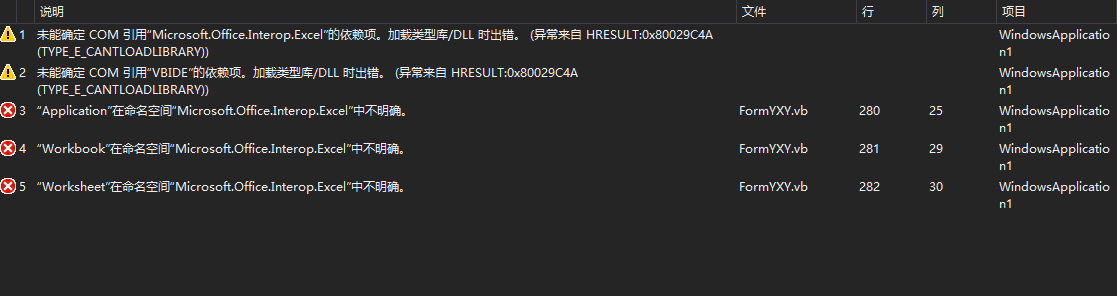
现在代码编好了运行出现这些问题。。。添加引用里勾了microsoft excel 15.0 object library。并且在public class 前面加了Imports Microsoft.Office.Interop.Excel。还是出错。

你用的是VB6还是2008啊?
vb2013
我那个代码是VB6的
VB 导出 WORD,错误在哪里,谢谢指教!
powerword.dot文件是一个模板文件,你是不是打开了ty.doc文件,或者是重复运行了本程序,造成原ty。doc文件没有关闭。如果你重开机运行第一次本程序不出错,那就是这原因了。加入关闭程序的代码吧。具体我不记得了。
求助大神 VB 6.0 导出word文档问题
在这句里加 : doc.Documents.Add.Content.InsertAfter ("a" & vbCrLf & "b" &text1.text)doc.Documents(1).SaveAs App.Path & "\aa.doc"
如果是不同的表格里的呢 应该怎么写呢?比如说是form1里的
VB中怎么才能把datagrid中的记录导出到word文档里
一般人都是导出到EXCEL,你牛啊,居然要导到WORD里,表格的数据导到WORD里有什么用呢
VB的代码问题,导出到word
Replace(ttt, "\\", "\")是替换函数,把ttt字串中的\\换成\
dir是vb的目录操作函数,是判断指定目录是否存在
mkdir是建立目录
目录就是文件夹,呵呵
VB 数据库 导入EXCEL WORD和导出问题
Private Sub Command3_Click()
On Error Resume Next
Dim irow, icol, count, i As Integer
Dim irowcount, icolcount As Integer
Dim xlApp As Excel.Application
Dim xlBook As Excel.Workbook
Dim xlSheet As Excel.Worksheet
Dim bl As Boolean
Dim key As Integer
Dim RsUserTemp As Recordset
Dim RsOrderTemp As Recordset
Dim a, b
Dim aa As String
aa = Trim(Now)
Set xlApp = CreateObject("excel.application")
Set xlBook = xlApp.Workbooks.Add
Set xlSheet = xlBook.Worksheets(1)
'If rs.RecordCount < 1 Then
'MsgBox ("Error 没有记录")
'Exit Sub
'End If
irowcount = rs.RecordCount
icolcount = 18
count = 0
rs.MoveFirst
For icol = 0 To 2
'xlSheet.Cells(1, 1).Value = "查询数据" '加标头;
Next icol
xlSheet.Cells(1, 1).Value = "时间" '加标头;
xlSheet.Cells(1, 2).Value = "药开度" '加标头;
xlSheet.Cells(1, 3).Value = "药瞬时流量" '加标头;
xlSheet.Cells(1, 4).Value = "药累计流量" '加标头;
xlSheet.Cells(1, 5).Value = "矿浆浓度" '加标头;
xlSheet.Cells(1, 6).Value = "矿浆流量" '加标头
xlSheet.Cells(1, 7).Value = "酸1开度" '加标头;
xlSheet.Cells(1, 8).Value = "酸1瞬时流量" '加标头;
xlSheet.Cells(1, 9).Value = "酸1累计流量" '加标头
xlSheet.Cells(1, 10).Value = "酸2开度" '加标头;
xlSheet.Cells(1, 11).Value = "酸2瞬时流量" '加标头;
xlSheet.Cells(1, 12).Value = "酸2累计流量" '加标头
xlSheet.Cells(1, 13).Value = "酸3开度" '加标头;
xlSheet.Cells(1, 14).Value = "酸3瞬时流量" '加标头;
xlSheet.Cells(1, 15).Value = "酸3累计流量" '加标头
xlSheet.Cells(1, 16).Value = "酸4开度" '加标头;
xlSheet.Cells(1, 17).Value = "酸4瞬时流量" '加标头;
xlSheet.Cells(1, 18).Value = "酸4累计流量"
xlSheet.Cells(1, 19).Value = "酸5开度"
xlSheet.Cells(1, 20).Value = "酸5瞬时流量"
xlSheet.Cells(1, 21).Value = "酸5累计流量"
Adodc1.Recordset.MoveFirst
For a = 2 To 200
b = 1
If Not Adodc1.Recordset.EOF Then
xlSheet.Cells(a, b) = Adodc1.Recordset("时间")
xlSheet.Cells(a, b + 1) = Adodc1.Recordset("药开度")
xlSheet.Cells(a, b + 2) = Adodc1.Recordset("药瞬时流量")
xlSheet.Cells(a, b + 3) = Adodc1.Recordset("药累计流量")
xlSheet.Cells(a, b + 4) = Adodc1.Recordset("酸1开度")
xlSheet.Cells(a, b + 5) = Adodc1.Recordset("酸1瞬时流量")
xlSheet.Cells(a, b + 6) = Adodc1.Recordset("酸1累计流量")
xlSheet.Cells(a, b + 7) = Adodc1.Recordset("酸2开度")
xlSheet.Cells(a, b + 8) = Adodc1.Recordset("酸2瞬时流量")
xlSheet.Cells(a, b + 9) = Adodc1.Recordset("酸2累计流量")
xlSheet.Cells(a, b + 10) = Adodc1.Recordset("酸3开度")
xlSheet.Cells(a, b + 11) = Adodc1.Recordset("酸3瞬时流量")
xlSheet.Cells(a, b + 12) = Adodc1.Recordset("酸3累计流量")
xlSheet.Cells(a, b + 13) = Adodc1.Recordset("酸4开度")
xlSheet.Cells(a, b + 14) = Adodc1.Recordset("酸4瞬时流量")
xlSheet.Cells(a, b + 15) = Adodc1.Recordset("酸4累计流量")
xlSheet.Cells(a, b + 16) = Adodc1.Recordset("酸5开度")
xlSheet.Cells(a, b + 17) = Adodc1.Recordset("酸5瞬时流量")
xlSheet.Cells(a, b + 18) = Adodc1.Recordset("酸5累计流量")
Else
Exit For
End If
Adodc1.Recordset.Move 1
Next
rs.MoveFirst
xlSheet.Cells(2, 2).Value = Trim(Text1.Text) & Trim(Text2.Text)
For irow = 0 To irowcount - 1
Set RsUserTemp = New Recordset
RsUserTemp.CursorLocation = adUseClient
RsUserTemp.Open "select * from 状态数据 " _
& "where user0_id=" & rs!user0_id, Cn, adOpenStatic, adLockReadOnly
xlSheet.Cells(irow + 4, 1).Value = count + 1
xlSheet.Cells(irow + 4, 2).Value = RsUserTemp!user0_id
xlSheet.Cells(irow + 4, 3).Value = RsUserTemp!user0_name
xlSheet.Cells(irow + 4, 4).Value = RsUserTemp!Address
xlSheet.Cells(irow + 4, 5).Value = RsUserTemp!callno1
Set RsUserTemp = Nothing
Set RsOrderTemp = New Recordset
RsOrderTemp.CursorLocation = adUseClient
RsOrderTemp.Open "select * from 状态数据 where user0_id = " _
If RsOrderTemp.RecordCount = 0 Then
Else
RsOrderTemp.MoveFirst
Do While (Not RsOrderTemp.EOF)
key = 0
key = Val(Mid(str(RsOrderTemp!Order_Time), 6, 2))
Select Case key
Case 0
Exit Do
Case 1
xlSheet.Cells(irow + 4, 6).Value = RsOrderTemp!Order_Amount
Case 2
xlSheet.Cells(irow + 4, 7).Value = RsOrderTemp!Order_Amount
Case 3
xlSheet.Cells(irow + 4, 8).Value = RsOrderTemp!Order_Amount
Case 4
xlSheet.Cells(irow + 4, 9).Value = RsOrderTemp!Order_Amount
Case 5
xlSheet.Cells(irow + 4, 10).Value = RsOrderTemp!Order_Amount
Case 6
xlSheet.Cells(irow + 4, 11).Value = RsOrderTemp!Order_Amount
Case 7
xlSheet.Cells(irow + 4, 12).Value = RsOrderTemp!Order_Amount
Case 8
xlSheet.Cells(irow + 4, 13).Value = RsOrderTemp!Order_Amount
Case 9
xlSheet.Cells(irow + 4, 14).Value = RsOrderTemp!Order_Amount
Case 10
xlSheet.Cells(irow + 4, 15).Value = RsOrderTemp!Order_Amount
Case 11
xlSheet.Cells(irow + 4, 16).Value = RsOrderTemp!Order_Amount
Case 12
xlSheet.Cells(irow + 4, 17).Value = RsOrderTemp!Order_Amount
End Select
RsOrderTemp.MoveNext
Loop
End If
Set RsOrderTemp = Nothing
count = count + 1
rs.MoveNext
If bl Then '因为第一条记录还未导出所以让指针回滚;
rs.MovePrevious
End If
Next
xlApp.Visible = True
xlBook.Save
Set xlApp = Nothing
End Sub
这是我的一个代码,参考一下吧。。。导出到EXCEL的
VB将数据导出到word的问题
Private Sub Command1_Click()
Dim wd As New Word.Application
wd.Documents.Add DocumentType:=wdNewBlankDocument
With wd.Selection
.Font.Spacing = 2
.ParagraphFormat.Alignment = wdAlignParagraphCenter
.Font.Size = 16
.Font.Name = "宋体"
.Font.Bold = True
.ParagraphFormat.LineSpacingRule = wdLineSpaceSingle
.Font.Spacing = 0
.TypeText label1.Caption
.Font.Bold = False
.TypeParagraph
.ParagraphFormat.Alignment = wdAlignParagraphJustify
.Font.Size = 10
.TypeText text1.Text & text2.Text
wd.ActiveDocument.Tables.Add Range:=wd.Selection.Range, NumRows:=mshflexgrid1.Rows, NumColumns _
:=10, DefaultTableBehavior:=wdWord9TableBehavior, AutoFitBehavior:=wdAutoFitFixed
For i = 1 To mshflexgrid1.Rows
For j = 1 To 10
.Tables(1).Cell(i, j).Range.Text = mshflexgrid1.textmatrix(i - 1, j - 1)
Next j
Next i
.EndKey Unit:=wdStory
.Font.Color = wdColorRed
.TypeText text3.Text & vbTab & vbTab & vbTab & text4.Text
.TypeParagraph
.Font.Color = wdColorAutomatic
.TypeText text5.Text & vbTab & vbTab & vbTab & text6.Text
End With
wd.Visible = True
wd.ShowMe
Set wd = Nothing
End Sub
转载请注明出处51数据库 » vb导出word文档 vb的内容如何导出到word中
