
 乌拉拉小国王
前言
ssl socket通讯是对socket的扩展,增加socket通讯的数据安全性,ssl认证分为单向和双向认证。单向认证只认证服务器端的合法性而不认证客户端的合法性。双向认证是同时认证服务端和客户端。下面我分别说说使用c#实现单向认证和双向认证的过程,并用代码实现。
一、 单向认证
第1步:准备一个数字证书,可以使用如下脚本生成
先进入到vs2005的命令行状态,即:
开始–>程序–>microsoft visual studio 2005–>visual studio tools–>visual studio 2005 命令提示
键入: makecert -r -pe -n “cn=testserver” -ss root -sky exchange
说明:上面的指令将在创建一个受信任的根证书,
第2步创建服务器端程序,代码如下:
using system;
using system.servicemodel;
using system.net;
using system.net.sockets;
using system.net.security;
using system.text;
using system.security.authentication;
using system.security.cryptography.x509certificates;
using system.identitymodel.tokens;
using system.identitymodel.selectors;

namespace consoleapp
{
public class program
{
static x509certificate servercertificate = null;
 public static void runserver()
  {
    tcplistener listener = new tcplistener(ipaddress.parse("192.168.1.25"), 901);
    listener.start();
    while (true)
    {
      try
      {
        console.writeline("waiting for a client to connect...");
        tcpclient client = listener.accepttcpclient();
        processclient(client);
      }
      catch
      {
      }
    }
  }

  static void processclient(tcpclient client)
  {
    sslstream sslstream = new sslstream(client.getstream(), false);
    try
    {
      sslstream.authenticateasserver(servercertificate, false, sslprotocols.tls, true);
      displaysecuritylevel(sslstream);
      displaysecurityservices(sslstream);
      displaycertificateinformation(sslstream);
      displaystreamproperties(sslstream);

      sslstream.readtimeout = 5000;
      sslstream.writetimeout = 5000;
      byte[] message = encoding.utf8.getbytes("hello from the server.");
      console.writeline("sending hello message.");
      sslstream.write(message);
      console.writeline("waiting for client message...");
      while (true)
      {
        string messagedata = readmessage(sslstream);
        console.writeline("received: {0}", messagedata);
        if (messagedata.toupper() == "exit")
          break;
      }
    }
    catch (authenticationexception e)
    {
      console.writeline("exception: {0}", e.message);
      if (e.innerexception != null)
      {
        console.writeline("inner exception: {0}", e.innerexception.message);
      }
      console.writeline("authentication failed - closing the connection.");
      sslstream.close();
      client.close();
      return;
    }
    finally
    {
      sslstream.close();
      client.close();
    }
  }

  static string readmessage(sslstream sslstream)
  {
    byte[] buffer = new byte[2048];
    stringbuilder messagedata = new stringbuilder();
    int bytes = -1;
    do
    {
      bytes = sslstream.read(buffer, 0, buffer.length);
      decoder decoder = encoding.utf8.getdecoder();
      char[] chars = new char[decoder.getcharcount(buffer, 0, bytes)];
      decoder.getchars(buffer, 0, bytes, chars, 0);
      messagedata.append(chars);
      if (messagedata.tostring().indexof("") != -1)
      {
        break;
      }
    }
    while (bytes != 0);

    return messagedata.tostring();
  }

  static void displaysecuritylevel(sslstream stream)
  {
    console.writeline("cipher: {0} strength {1}", stream.cipheralgorithm, stream.cipherstrength);
    console.writeline("hash: {0} strength {1}", stream.hashalgorithm, stream.hashstrength);
    console.writeline("key exchange: {0} strength {1}", stream.keyexchangealgorithm, stream.keyexchangestrength);
    console.writeline("protocol: {0}", stream.sslprotocol);
  }

  static void displaysecurityservices(sslstream stream)
  {
    console.writeline("is authenticated: {0} as server? {1}", stream.isauthenticated, stream.isserver);
    console.writeline("issigned: {0}", stream.issigned);
    console.writeline("is encrypted: {0}", stream.isencrypted);
  }

  static void displaystreamproperties(sslstream stream)
  {
    console.writeline("can read: {0}, write {1}", stream.canread, stream.canwrite);
    console.writeline("can timeout: {0}", stream.cantimeout);
  }

  static void displaycertificateinformation(sslstream stream)
  {
    console.writeline("certificate revocation list checked: {0}", stream.checkcertrevocationstatus);

    x509certificate localcertificate = stream.localcertificate;
    if (stream.localcertificate != null)
    {
      console.writeline("local cert was issued to {0} and is valid from {1} until {2}.",
      localcertificate.subject,
        localcertificate.geteffectivedatestring(),
        localcertificate.getexpirationdatestring());
    }
    else
    {
      console.writeline("local certificate is null.");
    }
    x509certificate remotecertificate = stream.remotecertificate;
    if (stream.remotecertificate != null)
    {
      console.writeline("remote cert was issued to {0} and is valid from {1} until {2}.",
        remotecertificate.subject,
        remotecertificate.geteffectivedatestring(),
        remotecertificate.getexpirationdatestring());
    }
    else
    {
      console.writeline("remote certificate is null.");
    }
  }

  private static void displayusage()
  {
    console.writeline("to start the server specify:");
    console.writeline("serversync certificatefile.cer");
  }

  public static void main(string[] args)
  {
    try
    {
      x509store store = new x509store(storename.root);
      store.open(openflags.readwrite);
      // 检索证书
      x509certificate2collection certs = store.certificates.find(x509findtype.findbysubjectname, "testserver", false); // vaildonly = true时搜索无结果。
      if (certs.count == 0) return;

      servercertificate = certs[0];
      runserver();
      store.close(); // 关闭存储区。
    }
    catch (exception ex)
    {
      console.writeline(ex.message);
    }
    console.readline();
  }
}
}
第3步,创建客户端代码
namespace consoleappclient
{
using system;
using system.collections;
using system.net.security;
using system.net.sockets;
using system.security.authentication;
using system.text;
using system.security.cryptography.x509certificates;
namespace examples.system.net
{
  public class ssltcpclient
  {
    private static hashtable certificateerrors = new hashtable();
    // the following method is invoked by the remotecertificatevalidationdelegate.
    public static bool validateservercertificate(
       object sender,
       x509certificate certificate,
       x509chain chain,
       sslpolicyerrors sslpolicyerrors)
    {
      if (sslpolicyerrors == sslpolicyerrors.none)
        return true;
      console.writeline("certificate error: {0}", sslpolicyerrors);
      // do not allow this client to communicate with unauthenticated servers.
      return false;
    }

    public static void runclient(string machinename)
    {
      // create a tcp/ip client socket.
      // machinename is the host running the server application.
      tcpclient client = new tcpclient(machinename, 901);
      console.writeline("client connected.");
      // create an ssl stream that will close the client's stream.
      sslstream sslstream = new sslstream(client.getstream(), false, new remotecertificatevalidationcallback(validateservercertificate), null);
      try
      {
        sslstream.authenticateasclient("testserver");
      }
      catch (authenticationexception e)
      {
        console.writeline("exception: {0}", e.message);
        if (e.innerexception != null)
        {
          console.writeline("inner exception: {0}", e.innerexception.message);
        }
        console.writeline("authentication failed - closing the connection.");
        client.close();
        return;
      }
      // encode a test message into a byte array.
      // signal the end of the message using the "<eof>".
      byte[] messsage = encoding.utf8.getbytes("hello from the client.<eof>");
      // send hello message to the server.
      sslstream.write(messsage);
      sslstream.flush();
      // read message from the server.
      string servermessage = readmessage(sslstream);
      console.writeline("server says: {0}", servermessage);

      messsage = encoding.utf8.getbytes("exit");
      sslstream.write(messsage);
      sslstream.flush();
      // close the client connection.
      client.close();
      console.writeline("client closed.");
    }

    static string readmessage(sslstream sslstream)
    {
      // read the message sent by the server.
      // the end of the message is signaled using the
      // "<eof>" marker.
      byte[] buffer = new byte[2048];
      stringbuilder messagedata = new stringbuilder();
      int bytes = -1;
      do
      {
        bytes = sslstream.read(buffer, 0, buffer.length);

        // use decoder class to convert from bytes to utf8
        // in case a character spans two buffers.
        decoder decoder = encoding.utf8.getdecoder();
        char[] chars = new char[decoder.getcharcount(buffer, 0, bytes)];
        decoder.getchars(buffer, 0, bytes, chars, 0);
        messagedata.append(chars);
        // check for eof.
        if (messagedata.tostring().indexof("<eof>") != -1)
        {
          break;
        }
      } while (bytes != 0);

      return messagedata.tostring();
    }

    private static void displayusage()
    {
      console.writeline("to start the client specify:");
      console.writeline("clientsync machinename [servername]");
      environment.exit(1);
    }

    public static void main(string[] args)
    {
      string machinename = null;
      machinename = "192.168.1.25";
      try
      {
        runclient(machinename);
      }
      catch (exception ex)
      {
        console.writeline(ex.message);
      }
      console.readline();
    }
  }
}
}
运行效果如下图:
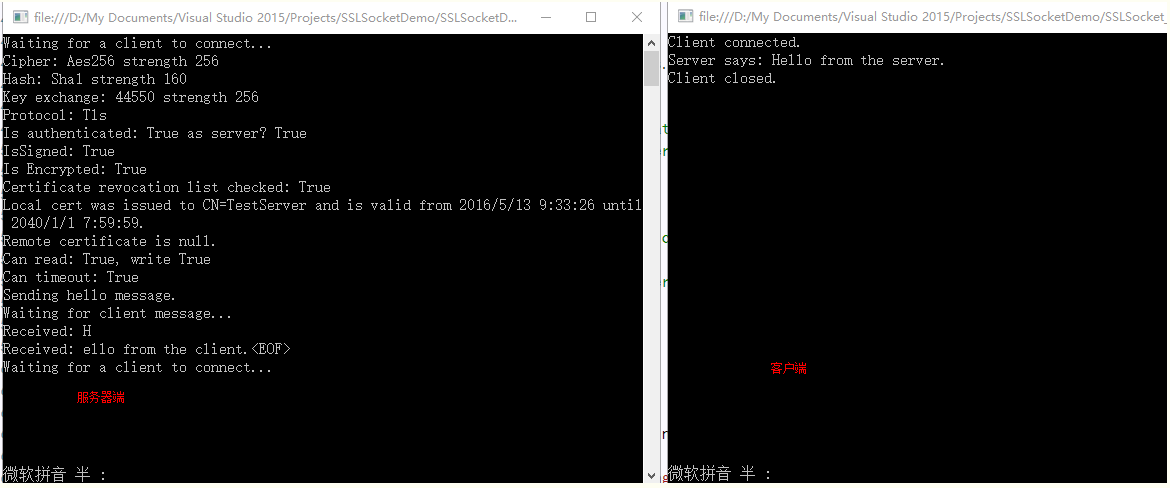
导致通讯失败可能问题如下:
1)证书没有导入到受信任的根证书列表中;2)证书失效;3)客户端在使用authenticateasclient注册时没有正确使用服务器端证书名称。
二、 双向认证
第1步:创建所需证书,服务器端所需证书同单向认证中的创建过程
先进入到vs2005的命令行状态,即:
开始–>程序–>microsoft visual studio 2005–>visual studio tools–>visual studio 2005 命令提示
键入:
makecert -r -pe -n “cn=testclient” -ss root -sky exchange
第2步:创建服务端程序
服务端的程序同单向认证的服务器端代码
第3步:创建客户端程序
namespace consoleappclient
{
using system;
using system.collections;
using system.net.security;
using system.net.sockets;
using system.security.authentication;
using system.text;
using system.security.cryptography.x509certificates;
namespace examples.system.net
{
  public class ssltcpclient
  {
    private static hashtable certificateerrors = new hashtable();
    // the following method is invoked by the remotecertificatevalidationdelegate.
    public static bool validateservercertificate(
       object sender,
       x509certificate certificate,
       x509chain chain,
       sslpolicyerrors sslpolicyerrors)
    {
      if (sslpolicyerrors == sslpolicyerrors.none)
        return true;

      console.writeline("certificate error: {0}", sslpolicyerrors);

      // do not allow this client to communicate with unauthenticated servers.
      return false;
    }

    public static void runclient(string machinename)
    {
      // create a tcp/ip client socket.
      // machinename is the host running the server application.
      tcpclient client = new tcpclient(machinename, 901);
      console.writeline("client connected.");
      // create an ssl stream that will close the client's stream.
      sslstream sslstream = new sslstream(client.getstream(), false, new remotecertificatevalidationcallback(validateservercertificate), null);
      // the server name must match the name on the server certificate.

      x509store store = new x509store(storename.root);
      store.open(openflags.readwrite);

      //// 检索证书
      x509certificate2collection certs = store.certificates.find(x509findtype.findbysubjectname, "testclient", false);
      try
      {
        sslstream.authenticateasclient("testserver", certs, sslprotocols.tls, false);
      }
      catch (authenticationexception e)
      {
        console.writeline("exception: {0}", e.message);
        if (e.innerexception != null)
        {
          console.writeline("inner exception: {0}", e.innerexception.message);
        }
        console.writeline("authentication failed - closing the connection.");
        client.close();
        return;
      }
      // encode a test message into a byte array.
      // signal the end of the message using the "<eof>".
      byte[] messsage = encoding.utf8.getbytes("hello from the client.<eof>");
      // send hello message to the server.
      sslstream.write(messsage);
      sslstream.flush();
      // read message from the server.
      string servermessage = readmessage(sslstream);
      console.writeline("server says: {0}", servermessage);

      messsage = encoding.utf8.getbytes("exit");
      sslstream.write(messsage);
      sslstream.flush();

      // close the client connection.
      client.close();
      console.writeline("client closed.");
    }

    static string readmessage(sslstream sslstream)
    {
      // read the message sent by the server.
      // the end of the message is signaled using the
      // "<eof>" marker.
      byte[] buffer = new byte[2048];
      stringbuilder messagedata = new stringbuilder();
      int bytes = -1;
      do
      {
        bytes = sslstream.read(buffer, 0, buffer.length);

        // use decoder class to convert from bytes to utf8
        // in case a character spans two buffers.
        decoder decoder = encoding.utf8.getdecoder();
        char[] chars = new char[decoder.getcharcount(buffer, 0, bytes)];
        decoder.getchars(buffer, 0, bytes, chars, 0);
        messagedata.append(chars);
        // check for eof.
        if (messagedata.tostring().indexof("<eof>") != -1)
        {
          break;
        }
      } while (bytes != 0);

      return messagedata.tostring();
    }

    private static void displayusage()
    {
      console.writeline("to start the client specify:");
      console.writeline("clientsync machinename [servername]");
      environment.exit(1);
    }

    public static void main(string[] args)
    {
      string machinename = null;
      machinename = "192.168.1.25";
      try
      {
        runclient(machinename);
      }
      catch (exception ex)
      {
        console.writeline(ex.message);
      }
      console.readline();
    }
  }
}
}
总结
到此这篇关于利用c#实现sslsocket加密通讯的文章就介绍到这了,更多相关c#实现sslsocket加密通讯内容请搜索以前的文章或继续浏览下面的相关文章希望大家以后多多支持!
