
 我有药阿
我有药阿
前言
玩过王者荣耀或者荒野行动的人,都知道,手机左下方或右下方都会有一个摇杆,滑动摇杆可以让人物向360度方向移动。没有玩过的可以看看下方图片(荒野行动手机端为例)。本篇就来讲解如何使用unity制作摇杆控制人物移动。
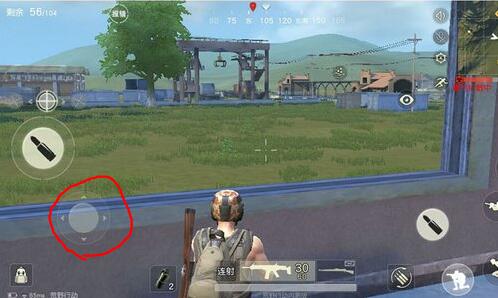
2种方法:
1.guitexture制作,是unity自带的一个joystick组件,主要由guitexture和一个js脚本构成。优点:unity自带,使用简单方便。缺点是无法适应屏幕大小。
2.easytouch插件,可以实现1的功能并且克服了1的缺陷,可以适应屏幕大小。本篇文章也是主要讲解使用easytouch插件实现摇杆控制人物移动。
准备
1.导入easytouch包。在网上下载easytouch的package,然后import到项目中,这时候,菜单会出现tools。这时候摇杆我们具备了。
2.导入人物。unity功能超级强大,自带一个人物模型,叫ethan。这个时候要导入standard assets。里面就有ethan模型(具体在standard assets--character--thirdpersoncharacter--models--ethan)。
具体实现
1.点击菜单中的tools--hedgehog team--easytouch--extensions--add a new joystick,这时候scene中就有了一个摇杆。
2.导入ethan,找到ethan直接拖到scene中就ok。
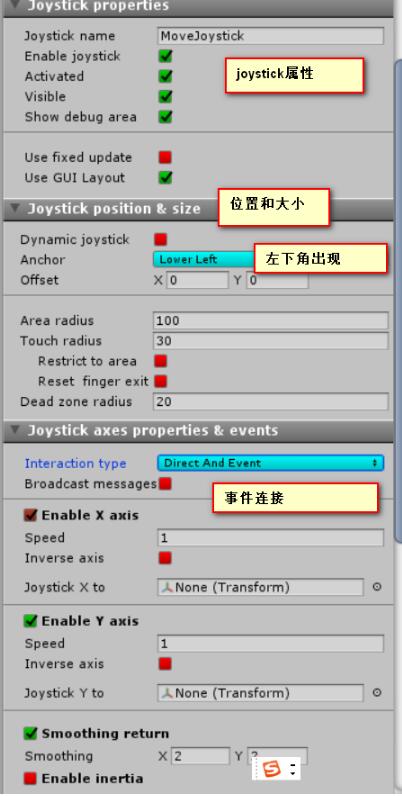
3.joystick参数设置和介绍见下图
3.写脚本,绑定到人物ethan上。
using unityengine;
using system.collections;

public class movecontroller : monobehaviour
{
 void onenable()
 {
 easyjoystick.on_joystickmove += onjoystickmove;
 easyjoystick.on_joystickmoveend += onjoystickmoveend;
 }

 //移动摇杆结束
 void onjoystickmoveend(movingjoystick move)
 {
 //停止时,角色恢复状态为idle
 if (move.joystickname == "movejoystick")
 {
  getcomponent<animation>().crossfade("idle");
 }
 }

 //移动摇杆中
 void onjoystickmove(movingjoystick move)
 {
 if (move.joystickname != "movejoystick")
 {
  return;
 }

 //获取摇杆中心偏移的坐标
 float joypositionx = move.joystickaxis.x;
 float joypositiony = move.joystickaxis.y;

 //摇杆中心位置只要产生变动,即只要对摇杆进行操作
 if (joypositiony != 0 || joypositionx != 0)
 {
  //移动玩家的位置(按朝向位置移动)
  transform.translate(vector3.forward * time.deltatime * 100);
  //播放奔跑动画
  getcomponent<animation>().crossfade("run");
 }
 }
}
#endregion
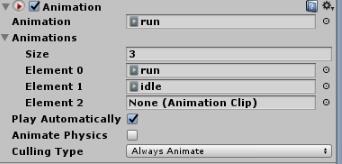
4.由于脚本中人物的移动是播放动画,unity本身就有很多走啊、跑啊、静止的一些动画,所以我们现在为ethan添加动画(animation)。如下图所示:
5.由于我们的游戏是纯第一人称游戏,所以是不需要再游戏中看到自己的。所以为ethan添加first person controller的脚本。(这个根据项目需要而定)。
以上就是本文的全部内容,希望对大家的学习有所帮助,也希望大家多多支持。
