
 总有人想捧红我
本文实例为大家分享了unity实现简单虚拟摇杆的具体代码,供大家参考,具体内容如下
需求:点击创建一个虚拟摇杆底盘,鼠标拖拽时候上方摇杆会跟随鼠标方向移动,并且不会超出摇杆盘范围
*摇杆功能另外实现
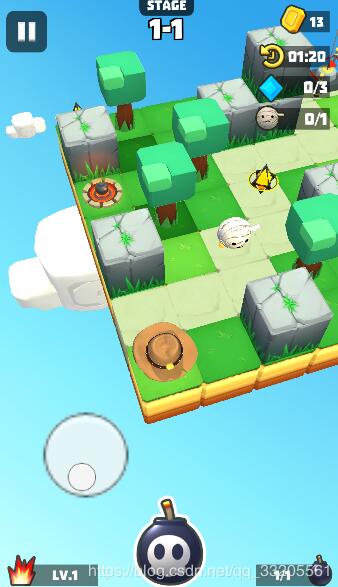
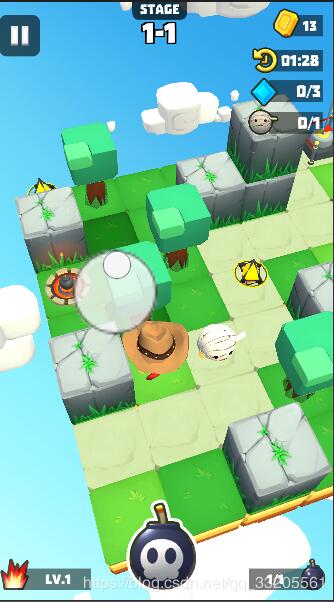
ui显示
using system.collections;
using system.collections.generic;
using unityengine;

public class rockingicon : monobehaviour
{
 public transform touchpoint;
 public transform bgpoint;
 public float radius;
 bool ispressing;
 vector3 bgpos;

 private void update()
 {
  bool pressing;
  vector3 pos;
  if (application.iseditor)
   getpressinginfoineditor(out pressing, out pos);
  else
   getpressinginfoinphone(out pressing, out pos);
  seticon(pressing, pos);

 }

 void getpressinginfoineditor(out bool pressing, out vector3 pos)
 {
  if (input.getmousebutton(0))
  {
   pressing = true;
   pos = input.mouseposition;
  }
  else
  {
   pressing = false;
   pos = vector3.zero;
  }
 }

 void getpressinginfoinphone(out bool pressing, out vector3 pos)
 {
  if(input.touchcount > 0)
  {
   pressing = true;
   pos = input.gettouch(0).position;
  }
  else
  {
   pressing = false;
   pos = vector3.zero;
  }
 }


 void seticon(bool pressing, vector3 pos)
 {
  if (pressing)
  {
   if (!ispressing)
   {
    bgpoint.gameobject.setactive(true);
    bgpoint.transform.position = pos;
    bgpos = pos;
    ispressing = true;
   }
   else
   {
    bgpoint.gameobject.setactive(true);
    settouchpointpos(pos);
   }
  }
  else
  {
   touchpoint.gameobject.setactive(false);
   bgpoint.gameobject.setactive(false);
   ispressing = false;
  }
 }

 void settouchpointpos(vector3 pos)
 {
  vector3 center = bgpoint.position;
  vector3 touch = pos;
  vector3 to;
  float distance = vector3.distance(center, touch);
  if (distance < radius)
   to = touch;
  else
  {
   vector3 dir = touch - center;
   dir.normalize();
   to = dir * radius;
   to += center;
  }
  touchpoint.gameobject.setactive(true);
  touchpoint.transform.position = to;
 }
}
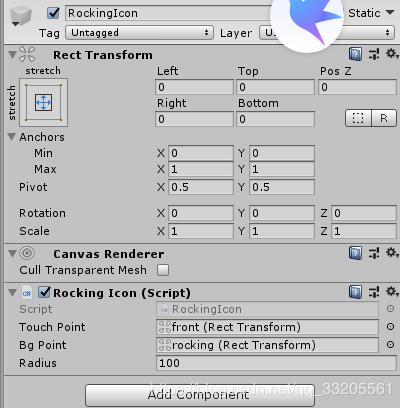
预制:
操作控制
#region 鼠标操作

float min_move_x = global.min_move_distance * (screen.width / 1080f);
float min_move_y = global.min_move_distance * (screen.height / 1900f);

if(application.platform == runtimeplatform.windowseditor)
  {
   if (input.getmousebuttondown(0))
   {
    touch_time = 0;
    first_touch_pos = input.mouseposition;
   }
   else if (input.getmousebutton(0))
   {

    touch_time += time.deltatime;
    if (touch_time >= global.touch_time_limit)
    {
     vector2 touch_pos = input.mouseposition;
     vector2 distance = touch_pos - first_touch_pos;

     //vector2 touch_pos_in_func = posinthefunc(touch_pos);
     //vector2 first_pos_in_func = posinthefunc(first_touch_pos);
     //vector2 distance = touch_pos_in_func - first_pos_in_func;

     if (mathf.abs(distance.x) > min_move_x && mathf.abs(distance.x) > mathf.abs(distance.y)) move(distance.x > 0 ? vector3.right : vector3.left);
     if (mathf.abs(distance.y) > min_move_y && mathf.abs(distance.y) > mathf.abs(distance.x)) move(distance.y > 0 ? vector3.forward : vector3.back);
    }
   }
   else if (input.getmousebuttonup(0))
   {

    //if(touch_time < global.touch_time_limit)
    //{
    // putboomb();
    //}
    touch_time = 0;
    first_touch_pos = vector3.zero;
   }
  }
  #endregion
  #region 手机操作

  if (application.platform == runtimeplatform.android)
  {
   if (input.touchcount > 0)
   {

    touch touch = input.gettouch(0);
    if (touch.phase == touchphase.began)
    {
     first_touch_pos = touch.position;


    }
    else if (touch.phase == touchphase.ended)
    {
     first_touch_pos = vector3.zero;
    }
    else if (touch.phase == touchphase.moved || touch.phase == touchphase.stationary)
    {
     vector2 touch_pos = touch.position;
     vector2 distance = touch_pos - first_touch_pos;
     if (mathf.abs(distance.x) > min_move_x && mathf.abs(distance.x) > mathf.abs(distance.y)) move(distance.x > 0 ? vector3.right : vector3.left);
     if (mathf.abs(distance.y) > min_move_y && mathf.abs(distance.y) > mathf.abs(distance.x)) move(distance.y > 0 ? vector3.forward : vector3.back);

    }
   }
  }
以上就是本文的全部内容,希望对大家的学习有所帮助,也希望大家多多支持。
