
 Fu3k丶you
前言
最近在学习c# socket相关的知识,学习之余,动手做了一个简单的局域网聊天器。有萌生做这个的想法,主要是由于之前家里两台电脑之间想要传输文件十分麻烦,需要借助qq,微信或者其他第三方应用,基本都要登录,而且可能传输的文件还有大小限制,压缩问题。所以本聊天器的首要目标就是解决这两个问题,做到使用方便(双击启动即用),传文件无限制。
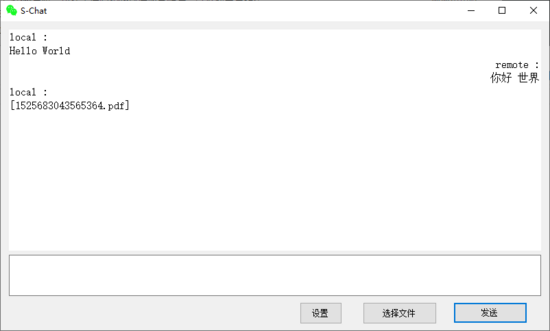
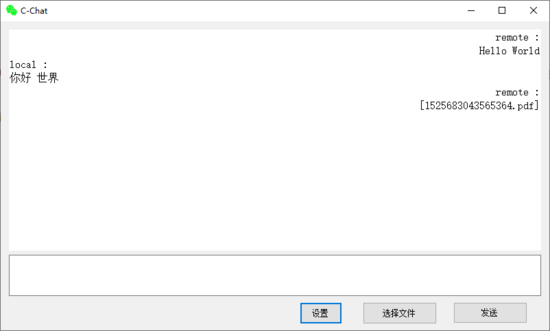
废话不多说,先上图。s-chat是服务端,c-chat是客户端,两者除了客户端首次启动后需要设置一下连接的ip地址外,无其他区别。操作与界面都完全相同,对于用户来说,基本不用在意谁是服务端谁是客户端。
编码
服务端监听接口
服务端主要负责开启监听线程,等待客户端接入
public void startlisten()
{
 // 创建socket对象 new socket(addressfamily.internetwork, sockettype.stream, protocoltype.tcp)
 socket socket = getsocket();
 // 将套接字与ipendpoint绑定
 socket.bind(this.getipendpoint());
 // 开启监听 仅支持一个连接
 socket.listen(1);
 // 开启线程等待客户端接入,避免堵塞
 thread acceptthread = new thread(new threadstart(tryaccept));
 acceptthread.isbackground = true;
 acceptthread.start();
}

public void tryaccept()
{
 socket socket = getsocket();
 while (true)
 {
  try
  {
   socket connectedsocket = socket.accept()
   this.connectedsocket = connectedsocket;
   onconnect(); // 连接成功回调
   this.startreceive(); // 开始接收线程
   break;
  }
  catch (exception e)
  {
  }
 }
}
客户端连接接口
客户端主要负责开启连接线程,每隔2秒,自动尝试连接服务端
public void startconnect()
{
 thread connectthread = new thread(new threadstart(tryconnect));
 connectthread.isbackground = true;
 connectthread.start();
}

public void tryconnect()
{
 socket socket = getsocket();
 while (true)
 {
  try
  {
   socket.connect(this.getipendpoint());
   this.connectedsocket = socket;
   onconnect(); // 连接成功回调
   this.startreceive();
   break;
  }
  catch (exception e)
  {
   thread.sleep(tryconnectinterval); // 指定间隔后重新尝试连接
  }
 }
}
文字发送,文件发送,接收文字,接收文件等通用接口主要实现在 chatbase 类中,是服务端与客户端的共同父类。
文字发送接口
发送数据的第一位表示发送信息的类型,0表示字符串文字,1表示文件
然后获取待发送字符串的长度,使用long类型表示,占用8个字节
共发送的字节数据可以表示为头部(类型 + 字符串字节长度,共9个字节)+ 实际字符串字节数据
public bool send(string msg)
{
 if (connectedsocket != null && connectedsocket.connected)
 {
  byte[] buffer = utf8.getbytes(msg);
  byte[] len = bitconverter.getbytes((long)buffer.length);
  byte[] content = new byte[1 + len.length + buffer.length];
  content[0] = (byte)chattype.str; // 发送信息类型,字符串
  array.copy(len, 0, content, 1, len.length); // 字符串字节长度
  array.copy(buffer, 0, content, 1 + len.length, buffer.length); // 实际字符串字节数据
  try
  {
   connectedsocket.send(content);
   return true;
  }
  catch (exception e)
  {
  }
 }
 return false;
}
文件发送接口
与字符串发送相同的头部可以表示为(类型 + 文件长度,共9个字节)
还需要再加上待发送的文件名的长度,与文件名字节数据
共发送的字节数据可以表示为头部(类型 + 文件长度,共9个字节)+ 文件名头部(文件名长度 + 文件名字节数据)+ 实际文件数据
public bool sendfile(string path)
{
 if (connectedsocket != null && connectedsocket.connected)
 {
  try
  {
   fileinfo fi = new fileinfo(path);
   byte[] len = bitconverter.getbytes(fi.length);
   byte[] name = utf8.getbytes(fi.name);
   byte[] namelen = bitconverter.getbytes(name.length);
   byte[] head = new byte[1 + len.length + namelen.length + name.length];
   head[0] = (byte)chattype.file; // 加上信息发送类型
   array.copy(len, 0, head, 1, len.length); // 加上文件长度
   array.copy(namelen, 0, head, 1 + len.length, namelen.length); // 加上文件名长度
   array.copy(name, 0, head, 1 + len.length + namelen.length, name.length); // 加上文件名字节数据
   connectedsocket.sendfile(
    path,
    head,
    null,
    transmitfileoptions.usedefaultworkerthread
   );
   return true;
  }
  catch(exception e)
  {
  }
 }
 return false;
}
信息接收接口(文字与文件)
主要是解析接收到的字节数据,根据字符串或文件的类型进行处理
public void receive()
{
 if (connectedsocket != null)
 {
  while (true)
  {
   try
   {
    // 读取公共头部
    byte[] head = new byte[9];
    connectedsocket.receive(head, head.length, socketflags.none);
    int len = bitconverter.toint32(head, 1);
    if (head[0] == (byte) chattype.str)
    {
     // 接收字符串
     byte[] buffer = new byte[len];
     connectedsocket.receive(buffer, len, socketflags.none);
     onreceive(chattype.str, utf8.getstring(buffer));
    }
    else if(head[0] == (byte)chattype.file)
    {
     // 接收文件
     if (!directory.exists(dirname))
     {
      directory.createdirectory(dirname);
     }
     // 读取文件名信息
     byte[] namelen = new byte[4];
     connectedsocket.receive(namelen, namelen.length, socketflags.none);
     byte[] name = new byte[bitconverter.toint32(namelen, 0)];
     connectedsocket.receive(name, name.length, socketflags.none);
     string filename = utf8.getstring(name);
     // 读取文件内容并写入
     int readbyte = 0;
     int count = 0;
     byte[] buffer = new byte[1024 * 8];
     string filepath = path.combine(dirname, filename);
     if (file.exists(filepath))
     {
      file.delete(filepath);
     }
     using (filestream fs = new filestream(filepath, filemode.append, fileaccess.write))
     {
      while (count != len)
      {
       int readlength = buffer.length;
       if(len - count < readlength)
       {
        readlength = len - count;
       }
       readbyte = connectedsocket.receive(buffer, readlength, socketflags.none);
       fs.write(buffer, 0, readbyte);
       count += readbyte;
      }
     }
     onreceive(chattype.file, filename);
    }
    else
    {
     // 未知类型
    }
   }
   catch (exception e)
   {
   }
  }
 }
}
使用
第一次使用,客户端需要设置待连接的ip地址。之后再启动会自动连接
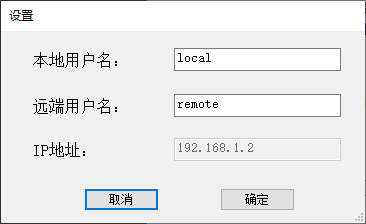
双击服务端exe启动,点击 设置 ,查看ip地址项
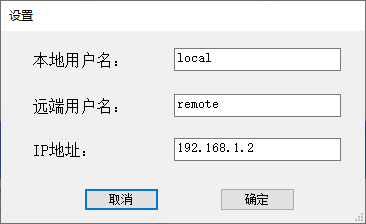
双击客户端exe启动,点击 设置 ,在 ip地址 项,输入服务端查看到的ip地址
- 设置成功后,等待大约一两秒,应用cion变成绿色,即表示连接成功,可以正常发送文字和文件了
- 可以点击选择文件(支持选择多个文件),发送文件
- 支持直接拖拽文件到输入框,发送文件
- 支持ctrl+enter快捷键发送
- 接收到的文件自动存放在exe所在目录的chatfiles文件夹下
注意事项
客户端服务端需要在同一个局域网下才能实现连接
服务端ip地址是不支持修改的,自动读取本机的ip地址
源码
完整代码放在github上,点击查看
预编译好的可运行exe程序,在仓库的release目录,也可以直接本地下载:下载地址
到此这篇关于c# socket编程实现简单的局域网聊天器的示例代码的文章就介绍到这了,更多相关c# socket 局域网聊天器内容请搜索以前的文章或继续浏览下面的相关文章希望大家以后多多支持!
