
 疯子16060641
本文实例为大家分享了unity实现vr中在黑板上写字的具体代码,供大家参考,具体内容如下
一、工具
1.开发用的是unity 5.6.2版本
2.vr中的物理交互用的是vrtk插件,这个插件集成了比较好的物理交互功能;
3.htc vive
二、概述
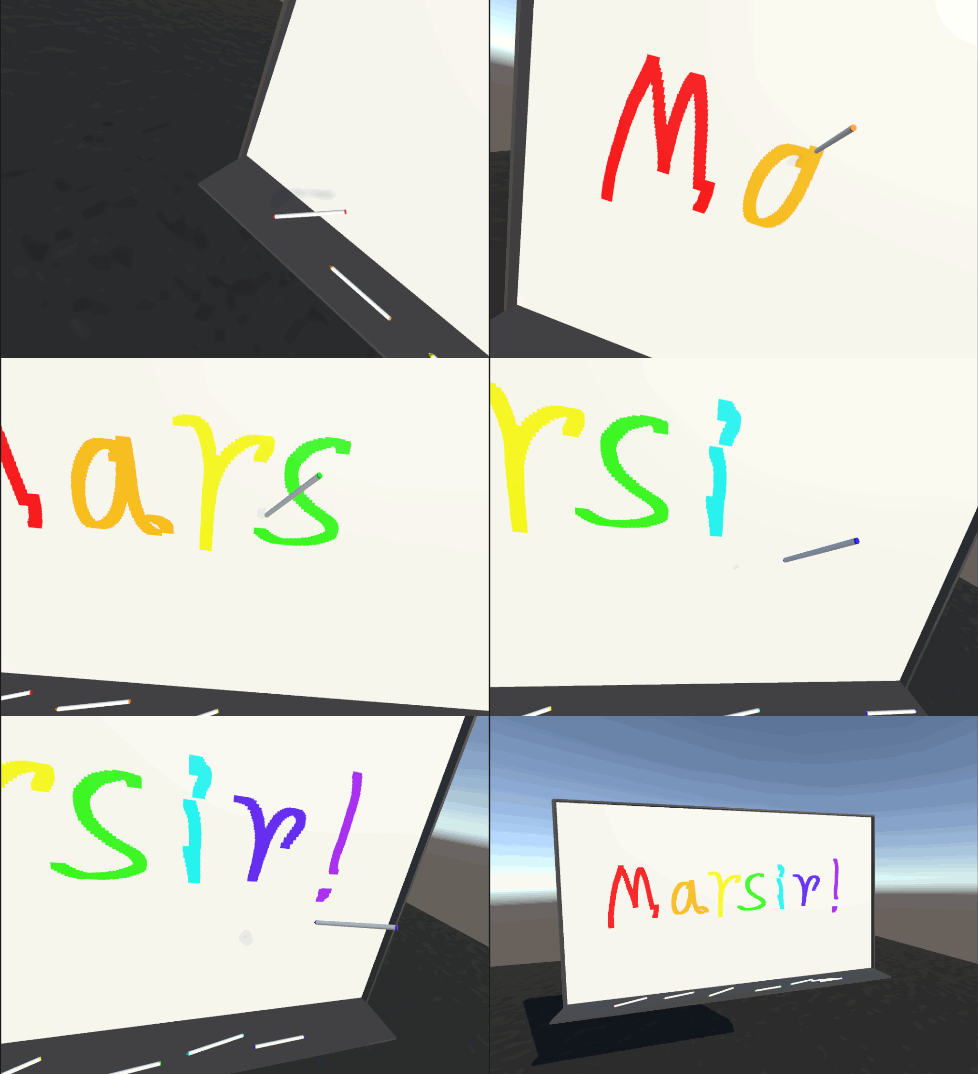
实现的功能: 在一个白板上,用不同颜色的笔,在白板画出任何想要的图形;
因为只是一个初级篇所以只是用两个脚本简单的实现,而且并没有黑板擦等功能 ,也不能两个笔同时画画,这些功能将会在未来的升级篇中写出;
三、知识点
其实这个功能很简单,只是简单的运用unity texure2d类中的两个函数:
public void setpixels32(int x, int y, int blockwidth, int blockheight, color32[] colors, int miplevel = 0);
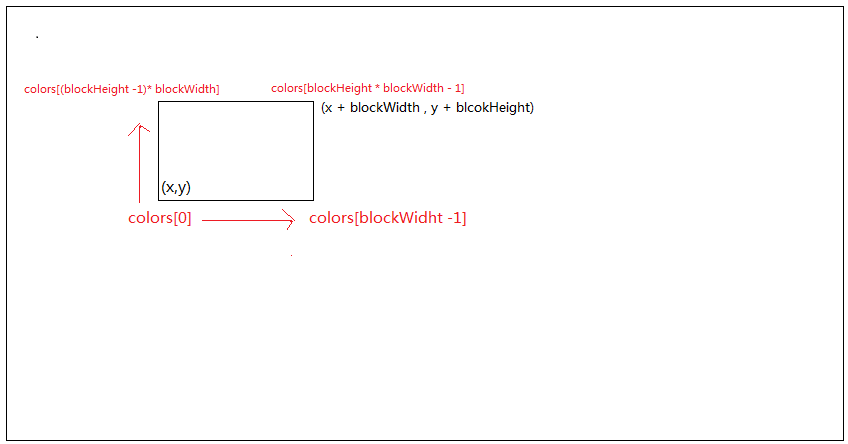
前面4个参数相当于一个矩形,x和y就是矩形的左下角的那个点,blockwidth和blockheight分别是矩形的宽和高,这个矩形所代表的范围就是blockwidth*blockheight个像素所在的位置,不妨称这个矩形范围为一个色块;
colors这个参数的大小必须等于blockwidth*blockheight,因为这个方法就是给坐标(x,y)开始,从左到右,从下到上,一行一行的对矩形范围内的每个像素赋值;
也就是把colors[0]~colors[blockwidth - 1]分别赋值到坐标为(x,y)~(x + blockwidth,y)的像素,以此类推;
最后一个参数,因为我们用的图片把generate min maps这个选项关闭了,所以用默认的可选参数0;
public void apply(bool updatemipmaps = true, bool makenolongerreadable = false);
当对图片改动完成以后,需要调用这个方法,才能让改动真正的应用在图片上;
四、场景搭建
1.画板
在场景中建一个quad,把它的x和y方向的scale分别设置为1.92和1.08(或者其它尺寸);注意这个quad一定要用mesh collider作为碰撞体,不然到时候射线获取的纹理坐标有误,并为它设置一个tag为board;
2.笔
建一个尺寸合适的笔,创建一个空的子物体,命名为snappoint,并设置snappoint的z方向指向笔尖方向,这个子物体就是,手柄拿笔的位置就是,并且保证笔的姿态是相当于人正常拿笔的样子;
3.其它
创建一个放笔的物体,让笔处于比较好拿的位置;
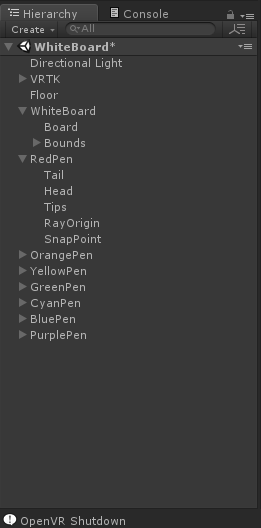
我的场景中代表画板的是whiteboard下的board物体;
五、代码实现功能
这个脚本是挂在代表画板的物体上的:
using system.linq;
using unityengine;

/// <summary>
/// 画板
/// </summary>
public class board : monobehaviour
{
 //当画笔移动速度很快时,为了不出现断断续续的点,所以需要对两个点之间进行插值,lerp就是插值系数
 [range(0, 1)]
 public float lerp = 0.05f;
 //初始化背景的图片
 public texture2d initailizetexture;
 //当前背景的图片
 private texture2d currenttexture;
 //画笔所在位置映射到画板图片的uv坐标
 private vector2 paintpos;

 private bool isdrawing = false;//当前画笔是不是正在画板上
 //离开时画笔所在的位置
 private int lastpaintx;
 private int lastpainty;
 //画笔所代表的色块的大小
 private int paintertipswidth = 30;
 private int paintertipsheight = 15;
 //当前画板的背景图片的尺寸
 private int texturewidth;
 private int textureheight;

 //画笔的颜色
 private color32[] paintercolor;

 private color32[] currentcolor;
 private color32[] origincolor;


 private void start()
 {
 //获取原始图片的大小
 texture2d origintexture = getcomponent<meshrenderer>().material.maintexture as texture2d;
 texturewidth = origintexture.width;//1920
 textureheight = origintexture.height;//1080

 //设置当前图片
 currenttexture = new texture2d(texturewidth, textureheight, textureformat.rgba32, false, true);
 currenttexture.setpixels32(origintexture.getpixels32());
 currenttexture.apply();

 //赋值给黑板
 getcomponent<meshrenderer>().material.maintexture = currenttexture;

 //初始化画笔的颜色
 paintercolor = enumerable.repeat<color32>(new color32(255, 0, 0, 255), paintertipswidth * paintertipsheight).toarray<color32>();
 }

 private void lateupdate()
 {
 //计算当前画笔,所代表的色块的一个起始点
 int texposx = (int)(paintpos.x * (float)texturewidth - (float)(paintertipswidth / 2));
 int texposy = (int)(paintpos.y * (float)textureheight - (float)(paintertipsheight / 2));
 if (isdrawing)
 {
  //改变画笔所在的块的像素值
  currenttexture.setpixels32(texposx, texposy, paintertipswidth, paintertipsheight, paintercolor);
  //如果快速移动画笔的话,会出现断续的现象,所以要插值
  if (lastpaintx != 0 && lastpainty != 0)
  {
  int lerpcount = (int)(1 / lerp);
  for (int i = 0; i <= lerpcount; i++)
  {
   int x = (int)mathf.lerp((float)lastpaintx, (float)texposx, lerp);
   int y = (int)mathf.lerp((float)lastpainty, (float)texposy, lerp);
   currenttexture.setpixels32(x, y, paintertipswidth, paintertipsheight, paintercolor);
  }
  }
  currenttexture.apply();
  lastpaintx = texposx;
  lastpainty = texposy;
 }
 else
 {
  lastpaintx = lastpainty = 0;
 }

 }

 /// <summary>
 /// 设置当前画笔所在的uv位置
 /// </summary>
 /// <param name="x"></param>
 /// <param name="y"></param>
 public void setpainterpositon(float x, float y)
 {
 paintpos.set(x, y);
 }

 /// <summary>
 /// 画笔当前是不是在画画
 /// </summary>
 public bool isdrawing
 {
 get
 {
  return isdrawing;
 }
 set
 {
  isdrawing = value;
 }
 }

 /// <summary>
 /// 使用当前正在画板上的画笔的颜色
 /// </summary>
 /// <param name="color"></param>
 public void setpaintercolor(color32 color)
 {
 if (!paintercolor[0].isequal(color))
 {
  for (int i = 0; i < paintercolor.length; i++)
  {
  paintercolor[i] = color;
  }
 }
 }


}
public static class methodextention
{
 /// <summary>
 /// 用于比较两个color32类型是不是同种颜色
 /// </summary>
 /// <param name="origin"></param>
 /// <param name="compare"></param>
 /// <returns></returns>
 public static bool isequal(this color32 origin, color32 compare)
 {
 if (origin.g == compare.g && origin.r == compare.r)
 {
  if (origin.a == compare.a && origin.b == compare.b)
  {
  return true;
  }
 }
 return false;
 }
}
下面这个脚本是挂在画笔上的:
using unityengine;

public class painter : monobehaviour
{
 /// <summary>
 /// 画笔的颜色
 /// </summary>
 public color32 pencolor;

 public transform rayorigin;

 private raycasthit hitinfo;
 //这个画笔是不是正在被手柄抓着
 private bool isgrabbing;
 private static board board;//设置成类型的成员,而不是类型实例的成员,因为所有画笔都是用的同一个board

 private void start()
 {
 //将画笔部件设置为画笔的颜色,用于识别这个画笔的颜色
 foreach (var renderer in getcomponentsinchildren<meshrenderer>())
 {
  if (renderer.transform == transform)
  {
  continue;
  }
  renderer.material.color = pencolor;
 }
 if (!board)
 {
  board = findobjectoftype<board>();
 }

 }

 private void update()
 {
 ray r = new ray(rayorigin.position, rayorigin.forward);
 if (physics.raycast(r, out hitinfo, 0.1f))
 {
  if (hitinfo.collider.tag == "board")
  {
  //设置画笔所在位置对应画板图片的uv坐标
  board.setpainterpositon(hitinfo.texturecoord.x, hitinfo.texturecoord.y);
  //当前笔的颜色
  board.setpaintercolor(pencolor);
  board.isdrawing = true;
  isgrabbing = true;
  }
 }
 else if(isgrabbing)
 {
  board.isdrawing = false;
  isgrabbing = false;
 }
 }

}
六、等待完善的地方
1.画笔所能画的最小点是有大小的,也就是setpixels参数中的blockwidth*blockheight的大小,当这个画笔在画板的边缘的时候,那么这个画笔所能画的色块的矩形范围就到图片之外去了,这会引起未处理异常;
2.同时只有一个笔能在画板上画画;
3.没有黑板擦功能;
4.没有颜色混合功能;
5.画笔是纯粹的颜色,其实可以用一个图片设置画笔的形状;
6.笔可以穿透画板
这些问题都将在升级篇中完善;
以上就是本文的全部内容,希望对大家的学习有所帮助,也希望大家多多支持。
