
 林筅泩
林筅泩
本文为大家分享了android实现通用验证码输入框的具体代码,供大家参考,具体内容如下
效果图
话不多说先上效果图,可以先先看看是不是自己想要的
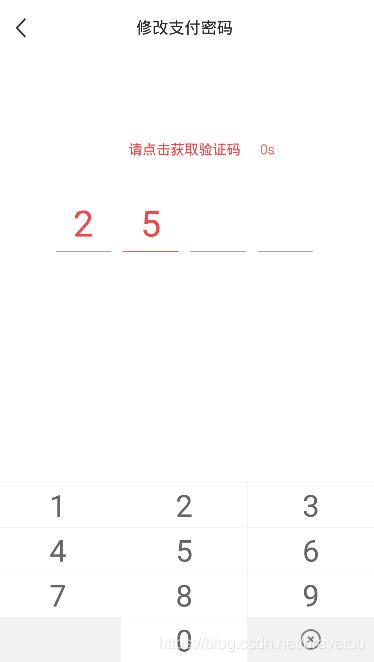
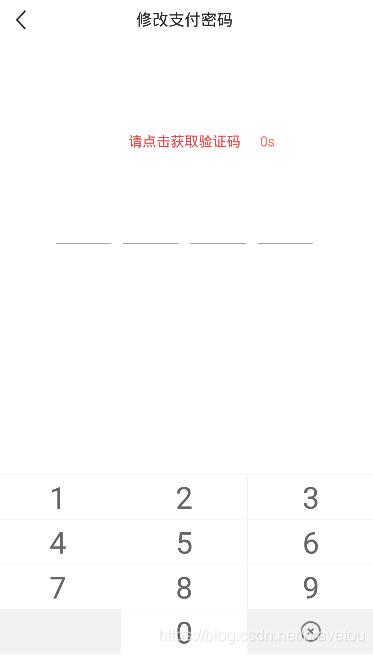
闲聊
闲来无事优化项目时,发现原来的验证码输入框,可扩展性不高,就拿来优化了一下,说说我开始的的思路吧,最开始是想用自定义view实现的,但是发现各种画矩,太烦人了,最后采用的组合控件的形式,android有现成的控件,用来组合组合就能用,为什么不用呢。
源码
xml item 布局文件(view_auth_code_input_item.xml)
<?xml version="1.0" encoding="utf-8"?>
<linearlayout xmlns:android="http://schemas.android.com/apk/res/android"
 android:layout_width="match_parent"
 android:layout_height="match_parent"
 android:orientation="vertical">

 <textview
  android:id="@+id/number_tv"
  style="@style/textstylemain"
  android:layout_width="match_parent"
  android:layout_height="0mm"
  android:layout_weight="1"
  android:maxlength="1"
  android:text="0"
  android:textsize="72mm" />

 <view
  android:id="@+id/split_v"
  android:layout_width="match_parent"
  android:layout_height="1mm"
  android:background="@color/colormain" />

</linearlayout>
attrs 自定义属性(attrs.xml)
<?xml version="1.0" encoding="utf-8"?>
<resources>

 <!-- 自定义验证码输入框 属性 -->
 <declare-styleable name="authcodeinputview">
  <!-- 当前输入位分割线颜色 -->
  <attr name="currentsplitlinecolor"
   format="reference|color" />
  <!-- 其他输入位分割线颜色 -->
  <attr name="othersplitlinecolor"
   format="reference|color" />
  <!-- 分割线高度 -->
  <attr name="splitlineheight"
   format="dimension" />
  <!-- 验证码位数 -->
  <attr name="digit"
   format="integer" />
  <!-- 单个验证码宽度 -->
  <attr name="singlecaptchawidth"
   format="dimension" />
  <!-- 验证码当前输入位字体颜色 -->
  <attr name="currenttextcolor"
   format="reference|color" />
  <!-- 验证码当前输入位字体大小 -->
  <attr name="currenttextsize"
   format="dimension" />
  <!-- 验证码其他输入位字体颜色 -->
  <attr name="othertextcolor"
   format="reference|color" />
  <!-- 验证码其它输入位字体大小 -->
  <attr name="othertextsize"
   format="dimension" />
  <!-- 默认颜色 -->
  <attr name="defaultcolor"
   format="reference|color" />
  <!-- 默认字体大小 -->
  <attr name="defaulttextsize"
   format="dimension" />
  <!-- 默认间距 -->
  <attr name="defaultspacing"
   format="dimension" />
 </declare-styleable>

</resources>
组合控件(authcodeinputview.java)
import android.content.context;
import android.content.res.typedarray;
import android.graphics.color;
import android.os.build;
import android.text.textutils;
import android.util.attributeset;
import android.util.typedvalue;
import android.view.gravity;
import android.view.layoutinflater;
import android.view.view;
import android.view.viewgroup;
import android.widget.linearlayout;
import android.widget.textview;

import androidx.annotation.colorint;
import androidx.annotation.requiresapi;

/**
 * <pre>
 *  <b>author</b> :bravetou
 *  <b>blog</b>  :http://www.51sjk.com/Upload/Articles/1/0/246/246566_20210620000405600.jpg
 *  <b>time</b>  :2020/9/4 16:43
 *  <b>desc</b>  :<pre>
 *   自定义验证码输入框
 *  </pre>
 * </pre>
 */
public class authcodeinputview extends linearlayout {
 // <!-- 默认间距 -->
 private int mdefaultspacing = 16;
 // <!-- 默认颜色 -->
 @colorint
 private int mdefaultcolor = color.black;
 // <!-- 默认字体大小 -->
 private int mdefaulttextsize = 36;
 // <!-- 当前输入位分割线颜色 -->
 @colorint
 private int mcurrentsplitlinecolor = mdefaultcolor;
 // <!-- 其他输入位分割线颜色 -->
 @colorint
 private int mothersplitlinecolor = mdefaultcolor;
 // <!-- 分割线高度 -->
 private int msplitlineheight = 1;
 // <!-- 验证码位数 -->
 private int mdigit = 4;
 // <!-- 单个验证码宽度 -->
 private int msinglecaptchawidth = 100;
 // <!-- 验证码当前输入位字体颜色 -->
 @colorint
 private int mcurrenttextcolor = mdefaultcolor;
 // <!-- 验证码当前输入位字体大小 -->
 private int mcurrenttextsize = mdefaulttextsize;
 // <!-- 验证码其他输入位字体颜色 -->
 @colorint
 private int mothertextcolor = mdefaultcolor;
 // <!-- 验证码其它输入位字体大小 -->
 private int mothertextsize = mdefaulttextsize;

 // 记录当前输入文本
 private string mtext = "";

 public authcodeinputview(context context) {
  super(context);
  init(context, null);
 }

 public authcodeinputview(context context, attributeset attrs) {
  super(context, attrs);
  init(context, attrs);
 }

 public authcodeinputview(context context, attributeset attrs, int defstyleattr) {
  super(context, attrs, defstyleattr);
  init(context, attrs);
 }

 @requiresapi(api = build.version_codes.lollipop)
 public authcodeinputview(context context, attributeset attrs, int defstyleattr,
        int defstyleres) {
  super(context, attrs, defstyleattr, defstyleres);
  init(context, attrs);
 }

 // 初始化
 private void init(context context, attributeset attrs) {
  setorientation(linearlayout.horizontal);
  setgravity(gravity.center);
  if (getchildcount() > 0) {
   removeallviews();
  }
  initattrs(context, attrs);
  if (mdigit <= 0) {
   return;
  }
  for (int i = 0; i < mdigit; i++) {
   // 实例化 item 组件
   view child = layoutinflater.from(context).inflate(
     r.layout.view_auth_code_input_item, this, false);
   layoutparams lp = new layoutparams(msinglecaptchawidth,
     viewgroup.layoutparams.match_parent);
   if (i != 0) {
    lp.leftmargin = mdefaultspacing;
   }
   child.setlayoutparams(lp);
   setviewattrs(child, null, false);
   // 分割线高度只在初始化时设置一次
   view msplitv = child.findviewbyid(r.id.split_v);
   linearlayout.layoutparams params = new linearlayout.layoutparams(
     viewgroup.layoutparams.match_parent, msplitlineheight);
   msplitv.setlayoutparams(params);
   addview(child);
  }
 }

 // 设置(未)选中属性
 private void setviewattrs(view child, string text, boolean isselected) {
  textview mnumbertv = child.findviewbyid(r.id.number_tv);
  view msplitv = child.findviewbyid(r.id.split_v);
  if (isselected) {
   mnumbertv.settextcolor(mcurrenttextcolor);
   mnumbertv.settextsize(typedvalue.complex_unit_px, mcurrenttextsize);
   msplitv.setbackgroundcolor(mcurrentsplitlinecolor);
  } else {
   mnumbertv.settextcolor(mothertextcolor);
   mnumbertv.settextsize(typedvalue.complex_unit_px, mothertextsize);
   msplitv.setbackgroundcolor(mothersplitlinecolor);
  }
  mnumbertv.settext(textutils.isempty(text) ? "" : text);
 }

 // 初始化属性
 private void initattrs(context context, attributeset attrs) {
  if (null != attrs) {
   // attributeset 属性值的索引
   typedarray o = context.obtainstyledattributes(attrs, r.styleable.authcodeinputview);
   // 默认间距
   mdefaultspacing = (int) o.getdimension(r.styleable.authcodeinputview_defaultspacing,
     16f);
   // 获取默认颜色
   mdefaultcolor = o.getcolor(r.styleable.authcodeinputview_defaultcolor, color.black);
   // 获取默认字体大小
   mdefaulttextsize = (int) o.getdimension(r.styleable.authcodeinputview_defaulttextsize
     , 36f);
   // 输入位分割线颜色
   mcurrentsplitlinecolor =
     o.getcolor(r.styleable.authcodeinputview_currentsplitlinecolor, mdefaultcolor);
   // 其他输入位分割线颜色
   mothersplitlinecolor = o.getcolor(r.styleable.authcodeinputview_othersplitlinecolor,
     mdefaultcolor);
   // 分割线高度
   msplitlineheight = (int) o.getdimension(r.styleable.authcodeinputview_splitlineheight
     , 1f);
   msplitlineheight = msplitlineheight <= 1 ? 1 : msplitlineheight;
   // 验证码位数
   mdigit = o.getinteger(r.styleable.authcodeinputview_digit, 4);
   // 单个验证码宽度
   msinglecaptchawidth =
     (int) o.getdimension(r.styleable.authcodeinputview_singlecaptchawidth, 100f);
   // 验证码当前输入位字体颜色
   mcurrenttextcolor = o.getcolor(r.styleable.authcodeinputview_currenttextcolor,
     mdefaultcolor);
   // 验证码当前输入位字体大小
   mcurrenttextsize = (int) o.getdimension(r.styleable.authcodeinputview_currenttextsize
     , mdefaulttextsize);
   // 验证码其他输入位字体颜色
   mothertextcolor = o.getcolor(r.styleable.authcodeinputview_othertextcolor,
     mdefaultcolor);
   // 验证码其它输入位字体大小
   mothertextsize = (int) o.getdimension(r.styleable.authcodeinputview_othertextsize,
     mdefaulttextsize);
   // 回收资源
   o.recycle();
  }
 }

 // 追加文本
 public void addtext(string text) {
  text = textutils.isempty(text) ? "" : text;
  settext(mtext + text);
 }

 // 删除文本
 public void deltext() {
  int count = textutils.isempty(mtext) ? 0 : mtext.length();
  if (count > 0) {
   settext(mtext.substring(0, count - 1));
  } else {
   settext("");
  }
 }

 // 设置文本
 public void settext(string text) {
  text = text.trim();
  int length = textutils.isempty(text) ? 0 : text.length();
  if (length > mdigit) {
   this.mtext = text.substring(0, mdigit);
   length = mdigit;
  } else {
   this.mtext = length > 0 ? text : "";
  }
  int count = getchildcount();
  for (int i = 0; i < count; i++) {
   view child = getchildat(i);
   if (i + 1 < length) {
    setviewattrs(child, string.valueof(text.charat(i)), false);
   } else if (i + 1 == length) {
    setviewattrs(child, string.valueof(text.charat(i)), true);
   } else {
    setviewattrs(child, null, false);
   }
  }
 }

 // 获取文本
 public string gettext() {
  return mtext;
 }
}
至于效果图下面那个安全键盘源码就太多了,我就不多了的,我这边是组合控件实现的,超简单。
以上就是本文的全部内容,希望对大家的学习有所帮助,也希望大家多多支持。
