 用户27175023
一、系统环境
[root@localhost ~]# cat /etc/redhat-release 二、mysql安装
#yum install mysql mysql-server mysql-devel
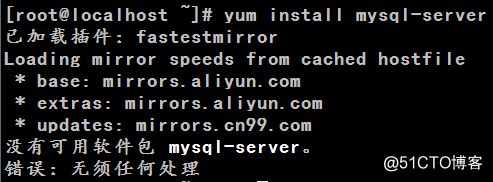
[root@localhost ~]# yum install mysql-server
这是因为CentOS 7用mariadb代替了MySQL数据库软件。 有两种解决办法:
1、方法一:安装mariadb 安装mariadb,大小59 M。
[root@localhost ~]# yum install mariadb-server mariadb systemctl start mariadb #启动MariaDB systemctl stop mariadb #停止MariaDB systemctl restart mariadb #重启MariaDB systemctl enable mariadb #设置开机启动 所以先启动数据库
[root@localhost ~]# systemctl start mariadb
[root@localhost ~]# mysql -u root -p Copyright (c) 2000, 2014, Oracle, MariaDB Corporation Ab and others. Type 'help;' or '\h' for help. Type '\c' to clear the current input statement.
MariaDB [(none)]> show databases; MariaDB [(none)]> 安装mariadb后显示的也是 MariaDB [(none)]> ,可能看起来有点不习惯。下面是第二种方法。
2、方法二:官网下载安装mysql-server
service mysqld restart
[root@localhost ~]# mysql -u root Copyright (c) 2000, 2015, Oracle and/or its affiliates. All rights reserved.
Oracle is a registered trademark of Oracle Corporation and/or its Type 'help;' or '\h' for help. Type '\c' to clear the current input statement.
mysql> show databases; mysql> 设置mysql登录密码:
mysql> set password for 'root'@'localhost' =password('password');
mysql> 在mysql安装过程中如下内容:
Installed:
Dependency Installed:
Replaced: 所以安装完以后mariadb自动就被替换了,将不再生效。
[root@localhost ~]# rpm -qa |grep mariadb 三、配置mysql
1、编码 最后加上编码配置
[mysql]
2、远程连接设置
mysql> grant all privileges on . to root@'%'identified by 'password';
mysql>create user 'username'@'%' identified by 'password'; |
用户登录
还没有账号?立即注册
用户注册
投稿取消
| 文章分类: |
|
还能输入300字

上传中....