
 等我6级弄死你
jquery的动画模块提供了包括隐藏显示动画、渐显渐隐动画、滑入划出动画,同时还支持构造复杂自定义动画,动画模块用到了之前讲解过的很多其它很多模块,例如队列、事件等等,
$.animate()的用法如下:animate(prop,speed,easing,callback),参数如下:
- prop ;对象, ;包含将要动画的样式
- speed ;字符串或数字 ;动画运行持续时间,单位毫秒,可以设置为"slow"、"normal"、"fast"等预定义时间
- easing ;字符串 ;表示所使用的缓动函数
- callback ;回调函数 ;当动画完成时被调用
还是举个栗子:
<!doctype html>
<html lang="en">
<head>
    <meta charset="utf-8">
    <title>document</title>
    <script src="http://www.51sjk.com/Upload/Articles/1/0/270/270941_20210708050912387.js"></script>
    <style>
        div{width: 200px;height: 50px;background: #cfc;}
    </style>
</head>
<body>
    <button>按钮</button>
    <div></div>
    <script>
        $('button').click(function(){
            $('div').animate({width:'400px',height:'100px',background:'#f00'},2000,'linear',function(){alert('动画完成成功')})
        })
    </script>
</body>
</html>
我们定义一个div和一个按钮,再在按钮上绑定一个事件,该事件回调用$.animate()来修改div的样式,动画完成后再执行一个回调函数,效果如下:
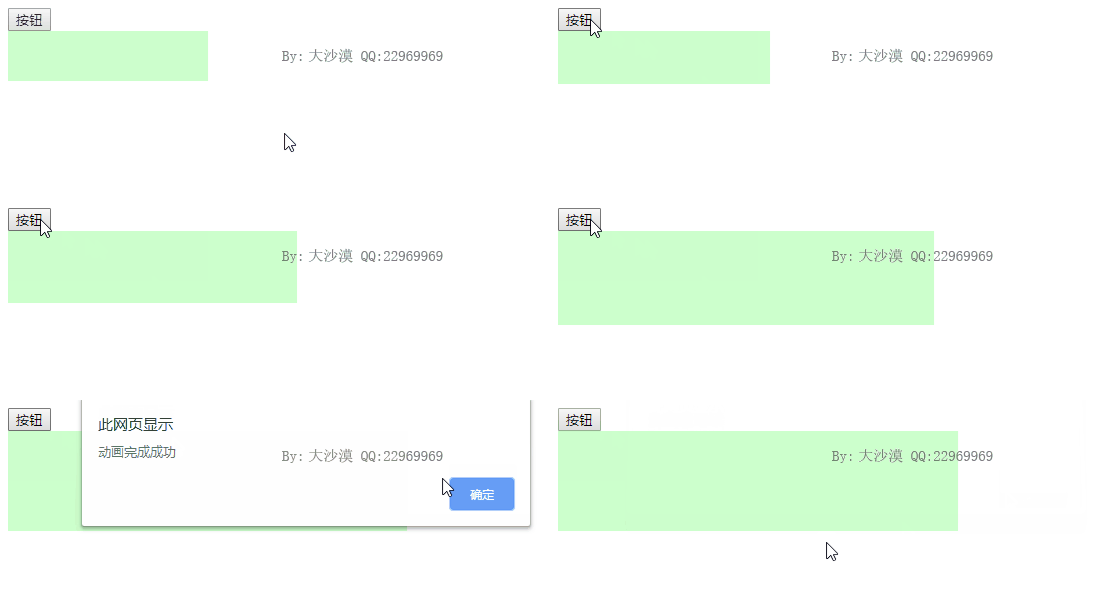
挺好用的啊,很方便的,可以用jquery实现各种动画,尺寸、位置、颜色,还可以配合css3的transform属性实现各种酷炫效果。
源码分析
jquery内在执行$.animate()时会遍历参数1也就是我们要修改的样式,然后分别创建一个对应的$.fx对象,实际上最终的动画是在$.fx这个对象上运行的,另外jquery内部会维护一个setinterval(),默认会每隔13毫秒执行一次样式的修改,这样看起来就和动画一样了。
直接看代码吧,$.animate()实现如下:
jquery.fn.extend({
    animate: function( prop, speed, easing, callback ) {                //动画入口函数,负责执行单个样式的动画,
        var optall = jquery.speed( speed, easing, callback );                //调用$.speed修正运行时间、缓动函数,重写完成回调函数

        if ( jquery.isemptyobject( prop ) ) {                                //如果prop中没有需要执行动画的样式
            return this.each( optall.complete, [ false ] );                        //则立即调用完成回调函数
        }

        // do not change referenced properties as per-property easing will be lost
        prop = jquery.extend( {}, prop );                                    //复制一份动画样式的集合,以避免改变原始动画样式集合,因为每个动画样式的缓存函数最终会丢失。

        function doanimation() {                                            //执行动画的函数,后面再讲解,我们先把流程理解了
            /*略*/
        }

        return optall.queue === false ?                                        //queue表示是否将当前动画放入队列
            this.each( doanimation ) :                                             //如果optall.queue为false,则调用.each()方法在每个匹配元素上执行动画函数doanimation();
            this.queue( optall.queue, doanimation );                             //否则调用方法.queue()将动画函数doanimation()插入选项queue指定的队列中。
    },
})
$.queue之前已经讲过了,可以看这个连接,由于插入的是默认动画,因此插入到队列后就会自动执行的。
$.speed()是用于负责修正运行时间、缓动函数,重写完成回调函数的,如下:
jquery.extend({
    speed: function( speed, easing, fn ) {         //负责修正运行时间、缓动函数,重写完成回调函数。//speed:表示动画持续时间、easing是所使用的缓动函数、fn是动画完成时被调用的函数。
        var opt = speed && typeof speed === "object" ? jquery.extend( {}, speed ) : {     //如果speed是对象,即$.fn.animate()只传入了两个参数的格式,则将该对象赋值给opt对象。
            complete: fn || !fn && easing ||                                                     //依次尝试把最后一个参数作为完成回调函数保存到complete中
                jquery.isfunction( speed ) && speed,
            duration: speed,                                                                     //动画持续时间
            easing: fn && easing || easing && !jquery.isfunction( easing ) && easing             //如果参数3非空,则设置easing为参数2
        };

        opt.duration = jquery.fx.off ? 0 : typeof opt.duration === "number" ? opt.duration :     //修正duration选项
            opt.duration in jquery.fx.speeds ? jquery.fx.speeds[ opt.duration ] : jquery.fx.speeds._default;

        // normalize opt.queue - true/undefined/null -> "fx"
        if ( opt.queue == null || opt.queue === true ) {
            opt.queue = "fx";
        }

        // queueing
        opt.old = opt.complete;                                                                 //备份完成回调函数complete到old属性中

        opt.complete = function( nounmark ) {                                                     //重写complete函数,当前动画完成时,自动取出下一个动画函数。
            if ( jquery.isfunction( opt.old ) ) {
                opt.old.call( this );
            }

            if ( opt.queue ) {
                jquery.dequeue( this, opt.queue );
            } else if ( nounmark !== false ) {
                jquery._unmark( this );
            }
        };

        return opt;                                                                             //最后返回opt
    },
})
$.animate函数非常灵活,可以有如下形式:
- animate(prop,speed,easing,callback)
- animate(prop,easing,callback)
- animate(prop,speed,callback)
- animate(prop,callback)
- animate(prop,obj)
这就是$.speed函数的功劳了。
回到$.animate函数内,当将doanimation插入到队列后,由于是默认队列就会自动执行该函数,doanimation实现如下:
function doanimation() {                    //负责遍历动画样式集合,先修正、解析、备份样式名,然后为每个样式调用构造函数jquery.fx()构造动画
    // xxx 'this' does not always have a nodename when running the
    // test suite

    if ( optall.queue === false ) {                //如果选项queue为false,动画将会立即执行
        jquery._mark( this );
    }

    var opt = jquery.extend( {}, optall ),                    //opt是完整选项集optall的副本;
        iselement = this.nodetype === 1,                    //iselement用于检测当前元素是否是dom元素
        hidden = iselement && jquery(this).is(":hidden"),    //hidden表示当前元素是否是可见的
        name, val, p, e,
        parts, start, end, unit,
        method;

    // will store per property easing and be used to determine when an animation is complete
    opt.animatedproperties = {};                            //存放动画样式的缓存函数,当动画完成后,属性值被设置为true。

    for ( p in prop ) {                                        //遍历动画样式集合prop。修正、解析、备份样式        ;p是每一个样式的名称,比如:width height

        // property name normalization
        name = jquery.camelcase( p );                            ///将样式名格式化为驼峰式
        if ( p !== name ) {
            prop[ name ] = prop[ p ];
            delete prop[ p ];
        }

        val = prop[ name ];

        //获取每个样式的结束值和缓动函数
        if ( jquery.isarray( val ) ) {                            //如果样式值是一个数组
            opt.animatedproperties[ name ] = val[ 1 ];                //取第二个元素为该样式的缓动函数
            val = prop[ name ] = val[ 0 ];                            //修正第一个元素为该样式的结束值。
        } else {
            opt.animatedproperties[ name ] = opt.specialeasing && opt.specialeasing[ name ] || opt.easing || 'swing';
        }

        if ( val === "hide" && hidden || val === "show" && !hidden ) {    //如果值是hide但当前元素不可见,或者值是show但当前元素可见,表示不需要执行动画就已经完成了
            return opt.complete.call( this );                                 //直接触发完成回调函数。这是一个优化措施
        }

        if ( iselement && ( name === "height" || name === "width" ) ) {    //备份或修正可能影响动画效果的样式,这些样式将在动画完成后被恢复。
            // make sure that nothing sneaks out
            // record all 3 overflow attributes because ie does not
            // change the overflow attribute when overflowx and
            // overflowy are set to the same value
            opt.overflow = [ this.style.overflow, this.style.overflowx, this.style.overflowy ];

            // set display property to inline-block for height/width
            // animations on inline elements that are having width/height animated
            if ( jquery.css( this, "display" ) === "inline" &&
                    jquery.css( this, "float" ) === "none" ) {

                // inline-level elements accept inline-block;
                // block-level elements need to be inline with layout
                if ( !jquery.support.inlineblockneedslayout || defaultdisplay( this.nodename ) === "inline" ) {
                    this.style.display = "inline-block";

                } else {
                    this.style.zoom = 1;
                }
            }
        }
    }

    if ( opt.overflow != null ) {         //如果opt.overflow不为空,即样式值是width或height、
        this.style.overflow = "hidden";     //则设置样式overflow为'hidden',即超出部分隐藏,这样不影响其他布局
    }

    for ( p in prop ) {                 //再次遍历动画样式集合prop,为每个属性执行动画效果 p是每个样式名,比如:width、height
        e = new jquery.fx( this, opt, p );     //调用构造函数jquery.fn(elem,options,prop)创建一个标准动画对象
        val = prop[ p ];                     //获取设置的结束值,比如:500px,600px

        if ( rfxtypes.test( val ) ) {         //如果样式值val是toggle、show或hide

            // tracks whether to show or hide based on private
            // data attached to the element
            method = jquery._data( this, "toggle" + p ) || ( val === "toggle" ? hidden ? "show" : "hide" : 0 );
            if ( method ) {
                jquery._data( this, "toggle" + p, method === "show" ? "hide" : "show" );
                e[ method ]();
            } else {
                e[ val ]();
            }

        } else {                             //如果样式值是数值型,则计算开始值start、结束值end、单位unit,然后开始执行动画
            parts = rfxnum.exec( val );         //rfxnum用于匹配样式值中的运算符、数值、单位。rfxnum = /^([+\-]=)?([\d+.\-]+)([a-z%]*)$/i,    格式:array [ "700px", 符号, "数值", "单位" ] ,比如:'+=20px',匹配后:array [ "+=20px", "+=", "20", "px" ]
            start = e.cur();                     //获取初始值,比如:200

            if ( parts ) {                         //如果样式值能够匹配正则parts,则说明是数值型,就计算开始值start、结束值end、单位unit,然后开始执行动画。
                end = parsefloat( parts[2] );                                         //end是传入的样式的数值,可能是结束值,也可能要加上或减去的值
                unit = parts[3] || ( jquery.cssnumber[ p ] ? "" : "px" );             //unit是最后的单位,如果没有传入则设置为px单位

                // we need to compute starting value
                if ( unit !== "px" ) {                                                 //如果结束值的单位不是默认单位px,则将开始值start换算为与结束值end的单位一致的数值。
                    jquery.style( this, p, (end || 1) + unit);
                    start = ( (end || 1) / e.cur() ) * start;
                    jquery.style( this, p, start + unit);
                }

                // if a +=/-= token was provided, we're doing a relative animation
                if ( parts[1] ) {                                                     //如果样式值以+= 或 -=开头,则用开始值加上或减去给定的值,
                    end = ( (parts[ 1 ] === "-=" ? -1 : 1) * end ) + start;             //得到结束值
                }

                e.custom( start, end, unit );                                         //调用jquery.fx.prototype.custom(from,to,unit)开始执行动画。start是开始值,end是结束值,unit是单位。

            } else {
                e.custom( start, val, "" );                                     //样式值不是数值型时,仍然开始执行动画,以支持插件扩展的动画样式。
            }
        }
    }

    // for js strict compliance
    return true;
}
函数内首先调用new jquery.fx()创建一个$.fx对象,最后调用该对象的custom开始执行动画,$.fx的定义如下:
jquery.extend({
    fx: function( elem, options, prop ) {         //jquery构造函数,用于为单个样式构造动画对象。elem:当前匹配元素、options:当前动画的选项集、prop:参与动画的当前样式。
        this.options = options;
        this.elem = elem;
        this.prop = prop;

        options.orig = options.orig || {};
    }
})
就是在当前实例上挂载几个属性,它的其它方法都定义在原型上的,例如cur和custom如下:
jquery.fx.prototype = {
    // get the current size
    cur: function() {             //获取this.elem元素this.prop样式当前的值
        if ( this.elem[ this.prop ] != null && (!this.elem.style || this.elem.style[ this.prop ] == null) ) {     //如果当前dom元素的this.prop属性不为空,且没有style属性或者有style属性但是style[this.prop]为null
            return this.elem[ this.prop ];                                                                                 //
        }

        var parsed,
            r = jquery.css( this.elem, this.prop );                             //获取该dom元素的prop样式的值,比如:200px
        // empty strings, null, undefined and "auto" are converted to 0,
        // complex values such as "rotate(1rad)" are returned as is,
        // simple values such as "10px" are parsed to float.
        return isnan( parsed = parsefloat( r ) ) ? !r || r === "auto" ? 0 : r : parsed;
    },

    // start an animation from one number to another
    custom: function( from, to, unit ) {                                     //负责开始执行单个样式的动画。from:当前样式的开始值、to:当前样式的结束值、unit:当前样式的单位。
        var self = this,                                                         //self是当前样式的jquery.fx对象
            fx = jquery.fx;

        this.starttime = fxnow || createfxnow();                                 //动画开始的时间,值为当前时间,每次调用animate()方法时多个样式的该值是一样的。
        this.end = to;                                                            //当前样式的结束值
        this.now = this.start = from;                                            //当前样式的单位。
        this.pos = this.state = 0;                                                //this.now:当前帧样式值    、this.start:当前样式的开始值
        this.unit = unit || this.unit || ( jquery.cssnumber[ this.prop ] ? "" : "px" );     //this.pos:差值百分比。this.state:已执行时间的百分比

        function t( gotoend ) {                                                 //构造封装了jquery.fx.prototype.step()的单帧闭包动画函数,函数t通过闭包机制引用jquery.fx()对象。
            return self.step( gotoend );
        }

        t.queue = this.options.queue;         //动画类型,默认为:fx
        t.elem = this.elem;                 //elem是当前匹配元素
        t.savestate = function() {             //记录当前样式动画的状态,在stop()中用的到
            if ( self.options.hide && jquery._data( self.elem, "fxshow" + self.prop ) === undefined ) {
                jquery._data( self.elem, "fxshow" + self.prop, self.start );
            }
        };

        if ( t() && jquery.timers.push(t) && !timerid ) {                         //执行单帧闭包动画函数t(gotoend),如果该函数返回true则表示动画尚未完成,则并将其插入全局动画函数数组jquery.timers中,如果timeid不存在,timeid是执行动画的全局定时器。
            timerid = setinterval( fx.tick, fx.interval );                             //创建一个定时器。周期性的执行jquery.fx.tick()方法,从而开始执行动画。
        }
    },
$.tick()内会执行setinterval,隔13毫秒就执行一次 t() 函数,t函数内会执行step()函数,该函数会计算匹配元素下一次的样式值,如下:
writer by:大沙漠 qq:22969969
jquery.fx.prototype = {
    step: function( gotoend ) {             //负责计算和执行当前样式动画的一帧。
        var p, n, complete,
            t = fxnow || createfxnow(),         //t是当前时间
            done = true,
            elem = this.elem,                     //匹配元素
            options = this.options;             //选项

        if ( gotoend || t >= options.duration + this.starttime ) {     //动画已完成的逻辑 如果参数totoend为true(stop())调用时),或超出了动画完成时间,最后会返回false
            this.now = this.end;                                         //设置当前帧式值为结束值
            this.pos = this.state = 1;                                     //设置已执行时间百分比和差值百分比为1
            this.update();                                                 //调用update()更新样式值。这三行代码是用来修正动画可能导致的样式误差的。

            options.animatedproperties[ this.prop ] = true;             //设置options.animatedproperties[ this.prop ]为true,表示当前样式动画已经执行完成。

            for ( p in options.animatedproperties ) {
                if ( options.animatedproperties[ p ] !== true ) {
                    done = false;
                }
            }

            if ( done ) {
                // reset the overflow
                if ( options.overflow != null && !jquery.support.shrinkwrapblocks ) {

                    jquery.each( [ "", "x", "y" ], function( index, value ) {
                        elem.style[ "overflow" + value ] = options.overflow[ index ];
                    });
                }

                // hide the element if the "hide" operation was done
                if ( options.hide ) {
                    jquery( elem ).hide();
                }

                // reset the properties, if the item has been hidden or shown
                if ( options.hide || options.show ) {
                    for ( p in options.animatedproperties ) {
                        jquery.style( elem, p, options.orig[ p ] );
                        jquery.removedata( elem, "fxshow" + p, true );
                        // toggle data is no longer needed
                        jquery.removedata( elem, "toggle" + p, true );
                    }
                }

                // execute the complete function
                // in the event that the complete function throws an exception
                // we must ensure it won't be called twice. #5684

                complete = options.complete;
                if ( complete ) {

                    options.complete = false;
                    complete.call( elem );
                }
            }

            return false;

        } else {                                                     //如果当前样式动画尚未完成
            // classical easing cannot be used with an infinity duration
            if ( options.duration == infinity ) {
                this.now = t;
            } else {
                n = t - this.starttime;                             //n = 当前时间-开始时间 = 已执行时间
                this.state = n / options.duration;                     //已执行时间百分比 = 已执行时间/运行时间

                // perform the easing function, defaults to swing
                this.pos = jquery.easing[ options.animatedproperties[this.prop] ]( this.state, n, 0, 1, options.duration );     //差值百分比=缓动函数(已执行时间百分比,已执行时间,0,1,运行时间)
                this.now = this.start + ( (this.end - this.start) * this.pos );                                                 //当前帧样式值=开始值+差值百分比*(结束值-开始值)
            }
            // perform the next step of the animation
            this.update();                                                                                                         //更新样式值。
        }

        return true;
    }
}
计算出样式值后会将值保存到this.now上面,最终调用this.update()进行更新样式,update源码如下:
jquery.fx.prototype = {
    update: function() {                 //更新当前样式的值。内部通过jquery.fx.step中的方法来更新样式的值
        if ( this.options.step ) {                 //如果当前的animate指定了step回调函数
            this.options.step.call( this.elem, this.now, this );     //则调用该回调函数,参数分别是当前样式的值和元素的引用
        }

        ( jquery.fx.step[ this.prop ] || jquery.fx.step._default )( this );     //否则调用默认方法jquery.fx.step._default()直接设置内联样式(style属性)或dom属性。
    },
}
可以看到优先通过$.fx.step来进行修改样式,其次通过$.fx.step._default来修改,如下:
jquery.extend( jquery.fx, {
    step: {                     //最后的步骤:更新样式
        opacity: function( fx ) {         //修正样式opacity的设置行为
            jquery.style( fx.elem, "opacity", fx.now );
        },

        _default: function( fx ) {         //默认情况下,通过直接设置内联属性(style属性)或dom属性更新样式值。
            if ( fx.elem.style && fx.elem.style[ fx.prop ] != null ) {     //如果当前元素有style属性,并且syle含有指定的样式
                fx.elem.style[ fx.prop ] = fx.now + fx.unit;                 //在style属性上设置样式值
            } else {
                fx.elem[ fx.prop ] = fx.now;                               //否则在dom元素上设置dom属性,例如:scrolltop、scrollleft
            }
        }
    }
})
可以看到最终就是修改的元素的style来修改样式的,或者直接修改dom对象属性。
