
 我想取一个好长好长好长好长好长好长的
本文实例为大家分享了openlayers测量距离与面积的具体代码,供大家参考,具体内容如下
1、地图测量功能
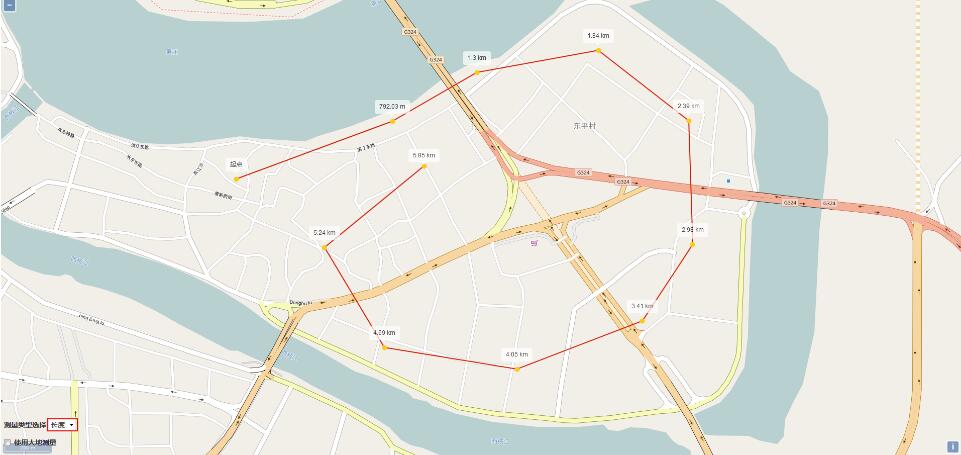
一般的地图的测量功能主要表现在两个方面,一是测量距离,一是测量面积;面积的测量是根据鼠标绘制的范围,通过地理坐标系的转换而计算出实际面积大小,距离的测量是根据鼠标在地图上绘制的点,实时计算出两点之间的实际距离,下面我们就在openlayers3中来实现这一功能;
2、代码实现
<!doctype html>
<html xmlns="http://www.51sjk.com/Upload/Articles/1/0/261/261501_20210702000640265.jpg">
<head>
<meta http-equiv="content-type" content="text/html; charset=utf-8"/>
 <title></title>
 <script src="../lib/ol/ol.js"></script>
 <link  rel="stylesheet" />
 <script src="../lib/jquery/jquery-1.8.2.js"></script>
 <link  rel="stylesheet" />
 <script src="../lib/bootstrap/bootstrap.min.js"></script>
 <style type="text/css">
  #map {
   width: 100%;
   height: 100%;
   position: absolute;
  }

  #menu {
   float: left;
   position: absolute;
   bottom: 10px;
   left: 10px;
   z-index: 2000;
  }

  .checkbox {
   left: 20px;
  }
  /**
  * 提示框的样式信息
  */
  .tooltip {
   position: relative;
   background: rgba(0, 0, 0, 0.5);
   border-radius: 4px;
   color: white;
   padding: 4px 8px;
   opacity: 0.7;
   white-space: nowrap;
  }

  .tooltip-measure {
   opacity: 1;
   font-weight: bold;
  }

  .tooltip-static {
   background-color: #ffffff;
   color: black;
   border: 1px solid white;
  }

   .tooltip-measure:before,
   .tooltip-static:before {
    border-top: 6px solid rgba(0, 0, 0, 0.5);
    border-right: 6px solid transparent;
    border-left: 6px solid transparent;
    content: "";
    position: absolute;
    bottom: -6px;
    margin-left: -7px;
    left: 50%;
   }

   .tooltip-static:before {
    border-top-color: #ffffff;
   }

  #scalebar {
   float: left;
   margin-bottom: 10px;
  }
 </style>
 <script type="text/javascript">
  $(function () {
   //初始化地图
   var map = new ol.map({
    target: 'map',
    layers: [
     new ol.layer.tile({
      source:new ol.source.osm()
     })
    ],
    view: new ol.view({
     center: new ol.proj.fromlonlat([114.4250, 23.0890]),
     zoom: 18,
     maxzoom: 20
    })
   });

   //定义矢量数据源
   var source = new ol.source.vector();
   //定义矢量图层
   var vector = new ol.layer.vector({
    source: source,
    style: new ol.style.style({
     fill: new ol.style.fill({
      color:'rgba(255,255,255,0.2)'
     }),
     stroke: new ol.style.stroke({
      color: '#e21e0a',
      width:2
     }),
     image: new ol.style.circle({
      radius: 5,
      fill: new ol.style.fill({
       color:'#ffcc33'
      })
     })
    })
   });
   //将矢量图层添加到地图中
   map.addlayer(vector);

   //添加比例尺控件
   var scalelinecontrol = new ol.control.scaleline({
    units: 'metric',
    target: 'scalebar',
    classname: 'ol-scale-line'
   });
   map.addcontrol(scalelinecontrol);


   //创建一个wgs84球体对象
   var wgs84sphere = new ol.sphere(6378137);
   //创建一个当前要绘制的对象
   var sketch = new ol.feature();
   //创建一个帮助提示框对象
   var helptooltipelement;
   //创建一个帮助提示信息对象
   var helptooltip;
   //创建一个测量提示框对象
   var measuretooltipelement;
   //创建一个测量提示信息对象
   var measuretooltip;
   //继续绘制多边形的提示信息
   var continuepolygonmsg = 'click to continue drawing the polygon';
   //继续绘制线段的提示信息
   var continuelinemsg = 'click to continue drawing the line';

   //鼠标移动触发的函数
   var pointermovehandler = function (evt) {
    //indicates if the map is currently being dragged.
    //only set for pointerdrag and pointermove events. default is false.
    //如果是平移地图则直接结束
    if (evt.dragging) {
     return;
    }
    //帮助提示信息
    var helpmsg = 'click to start drawing';

    if (sketch) {
     //get the feature's default geometry.
     //a feature may have any number of named geometries.
     //获取绘图对象的几何要素
     var geom = sketch.getgeometry();
     //如果当前绘制的几何要素是多边形,则将绘制提示信息设置为多边形绘制提示信息
     //如果当前绘制的几何要素是多线段,则将绘制提示信息设置为多线段绘制提示信息
     if (geom instanceof ol.geom.polygon) {
      helpmsg = continuepolygonmsg;
     } else if (geom instanceof ol.geom.linestring) {
      helpmsg = continuelinemsg;
     }
    }
    //设置帮助提示要素的内标签为帮助提示信息
    helptooltipelement.innerhtml = helpmsg;
    //设置帮助提示信息的位置
    //the coordinate in view projection corresponding to the original browser event.
    helptooltip.setposition(evt.coordinate);
    //移除帮助提示要素的隐藏样式
    $(helptooltipelement).removeclass('hidden');
   };

   //触发pointermove事件
   map.on('pointermove', pointermovehandler);

   //当鼠标移除地图视图的时为帮助提示要素添加隐藏样式
   $(map.getviewport()).on('mouseout', function () {
    $(helptooltipelement).addclass('hidden');
   });

   //获取大地测量复选框
   var geodesiccheckbox = document.getelementbyid('geodesic');
   //获取类型
   var typeselect = document.getelementbyid('type');
   //定义一个交互式绘图对象
   var draw;

   //添加交互式绘图对象的函数
   function addinteraction() {
    // 获取当前选择的绘制类型
    var type = typeselect.value == 'area' ? 'polygon' : 'linestring';
    //创建一个交互式绘图对象
    draw = new ol.interaction.draw({
     //绘制的数据源
     source: source,
     //绘制类型
     type: type,
     //样式
     style: new ol.style.style({
      fill: new ol.style.fill({
       color:'rgba(255,255,255,0.2)'
      }),
      stroke: new ol.style.stroke({
       color: 'rgba(0,0,0,0.5)',
       linedash: [10, 10],
       width:2
      }),
      image: new ol.style.circle({
       radius: 5,
       stroke: new ol.style.stroke({
        color:'rgba(0,0,0,0.7)'
       }),
       fill: new ol.style.fill({
        color: 'rgba(255,255,255,0.2)'
       })
      })
     })
    });
    //将交互绘图对象添加到地图中
    map.addinteraction(draw);

    //创建测量提示框
    createmeasuretooltip();
    //创建帮助提示框
    createhelptooltip();

    //定义一个事件监听
    var listener;
    //定义一个控制鼠标点击次数的变量
    var count = 0;
    //绘制开始事件
    draw.on('drawstart', function (evt) {
     //the feature being drawn.
     sketch = evt.feature;
     //提示框的坐标
     var tooltipcoord = evt.coordinate;
     //监听几何要素的change事件
     //increases the revision counter and dispatches a 'change' event.

     listener = sketch.getgeometry().on('change', function (evt) {
      //the event target.
      //获取绘制的几何对象
      var geom = evt.target;
      //定义一个输出对象,用于记录面积和长度
      var output;
      if (geom instanceof ol.geom.polygon) {
       map.removeeventlistener('singleclick');
       map.removeeventlistener('dblclick');
       //输出多边形的面积
       output = formatarea(geom);
       //return an interior point of the polygon.
       //获取多变形内部点的坐标
       tooltipcoord = geom.getinteriorpoint().getcoordinates();
      } else if (geom instanceof ol.geom.linestring) {
       //输出多线段的长度
       output = formatlength(geom);
       //return the last coordinate of the geometry.
       //获取多线段的最后一个点的坐标
       tooltipcoord = geom.getlastcoordinate();
      }

      //设置测量提示框的内标签为最终输出结果
      measuretooltipelement.innerhtml = output;
      //设置测量提示信息的位置坐标
      measuretooltip.setposition(tooltipcoord);
     });

     //地图单击事件
     map.on('singleclick', function (evt) {
      //设置测量提示信息的位置坐标,用来确定鼠标点击后测量提示框的位置
      measuretooltip.setposition(evt.coordinate);
      //如果是第一次点击,则设置测量提示框的文本内容为起点
      if (count == 0) {
       measuretooltipelement.innerhtml = "起点";
      }
      //根据鼠标点击位置生成一个点
      var point = new ol.geom.point(evt.coordinate);
      //将该点要素添加到矢量数据源中
      source.addfeature(new ol.feature(point));
      //更改测量提示框的样式,使测量提示框可见
      measuretooltipelement.classname = 'tooltip tooltip-static';
      //创建测量提示框
      createmeasuretooltip();
      //点击次数增加
      count++;
     });

     //地图双击事件
     map.on('dblclick', function (evt) {
      //根据
      var point = new ol.geom.point(evt.coordinate);
      source.addfeature(new ol.feature(point));
     });
    }, this);
    //绘制结束事件
    draw.on('drawend', function (evt) {
     count = 0;
     //设置测量提示框的样式
     measuretooltipelement.classname = 'tooltip tooltip-static';
     //set the offset for this overlay.
     //设置偏移量
     measuretooltip.setoffset([0, -7]);
     //清空绘制要素
     sketch = null;
     //清空测量提示要素
     measuretooltipelement = null;
     //创建测量提示框
     createmeasuretooltip();
     //removes an event listener using the key returned by on() or once().
     //移除事件监听
     ol.observable.unbykey(listener);
     //移除地图单击事件
     map.removeeventlistener('singleclick');
    }, this);
   }
   //创建帮助提示框
   function createhelptooltip() {
    //如果已经存在帮助提示框则移除
    if (helptooltipelement) {
     helptooltipelement.parentnode.removechild(helptooltipelement);
    }
    //创建帮助提示要素的div
    helptooltipelement = document.createelement('div');
    //设置帮助提示要素的样式
    helptooltipelement.classname = 'tooltip hidden';
    //创建一个帮助提示的覆盖标注
    helptooltip = new ol.overlay({
     element: helptooltipelement,
     offset: [15, 0],
     positioning:'center-left'
    });
    //将帮助提示的覆盖标注添加到地图中
    map.addoverlay(helptooltip);
   }
   //创建测量提示框
   function createmeasuretooltip() {
    //创建测量提示框的div
    measuretooltipelement = document.createelement('div');
    measuretooltipelement.setattribute('id','lengthlabel');
    //设置测量提示要素的样式
    measuretooltipelement.classname = 'tooltip tooltip-measure';
    //创建一个测量提示的覆盖标注
    measuretooltip = new ol.overlay({
     element: measuretooltipelement,
     offset: [0, -15],
     positioning:'bottom-center'
    });
    //将测量提示的覆盖标注添加到地图中
    map.addoverlay(measuretooltip);
   }
   //测量类型发生改变时触发事件
   typeselect.onchange = function () {
    //移除之前的绘制对象
    map.removeinteraction(draw);
    //重新进行绘制
    addinteraction();
   };

   //格式化测量长度
   var formatlength = function (line) {
    //定义长度变量
    var length;
    //如果大地测量复选框被勾选,则计算球面距离
    if (geodesiccheckbox.checked) {
     //return the coordinates of the linestring.
     //获取坐标串
     var coordinates = line.getcoordinates();
     //初始长度为0
     length = 0;
     //获取源数据的坐标系
     var sourceproj = map.getview().getprojection();
     //进行点的坐标转换
     for (var i = 0; i < coordinates.length - 1; i++) {
      //第一个点
      var c1 = ol.proj.transform(coordinates[i], sourceproj, 'epsg:4326');
      //第二个点
      var c2 = ol.proj.transform(coordinates[i + 1], sourceproj, 'epsg:4326');
      //获取转换后的球面距离
      //returns the distance from c1 to c2 using the haversine formula.
      length += wgs84sphere.haversinedistance(c1,c2);
     }
    } else {
     //return the length of the linestring on projected plane.
     //计算平面距离
     length = math.round(line.getlength() * 100) / 100;
    }
    //定义输出变量
    var output;
    //如果长度大于1000,则使用km单位,否则使用m单位
    if (length > 1000) {
     output = (math.round(length / 1000 * 100) / 100) + ' ' + 'km'; //换算成km单位
    } else {
     output = (math.round(length * 100) / 100) + ' ' + 'm'; //m为单位
    }
    return output;
   };

   //格式化测量面积
   var formatarea = function (polygon) {
    //定义面积变量
    var area;
    //如果大地测量复选框被勾选,则计算球面面积
    if (geodesiccheckbox.checked) {
     //获取初始坐标系
     var sourceproj = map.getview().getprojection();
     //make a complete copy of the geometry.
     //transform each coordinate of the geometry from one coordinate reference system to another.
     //the geometry is modified in place. for example, a line will be transformed to a line and a circle to a circle.
     //if you do not want the geometry modified in place, first clone() it and then use this function on the clone.
     //克隆该几何对象然后转换坐标系
     var geom = polygon.clone().transform(sourceproj, 'epsg:4326');
     //return the nth linear ring of the polygon geometry.
     //return null if the given index is out of range.
     //the exterior linear ring is available at index 0 and the interior rings at index 1 and beyond.
     //获取多边形的坐标系
     var coordinates = geom.getlinearring(0).getcoordinates();
     //returns the geodesic area for a list of coordinates.
     //获取球面面积
     area = math.abs(wgs84sphere.geodesicarea(coordinates));
    } else {
     //获取平面面积
     area = polygon.getarea();
    }
    //定义输出变量
    var output;
    //当面积大于10000时,转换为平方千米,否则为平方米
    if (area > 10000) {
     output = (math.round(area/1000000*100)/100) + ' ' + 'km<sup>2</sup>';
    } else {
     output = (math.round(area*100)/100) + ' ' + 'm<sup>2</sup>';
    }
    return output;
   };
   //添加交互绘图对象
   addinteraction();
  });
 </script>
</head>
<body>
 <div id="map">
  <div id="menu">
   <label>测量类型选择</label>
   <select id="type">
    <option value="length">长度</option>
    <option value="area">面积</option>
   </select>
   <label class="checkbox"><input type="checkbox" id="geodesic" />使用大地测量</label>
  </div>
 </div>
 <div id="scalebar"></div>
</body>
</html>
3、结果展示
测量距离
测量面积
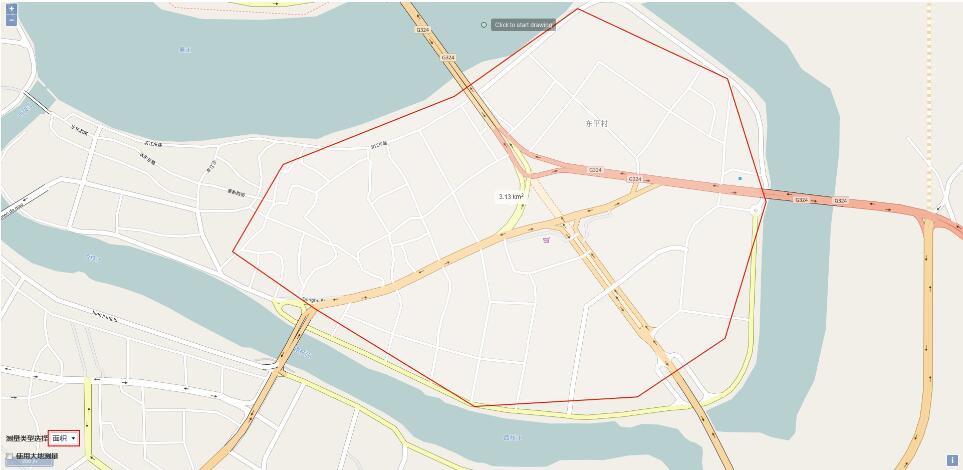
此外,还能勾选使用大地测量的复选框,进行球面距离和面积的测量
以上就是本文的全部内容,希望对大家的学习有所帮助,也希望大家多多支持。
