
 我是你身体长出的妖娆的花
本文实例为大家分享了ajax实现验证码功能的具体代码,供大家参考,具体内容如下
首先创建一个验证码:
<%@ page contenttype="image/jpeg; charset=utf-8"
  language="java" import="java.util.*,java.awt.*,java.awt.image.*,javax.imageio.*"
  pageencoding="utf-8"%>
<!-- 以上导入awt和awt.image包 -->
<%!
  //获取随机颜色
  public color getcolor(){
   random random = new random();
   //使用rgb()随机产生颜色
   int r = random.nextint(256);
   int g = random.nextint(256);
   int b = random.nextint(256);

   return new color(r,g,b);
  }

  //获取随机数字 产生一个4位数
  public string getnum(){
   string str = "";
   random random = new random();
   for(int i = 0;i < 4;i++){
    str += random.nextint(10); //0-9
   }
   return str;
  }
%>

<%
  /* 清除缓存 */
  response.setheader("pragma", "mo-cache");
  response.setheader("cache-control", "no-cache");
  response.setdateheader("expires", 0);
  //产生矩形框
  bufferedimage image = new bufferedimage(80,30,bufferedimage.type_int_rgb);
  //获取画笔工具
  graphics g = image.getgraphics();
  //设置矩形框的颜色
  g.setcolor(new color(200,200,200));
  //设置坐标和宽高
  g.fillrect(0, 0, 80, 30);

  //随机产生干扰线
  for(int i = 0;i < 30;i++){
   random random = new random();
   int x = random.nextint(80);
   int y = random.nextint(30);
   int x1 = random.nextint(x + 10);
   int y1 = random.nextint(y + 10);
   //设置随机颜色
   g.setcolor(getcolor());
   //画出来
   g.drawline(x, y, x1, y1);
  }

  //字的颜色和数字
  g.setfont(new font("microsoft yahei",font.bold,16));
  g.setcolor(color.black);
  //获取随机数字
  string checknum = getnum();

  //给字拼接空格
  stringbuffer sb = new stringbuffer();
  for(int i = 0;i < checknum.length();i++){
   sb.append(checknum.charat(i) + " ");
  }
  //画出数字
  g.drawstring(sb.tostring(), 15, 20);
  //存入session域中
  session.setattribute("checknum", checknum); //例如1010
  //将图像以jpeg的形式通过字节流输出
  imageio.write(image, "jpeg", response.getoutputstream());
  //清除缓存
  out.clear();
  //放入body中
  out = pagecontext.pushbody();
%>
将验证码压缩成图片,在checkcode.jsp中引用,并在该页面中利用ajax向服务器发送数据
<%@ page language="java" import="java.util.*" pageencoding="utf-8"%>
<%
string path = request.getcontextpath();
string basepath = request.getscheme()+"://"+request.getservername()+":"+request.getserverport()+path+"/";
%>

<!doctype html public "-//w3c//dtd html 4.01 transitional//en">
<html>
 <head>
 <base  rel="external nofollow" >

 <title>验证码</title>

 <meta http-equiv="pragma" content="no-cache">
 <meta http-equiv="cache-control" content="no-cache">
 <meta http-equiv="expires" content="0">
 <meta http-equiv="keywords" content="keyword1,keyword2,keyword3">
 <meta http-equiv="description" content="this is my page">
 <style type="text/css">
  table{
   margin: 100px auto;
  }

 </style>
 </head>

 <body>
  <table border="0" align="center">
   <tr>
    <td>验证码</td>
    <td><input type="text" name="checkcode" id="checkcodeid" maxlength="4" size="4"></td>
    <td><img alt="加载失败" src="image.jsp"></td>
    <td id="show">√√√</td>
   </tr>
  </table>
 </body>
 <script type="text/javascript">
  //去除空格
  function trim(str){
   //从左侧开始替换空格
   str = str.replace(/^\s*/,"");
   //从左侧开始替换空格
   str = str.replace(/\s$/,"");
   return str;
  }

 </script>

 <script type="text/javascript">
  //创建ajax对象
  function createajax(){
   var ajax = null;
   try{
    ajax = new activexobject("microsoft.xmlhttp");
   }catch(e){
    try{
     ajax = new xmlhttprequest();
    }catch(e1){
     alert("请更换浏览器");
    }
   }
   return ajax;
  }
 </script>


 <script type="text/javascript">
  document.getelementbyid("checkcodeid").onkeyup = function(){
   var checkcode = this.value;
   //去除空格
   checkcode = trim(checkcode);
   if(checkcode.length == 4){
    //获取ajax对象
    var ajax = createajax();
    //获取去空格的内容

    var method = "post";
    var url = "${pagecontext.request.contextpath}/checkcodeservlet?time="+new date().gettime();
    //准备发送异步请求
    ajax.open(method, url);
    //设置请求头post提交方式才需要
    ajax.setrequestheader("content-type", "application/x-www-form-urlencoded");
    //拼接实体内容
    var content = "checkcode=" + checkcode;
    //发送请求
    ajax.send(content);

    //监听服务器状态变化
    ajax.onreadystatechange = function(){
     if(ajax.readystate == 4){
      if(ajax.status == 200){
       //获取服务器内容
       var tip = ajax.responsetext;
       //获取图片路径 然后进行放入td中
       var img = document.createelement("img");
       img.src = tip;
       img.style.width = "14px";
       img.style.height = "14px";
       var td = document.getelementbyid("show");
       td.innerhtml = "";
       td.appendchild(img);
      }
     }
    }

   }

  }
 </script>
</html>
然后编写服务端,接收输入的信息,判断是否与验证码相互匹配,将对应的图片的路径以输出流的方式输出
public class checkcodeservlet extends httpservlet {
 @override
 protected void dopost(httpservletrequest req, httpservletresponse resp)
   throws servletexception, ioexception {
  req.setcharacterencoding("utf-8");
  resp.setcontenttype("text/html;charset=utf-8");
  //图片路径
  string tip = "images/msgerror.gif";

  string checkcode = req.getparameter("checkcode");
  //测试
  system.out.println(checkcode);
  //获取session域中的数字
  string checkcodeservice = (string) req.getsession().getattribute("checknum");
  //判断
  if (checkcode.equals(checkcodeservice)) {
   tip = "images/msgsent.gif";
  }
  //输出路径
  printwriter pw = resp.getwriter();
  pw.write(tip);
  pw.flush();
  pw.close();
 }
}
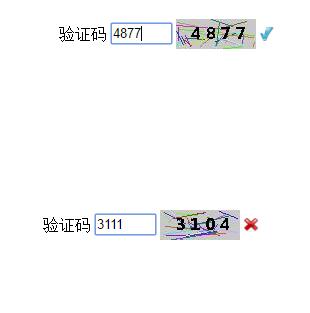
当输入第4个数字的时候就会出现提示
运行结果:
以上就是本文的全部内容,希望对大家的学习有所帮助,也希望大家多多支持。
