
 -艾玛
-艾玛
JAVA如何自动生成你的程序开发文档
项目到了尾声,大家都开始头疼——又要写文档了……是的,我们大多数人都不是从正规的Programer训练出来的。
当初学习编程序的时候,就从来没有想过要给自己写的那几个程序编写一份完整的文档,所有的注释都仅仅是为了自己当时能够想起这段代码到底是干什么的,没有人想过这些代码的升级、共享问题。 但是,开始做商业软件之后,一切都变了,尤其是大型的团队开发项目中。
大家也许注意到了,java的API文档总是紧紧跟随着JSDK的版本的提高而保持着最新的状态。试想一下,手工维护这么复杂的文档可能吗?当然不可能,这一切都是javadoc这个小程序的功劳(当然也有java类库作者们做程序注释的一份功劳)。
API文档就是用它根据最新的源代码自动生成的,一切都是这么容易——只需要你把本来就要写的注释写得更规范一些,再稍微详细一些。然而,大家似乎好像根本就没有意识到它的存在,很少有人会用它来为自己的程序生成文档。
不知道,你现在是否对它有了兴趣?好吧,下面我们就开始这个令人轻松的自动文档生成之旅。 【如何插入注释】 JAVADOC为你生成代码不是凭空来的,也不是它会自动分析你的代码——每个人都有自己的代码风格,如果要进行分析翻译恐怕还是机器码更容易生成百倍。
它的分析机制依赖于你按照规范为你的代码添加应有而足够的注释。 只有你老老实实写注释,才有可能把以前需要做双份的工作一次做了。
Javadoc工具可以从下列对象中提取出信息: · 包。 · 公共类。
· 公共接口。 · 公共或者受保护的方法。
· 公共或者受保护的变量/常数。 针对每一种特性,你都应该提供一条注释。
每一条注释都要以/**打头,以*/结尾。在每条/** …… */文档注释可包括任意格式的文字。
,它的第一个句子应该是一个总结性的语句,javadoc会自动把它提出来制作总结页。当然,这里你完全可以使用一些HTML的记号,例如。
。
表示斜体;。
。表示等宽的“打印机”字体;。
表示粗体;甚至用包括一副图象等等。 。
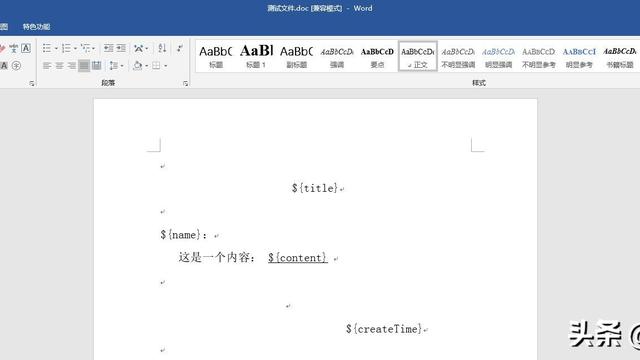
java如何根据word模板生成word文档
先下载jacob_1.10.1.zip。
解压后将jacob.dll放到windows/system32下面或\j2sdk\bin下面。 将jacob.jar加入项目。
/* * Java2word.java * * Created on 2007年8月13日, 上午10:32 * * To change this template, choose Tools | Template Manager * and open the template in the editor. */ /* * 传入数据为HashMap对象,对象中的Key代表word模板中要替换的字段,Value代表用来替换的值。 * word模板中所有要替换的字段(即HashMap中的Key)以特殊字符开头和结尾,如:$code$、$date$……, 以免执行错误的替换。
* 所有要替换为图片的字段,Key中需包含image或者Value为图片的全路径(目前只判断文件后缀名为:.bmp、 .jpg、.gif)。 * 要替换表格中的数据时,HashMap中的Key格式为“table$R@N”,其中:R代表从表格的第R行开始替换,N代表 word模板中的第N张表格;Value为ArrayList对象,ArrayList中包含的对象统一为String[],一条String[]代 表一行数据,ArrayList中第一条记录为特殊记录,记录的是表格中要替换的列号,如:要替换第一列、第三列、 第五列的数据,则第一条记录为String[3] {“1”,”3”,”5”}。
*/ package com.word.util; /** * * @author kdl */ import java.util.ArrayList; import java.util.HashMap; import java.util.Iterator; import com.jacob.activeX.ActiveXComponent; import com.jacob.com.Dispatch; import com.jacob.com.Variant; public class Java2word { private boolean saveOnExit; /** * word文档 */ Dispatch doc = null; /** * word运行程序对象s */ private ActiveXComponent word; /** * 所有word文档 */ private Dispatch documents; /** * 构造函数 */ public Java2word() { if(word==null){ word = new ActiveXComponent("Word.Application"); word.setProperty("Visible",new Variant(false)); } if(documents==null) documents = word.getProperty("Documents").toDispatch(); saveOnExit = false; } /** * 设置参数:退出时是否保存 * @param saveOnExit boolean true-退出时保存文件,false-退出时不保存文件 */ public void setSaveOnExit(boolean saveOnExit) { this.saveOnExit = saveOnExit; } /** * 得到参数:退出时是否保存 * @return boolean true-退出时保存文件,false-退出时不保存文件 */ public boolean getSaveOnExit() { return saveOnExit; } /** * 打开文件 * @param inputDoc String 要打开的文件,全路径 * @return Dispatch 打开的文件 */ public Dispatch open(String inputDoc) { return Dispatch.call(documents,"Open",inputDoc).toDispatch(); //return Dispatch.invoke(documents,"Open",Dispatch.Method,new Object[]{inputDoc},new int[1]).toDispatch(); } /** * 选定内容 * @return Dispatch 选定的范围或插入点 */ public Dispatch select() { return word.getProperty("Selection").toDispatch(); } /** * 把选定内容或插入点向上移动 * @param selection Dispatch 要移动的内容 * @param count int 移动的距离 */ public void moveUp(Dispatch selection,int count) { for(int i = 0;i < count;i="" ++)="" dispatch.call(selection,"moveup");="" }="" *="" *="" 把选定内容或插入点向下移动="" *="" @param="" selection="" dispatch="" 要移动的内容="" *="" @param="" count="" int="" 移动的距离="" */="" public="" void="" movedown(dispatch="" selection,int="" count)="" {="" for(int="" i="0;i">< count;i="" ++)="" dispatch.call(selection,"movedown");="" }="" *="" *="" 把选定内容或插入点向左移动="" *="" @param="" selection="" dispatch="" 要移动的内容="" *="" @param="" count="" int="" 移动的距离="" */="" public="" void="" moveleft(dispatch="" selection,int="" count)="" {="" for(int="" i="0;i">< count;i="" ++)="" {="" dispatch.call(selection,"moveleft");="" }="" }="" *="" *="" 把选定内容或插入点向右移动="" *="" @param="" selection="" dispatch="" 要移动的内容="" *="" @param="" count="" int="" 移动的距离="" */="" public="" void="" moveright(dispatch="" selection,int="" count)="" {="" for(int="" i="0;i">< count;i="" ++)="" dispatch.call(selection,"moveright");="" }="" *="" *="" 把插入点移动到文件首位置="" *="" @param="" selection="" dispatch="" 插入点="" */="" public="" void="" movestart(dispatch="" selection)="" {="" dispatch.call(selection,"homekey",new="" variant(6));="" }="" *="" *="" 从选定内容或插入点开始查找文本="" *="" @param="" selection="" dispatch="" 选定内容="" *="" @param="" tofindtext="" string="" 要查找的文本="" *="" @return="" boolean="" true-查找到并选中该文本,false-未查找到文本="" */="" public="" boolean="" find(dispatch="" selection,string="" tofindtext)="" {="" 从selection所在位置开始查询="" dispatch="" find="word.call(selection,"Find").toDispatch();" 设置要查找的内容="" dispatch.put(find,"text",tofindtext);="" 向前查找="" dispatch.put(find,"forward","true");="" 设置格式="" dispatch.put(find,"format","true");="" 大小写匹配="" dispatch.put(find,"matchcase","true");="" 全字匹配="" dispatch.put(find,"matchwholeword","true");="" 查找并选中="" return="" dispatch.call(find,"execute").getboolean();="" }="" *="" *="" 把选定内容替换为设定文本="" *="" @param="" selection="" dispatch="" 选定内容="" *="" @param="" newtext="" string="" 替换为文本="" */="" public="" void="">
java 代码生成word文件
没定格式的话可以再jsp页面添加这段:
<%
response.reset();
response.setContentType("application/vnd.ms-excel;charset=utf-8");
java.util.Date date = new Date();
DateFormat df = new SimpleDateFormat("yyyyMMddhhmmss");
String Starttime = df.format(date).toString();
response.setHeader("Content-disposition", "attachment; filename=GroupingInformation_"+ Starttime + ".doc");
%>
如果要定好格式的话,只有自己去看poi比较复杂。(但是用习惯了就没大问题了。)
poi后台:
导出第三句是格式,这个自己去试试。
JAVA中如何把WORD文档直接转换成html
jacob是java和windows下的com桥,通过它我们可以在java程序中调用COM组件。
如果你的JDK是1。4,那你需要下载jacob1。
9的jni库才能正常运行,早期版本在JDK1。4下有些问题。
package com;/** * Title:Word文档转html类 * Description: * Copyright:() 2002 * @author 舵手 * @version 1。 0 */import com。
jacob。com。
*;import com。jacob。
activeX。*; public class WordtoHtml { /** *文档转换函数 *@param docfile word文档的绝对路径加文件名(包含扩展名) *@param htmlfile 转换后的html文件绝对路径和文件名(不含扩展名) */ public static void change(String docfile, String htmlfile) { ActiveXComponent app = new ActiveXComponent("Word。
Application");// 启动word try { app。setProperty("Visible", new Variant(false)); //设置word不可见 Object docs = app。
getProperty("Documents")。 toDispatch(); Object doc = Dispatch。
invoke(docs,"Open",Dispatch。Method,new Object[] { docfile, new Variant(false),new Variant(true) }, new int[1])。
toDispatch(); // 打开word文件 Dispatch。invoke(doc, "SaveAs", Dispatch。
Method, new Object[] {htmlfile, new Variant(8) }, new int[1]); // 作为html格式保存到临时文件 Variant f = new Variant(false); Dispatch。 call(doc, "Close", f); } catch (Exception e) { e。
printStackTrace(); } finally { app。invoke("Quit", new Variant[]{}); } } public static void main(String[] strs){ WordtoHtml。
change("c:\\a\\运输管理调度系统总体方案。doc", "c:\\a\\t"); }}。
java中怎么将word文档怎么生成图片
public class CreateWordDemo{ public void createDocContext(String file)throws DocumentException,IOException { //设置纸张大小 Document document = newDocument(PageSize.A4); //建立一个书写器(Writer)与document对象关联,通过书写器(Writer)可以将文档写入到磁盘中 RtfWriter2.getInstance(document, newFileOutputStream(file)); document.open(); //设置中文字体 BaseFont bfChinese =BaseFont.createFont("STSongStd-Light", "UniGB-UCS2-H",BaseFont.NOT_EMBEDDED); //标题字体风格 Font titleFont = new Font(bfChinese, 12,Font.BOLD); //正文字体风格 Font contextFont = new Font(bfChinese, 10,Font.NORMAL); Paragraph title = newParagraph("标题"); //设置标题格式对齐方式 title.setAlignment(Element.ALIGN_CENTER); title.setFont(titleFont); document.add(title); String contextString ="iText是一个能够快速产生PDF文件的java类库。
" + " \n"//换行 +"iText的java类对于那些要产生包含文本," + "表格,图形的只读文档是很有用的。它的类库尤其与javaServlet有很好的给合。
" +"使用iText与PDF能够使你正确的控制Servlet的输出。"; Paragraph context = newParagraph(contextString); //正文格式左对齐 context.setAlignment(Element.ALIGN_LEFT); context.setFont(contextFont); //离上一段落(标题)空的行数 context.setSpacingBefore(5); //设置第一行空的列数 context.setFirstLineIndent(20); document.add(context); //利用类FontFactory结合Font和Color可以设置各种各样字体样式 Paragraph underline = new Paragraph("下划线的实现",FontFactory.getFont( FontFactory.HELVETICA_BOLDOBLIQUE, 18,Font.UNDERLINE, new Color(0, 0,255))); document.add(underline); // 设置 Table表格 Table aTable = newTable(3); int width[] = { 25, 25, 50}; aTable.setWidths(width);//设置每列所占比例 aTable.setWidth(90); // 占页面宽度90% aTable.setAlignment(Element.ALIGN_CENTER);//居中显示 aTable.setAlignment(Element.ALIGN_MIDDLE);//纵向居中显示 aTable.setAutoFillEmptyCells(true); //自动填满 aTable.setBorderWidth(1); //边框宽度 aTable.setBorderColor(new Color(0, 125, 255)); //边框颜色 aTable.setPadding(2);//衬距,看效果就知道什么意思了 aTable.setSpacing(3);//即单元格之间的间距 aTable.setBorder(2);//边框 //设置表头 Cell haderCell = newCell("表格表头"); haderCell.setHeader(true); haderCell.setColspan(3); aTable.addCell(haderCell); aTable.endHeaders(); Font fontChinese = new Font(bfChinese, 12, Font.NORMAL,Color.GREEN); Cell cell = new Cell(new Phrase("这是一个测试的 3*3 Table 数据",fontChinese)); cell.setVerticalAlignment(Element.ALIGN_TOP); cell.setBorderColor(new Color(255, 0,0)); cell.setRowspan(2); aTable.addCell(cell); aTable.addCell(newCell("#1")); aTable.addCell(newCell("#2")); aTable.addCell(newCell("#3")); aTable.addCell(newCell("#4")); Cell cell3 = new Cell(new Phrase("一行三列数据",fontChinese)); cell3.setColspan(3); cell3.setVerticalAlignment(Element.ALIGN_CENTER); aTable.addCell(cell3); document.add(aTable); document.add(newParagraph("\n")); //添加图片 Image.getInstance即可以放路径又可以放二进制字节流 Image img =Image.getInstance("d:\\img01800.jpg"); img.setAbsolutePosition(0,0); img.setAlignment(Image.RIGHT);//设置图片显示位置 img.scaleAbsolute(60, 60);//直接设定显示尺寸 //img.scalePercent(50);//表示显示的大小为原尺寸的50% // img.scalePercent(25,12);//图像高宽的显示比例 //img.setRotation(30);//图像旋转一定角度 document.add(img); document.close(); } public static void main(String[] args){ CreateWordDemo word = newCreateWordDemo(); String file ="d:/demo1.doc"; try{ word.createDocContext(file); } catch (DocumentException e){ e.printStackTrace(); } catch (IOException e){ e.printStackTrace(); } } }。
java 自动生成word怎么生成
用java生成word文档
poi是apache的一个项目,不过就算用poi你可能都觉得很烦,不过不要紧,这里提供了更加简单的一个接口给你:
http://mirrors.ibiblio.org/pub/mirrors/maven2/org/textmining/tm-extractors/0.4/
这个包就是:tm-extractors-0.4.jar
下载之后,放到你的classpath就可以了,下面是如何使用它的一个例子:
import java.io.*;
import org.textmining.text.extraction.WordExtractor;
/**
*
Title: pdf extraction
*
Description: email:chris@matrix.org.cn
*
Copyright: Matrix Copyright (c) 2003
*
Company: Matrix.org.cn
* @author chris
* @version 1.0,who use this example pls remain the declare
*/
public class PdfExtractor {
public PdfExtractor() {
}
public static void main(String args[]) throws Exception
{
FileInputStream in = new FileInputStream ("c:\\a.doc");
WordExtractor extractor = new WordExtractor();
String str = extractor.extractText(in);
System.out.println("the result length is"+str.length());
System.out.println("the result is"+str);
}
}
转载请注明出处51数据库 » javaword文档生成
